

How to Use Logical Operators in Python
Introduction
Logical Operators in Python: Alright, so you’re learning Python — that’s awesome! One important thing you’ll need to understand is how to make decisions in your code. Just like we do in real life.
Let’s say:
- You want to watch a movie only if you finished your homework and your friend is free.
- Or maybe you want to order food if you’re hungry or tired.
See those and and or words? That’s exactly what logical operators do in Python. They help your code say things like:
- “If both conditions are true, do this.”
- “Only one condition needs to be true for this to run.”
- “Skip this if the condition isn’t true.”
In Python, we use just three simple logical operators:
andornot
That’s it! But with just these three, you can do a lot.
In this guide, I’m going to teach you how each one works, with simple examples that actually make sense. We’ll try things out like you’re coding along with me.
Ready? Let’s start with and — the one that checks if two things are true at the same time.
What Are Logical Operators in Python?
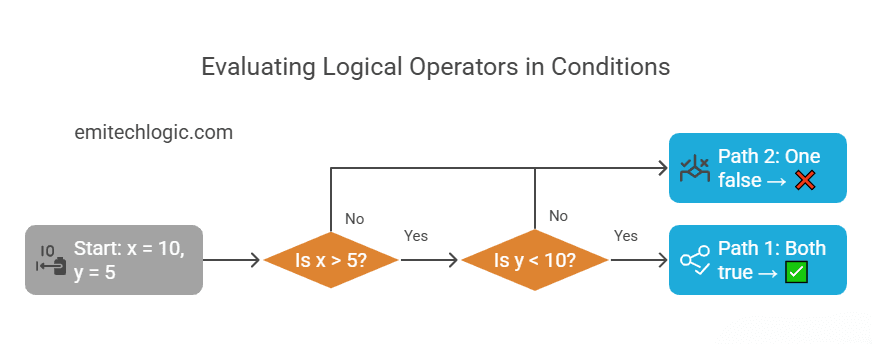
Logical operators in Python are special keywords that help your program make decisions. They connect two or more conditions and check whether they’re true or false. Based on that, Python decides what to do next.
You use logical operators when you want your program to check multiple things at once — like whether a user is logged in and has admin rights, or whether a value is too high or too low.
Python has three core logical operators:
and– returnsTrueonly if both conditions are trueor– returnsTrueif at least one condition is truenot– flips the result; returnsTrueif the condition is not true
These are called logical operators because they work with Boolean logic — the part of programming that deals with True and False.
Logical Operators in Python Symbol Table
Here’s a quick look at the logical operators in Python symbol and what they mean:
| Operator | Symbol | What It Means |
|---|---|---|
and | and | True if both conditions are true |
or | or | True if at least one is true |
not | not | True if the condition is false |
Simple, right? You’ll use these all the time once you get the hang of them.
Up next, I’ll show you how and works with a few examples, so you can actually see it in action.
Logical Operators in Python with Examples
Using and in Python
Let’s start with the and operator.
In everyday language, you might say:
“If I finish my homework and it’s not raining, I’ll go outside.”
In this sentence, you’re only going out if both things happen. That’s exactly what and does in Python. It checks if two (or more) conditions are true at the same time.
Let’s look at a simple example:
x = 5

if x > 2 and x < 10:
    print("x is between 2 and 10")
Let me walk you through this line by line:
x = 5: We’re setting a variablexto the value 5.if x > 2 and x < 10::
This is the condition we’re checking. Let’s break this down:- First part:
x > 2→ Is 5 greater than 2? Yes! So this is True. - Second part:
x < 10→ Is 5 less than 10? Also yes! So this is True too. - Now, because both conditions are True, the entire
ifstatement is considered True.
- First part:
So Python goes ahead and runs the print() line, giving you this output:
x is between 2 and 10
What if only one condition is true?
Let’s change the value of x and see what happens:
x = 12

if x > 2 and x < 10:
    print("x is between 2 and 10")
Let’s go through it again:
- We assign
x = 12, so now x is 12. - Next,
x > 2checks if 12 is greater than 2 — and that’s True. - Then we try
x < 10. Since 12 isn’t less than 10, the result is False.
Now here’s the key part:
Even though one condition is true, the and operator needs both to be true. Since the second part is false, the whole condition is false.
So what happens?
Python does not run the print() statement, and you get no output.
One more example to really lock it in:
age = 20
has_ticket = True

if age >= 18 and has_ticket:
    print("You can enter the event.")
Here:
age >= 18→ 20 is greater than or equal to 18 → Truehas_ticket→ is alreadyTrue
Since both conditions are true, the message gets printed:
You can enter the event.
But if has_ticket = False, then the condition fails — and you don’t get in.
In short:
Use and when you want all conditions to be true before something happens.
Up next, we’ll look at or, which works a little differently — you only need one condition to be true.
Using or in Python
The or operator helps your program make a decision when you only need one condition to be true.
Here’s a simple way to understand it:
“If this happens or that happens, do something.”
If either condition is true, the result is true.
A Simple Example
x = 12

if x < 10 or x > 11:
    print("x is either less than 10 or greater than 11")
Let’s break it down:
x = 12→ We’re sayingxis 12- The first condition is
x < 10→ Is 12 less than 10? No. So this is False - The second condition is
x > 11→ Is 12 greater than 11? Yes. So this is True
Now, because we’re using or, only one of these conditions needs to be true.
Since the second one is true, the whole condition is considered True.
So Python runs the print() line and shows:
x is either less than 10 or greater than 11
What if both conditions are false?
x = 8

if x < 5 or x > 15:
    print("x is outside the 5 to 15 range")
x = 8- Is 8 less than 5? No
- Is 8 greater than 15? No
Now both conditions are false, so Python skips the print() line.
You see no output.
Real-Life Example
Let’s say it’s the weekend or a holiday. You want to sleep in if either one is true.
is_weekend = True
is_holiday = False

if is_weekend or is_holiday:
    print("You can sleep in today!")
is_weekendisTrueis_holidayisFalse
Because one of them is True, the message prints:
You can sleep in today!
If both were False, nothing would print.
The key idea is this:
With or, you just need one condition to be true for the whole thing to be true.
Using not in Python
The not keyword is used when you want to say “only if something is not true.”
It basically flips the meaning of a condition.
Let me show you:
- If something is
True,notmakes itFalse. - If something is
False,notmakes itTrue.
Think of it like this:
Let’s say there’s a rule:
“If you’re not tired, you can go play.”
That means:
- If you’re tired, you can’t go play.
- But if you’re not tired, you can.
In Python, we use not the same way.
A Simple Code Example
is_tired = False

if not is_tired:
    print("You can go play!")
What’s going on here?
is_tired = False(you are not tired)not is_tiredmeans: “Is it true that you’re not tired?” → Yes!
So Python runs the code and prints:
You can go play!
Another Example
is_logged_in = True

if not is_logged_in:
    print("Please log in.")
else:
    print("Welcome back!")
Here:
is_logged_in = True(you are logged in)not is_logged_in→ “You are not logged in?” → No, that’s not true.- So Python goes to the
elsepart and prints:
Welcome back!
Why do we use not?
Because sometimes we want to check if something is not happening.
It makes our code easier to read.
Examples:
not raining→ it’s dry outsidenot finished→ still working on it
One last example:
is_daytime = False

if not is_daytime:
    print("It's night time!")
Output:
It's night time!
Remember:
not True→Falsenot False→True
That’s it!
Comparison Operators in Python vs Logical Operators
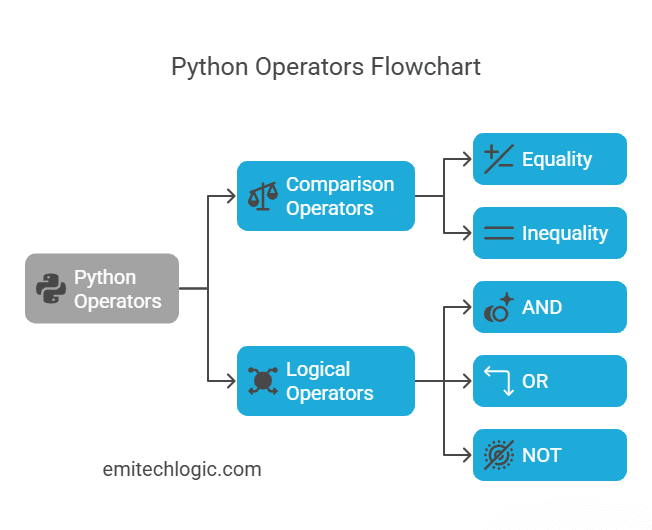
What Are Comparison Operators?
Comparison operators in Python are used to compare values.
They help you ask questions like:
- Is one number bigger than another?
- Are two things equal?
- Are they not equal?
Here are the main comparison operators you’ll use:
| Symbol | Meaning | Example |
|---|---|---|
< | Less than | x < 10 → True if x is less than 10 |
> | Greater than | x > 5 → True if x is more than 5 |
== | Equal to | x == 7 → True if x is equal to 7 |
!= | Not equal to | x != 3 → True if x is not 3 |
<= | Less than or equal to | x <= 8 → True if x is 8 or less |
>= | Greater than or equal to | x >= 6 → True if x is 6 or more |
How Logical and Comparison Operators Work Together
Now here’s the cool part: you can combine comparison operators using logical operators like and, or, and not.
Let’s say you want to check if a number is between 5 and 15.
That means:
- The number must be greater than 5
- And it must be less than 15
Here’s how you write that in Python:
x = 10

if x > 5 and x < 15:
    print("x is in range")
What’s happening?
x > 5→ Is 10 greater than 5? Yesx < 15→ Is 10 less than 15? Yes- Both are
True, and since we’re usingand, the final result isTrue
So Python prints:
x is in range
Let’s try one with or
age = 17

if age < 13 or age > 65:
    print("You get a discount!")
This checks:
- If the person is younger than 13
- Or older than 65
Since 17 is neither, nothing gets printed.
But if age = 10, then you’d see:
You get a discount!
Quick Summary
- Comparison operators check individual conditions
- Logical operators combine those conditions to make smarter decisions
You’ll often use both together in if statements to control how your program behaves.
Assignment Operators in Python: Are They Logical?
Short answer: No, assignment operators are not logical operators.
But they’re super important, and you’ll often see them used alongside logical and comparison operators—especially inside if statements or loops.
What Are Assignment Operators?
Assignment operators are used to store values in variables or update those values.
Here’s a quick list of common assignment operators:
| Operator | What it does | Example |
|---|---|---|
= | Assigns a value | x = 5 |
+= | Adds and assigns | x += 2 → x = x + 2 |
-= | Subtracts and assigns | x -= 3 → x = x - 3 |
*= | Multiplies and assigns | x *= 4 → x = x * 4 |
/= | Divides and assigns | x /= 2 → x = x / 2 |
%= | Modulo and assigns (remainder) | x %= 3 → x = x % 3 |
So, for example:
x = 10
x += 5
print(x)  # Output: 15
You’re just saying: “Take whatever is in x, add 5 to it, and store it back in x.”
Why They’re Not Logical Operators
Logical operators like and, or, and not are used to check if something is true or false.
Assignment operators, like = or +=, are used to set or update values.
Here’s a simple way to remember:
- Assignment = change a value
- Logical = check a condition
But… They Can Work Together
Here’s how assignment and logical operators often appear in the same code:
x = 7

if x > 5 and x < 10:
    x += 1  # This is an assignment operator
    print("x is now:", x)
x > 5 and x < 10→ this is a logical checkx += 1→ this is an assignment
They’re just doing different jobs.
x = 3       # assignment
if x == 3:  # comparison
    print("x is 3")
Must Read
- Two Pointers in Python: A Complete Problem-Solving Guide
- Arrays in Python: Operations, Complexity, and Common Patterns
- Amortized Analysis in Data Structures: Explained with Python
- How to Analyze the Time and Space Complexity of an Algorithm
- Recursion in Python: How Recursive Algorithms Actually Work
Bitwise Operators in Python vs Logical Operators
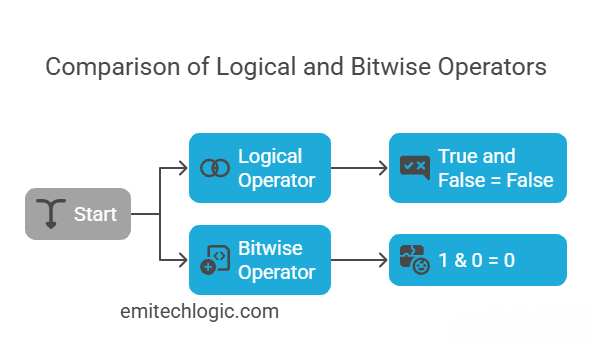
Bitwise Operators Overview
Bitwise operators in Python work with bits—the 1s and 0s that make up numbers inside the computer.
Here are the most common bitwise operators:
| Symbol | Name | What it does |
|---|---|---|
& | Bitwise AND | 1 if both bits are 1 |
| ` | ` | Bitwise OR |
^ | Bitwise XOR | 1 if only one bit is 1 (but not both) |
~ | Bitwise NOT | Flips all bits (1 becomes 0, and 0 becomes 1) |
These might sound a bit tricky at first—but don’t worry. You’ll understand them better when you see how they’re different from logical operators.
Logical vs Bitwise: What’s the Difference?
Here’s the key:
- Logical operators like
and,or, andnotwork with True and False (Boolean values). - Bitwise operators like
&,|,^, and~work with numbers at the bit level (0s and 1s).
Let’s compare them side by side using examples.
Example 1: Logical AND vs Bitwise AND
# Logical AND
print(True and False)  # Output: False
This checks: Are both True? No. So the result is False.
# Bitwise AND
print(1 & 0)  # Output: 0
This looks at the bits:
1in binary =00010in binary =0000
Bitwise AND:
  0001
& 0000
= 0000  → which is 0
Example 2: Logical OR vs Bitwise OR
# Logical OR
print(True or False)  # Output: True
This says: Is at least one value True? Yes → True.
# Bitwise OR
print(1 | 0)  # Output: 1
Bitwise OR:
  0001
| 0000
= 0001  → which is 1
Example 3: Bitwise XOR
print(1 ^ 0)  # Output: 1
print(1 ^ 1)  # Output: 0
^means “either 1 or the other is 1, but not both.”- So
1 ^ 0= 1 - And
1 ^ 1= 0
Example 4: Bitwise NOT
x = 2
print(~x)  # Output: -3
This one flips the bits of the number. It’s a little advanced because it also uses something called two’s complement, which is how computers handle negative numbers.
But for now, just know that ~x means: flip all the bits in x.
Quick Summary
| Type | Works With | Example |
|---|---|---|
| Logical | True, False | True and False → False |
| Bitwise | Numbers (bits) | 1 & 0 → 0 |
You’ll use logical operators more in everyday conditions (if statements).
Bitwise operators are handy when dealing with things like low-level data or binary logic.
Membership Operators in Python and Logic Operators in Python
Using in and not in in Python
Python gives us two special membership operators:
innot in
These are used to check if a value exists inside something, like a list, string, or dictionary.
What Do They Mean?
| Operator | Meaning |
|---|---|
in | Checks if a value exists in a sequence |
not in | Checks if a value does NOT exist |
Let’s go through an example together.
Example: Checking Items in a List
fruits = ['apple', 'banana']

if 'apple' in fruits and 'cherry' not in fruits:
    print("Apple is there, cherry is not.")
What’s happening here?
- We created a list called
fruitsthat has'apple'and'banana'. - Then we used:
'apple' in fruits→ This checks: Is'apple'in the list? ✅ Yes'cherry' not in fruits→ This checks: Is'cherry'NOT in the list? ✅ Yes
- Both conditions are
True, and since we usedand, theprint()statement runs.
Output:
Apple is there, cherry is not.
Where Can You Use in and not in?
You can use these with:
- Lists
- Strings
- Tuples
- Dictionaries
Example with a string:
name = "Alexander"
if 'x' in name:
    print("The letter 'x' is in the name!")
Example with a dictionary (keys only):
student = {'name': 'Lara', 'age': 20}
if 'name' in student:
    print("Name key is found!")
How It Connects with Logical Operators
You can combine in and not in with and, or, and not to build more complex conditions.
For example:
colors = ['red', 'blue']

if 'red' in colors or 'green' in colors:
    print("At least one color is there.")
This prints because 'red' in colors is True.
Wrapping Up: Why Logical Operators Matter in Python
Logical operators like and, or, and not may seem simple, but they are a big part of writing smart, decision-making code in Python. They help your programs make choices—like whether to run a block of code or not—based on conditions you set.
Here’s a quick recap:
- Use
andwhen both conditions must be true. - Use
orwhen at least one condition should be true. - Use
notto reverse a condition (True becomes False, and vice versa).
You also learned how logical operators can combine with comparison operators, work inside if statements, and team up with membership operators like in and not in to check if a value exists.
Understanding these basics gives you the power to control how your code behaves. It’s like teaching your program how to think clearly!
If you’re just getting started with Python, practice writing your own conditions. Try mixing and, or, and not with different variables and values. The more you use them, the easier it gets.
Want to explore more Python topics step by step?
👉 Check out more guides at emitechlogic.com for hands-on tutorials
💡 Found this helpful?
Do me a favor — share this post with your friends, colleagues, or on your social media. You never know who might need a quick Python refresher before their next interview.
Follow for Python tips & tricks
📸 Instagram: https://www.instagram.com/emi_techlogic/
💼 LinkedIn: https://www.linkedin.com/in/emmimal-alexander/
#PythonQuiz #CodingInterview #PythonInterviewQuestions #MCQChallenge #PythonMCQ #EmitechLogic #UncoveredAI #PythonTips #AIwithEmi #PythonCoding #TechWithEmi
FAQs
Python uses three logical operators: and, or, and not. These are used to combine or reverse conditions in if statements and other logical expressions.
You use the and operator in Python when both conditions must be true.
Logical operators work with True and False.
Bitwise operators like & and | work on the binary representation of numbers.
Yes, you can use in and not in with logical operators like and and or to check membership and combine multiple conditions in Python.
External Resources
Python Official Documentation – Boolean Operations
https://docs.python.org/3/library/stdtypes.html#boolean-operations-and-or-not
→ A detailed explanation of and, or, and not with Python’s official syntax and rules.






Leave a Reply