
How to Check if Dictionary Values Are Sorted in Python
Check If Dictionary Values Are Sorted in Python — Complete Guide
Two Different Questions: Clarifying What You’re Actually Checking
The phrase “check if dictionary values are sorted” is ambiguous. It could mean two completely different things depending on your data structure and what you’re validating:
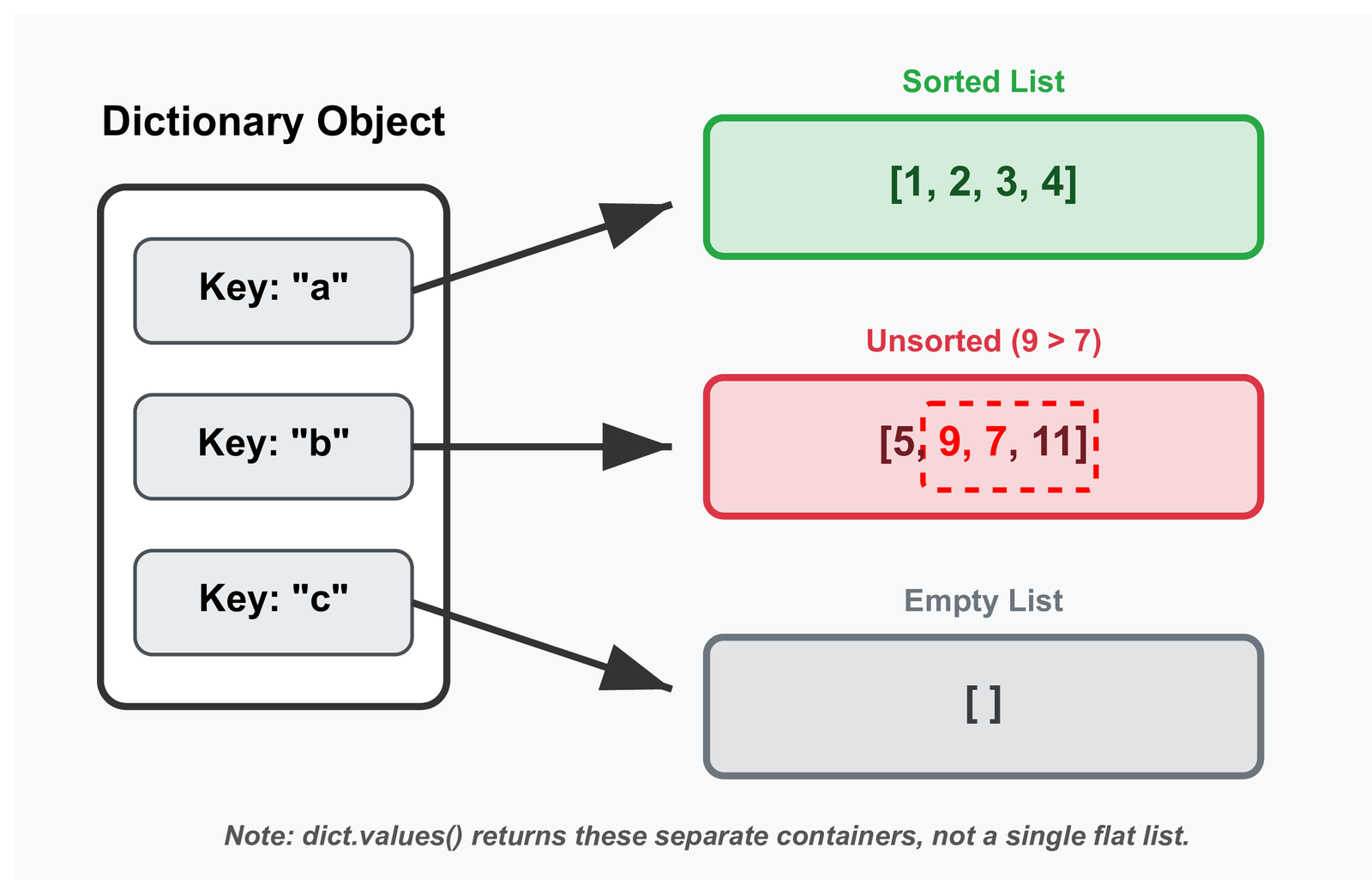
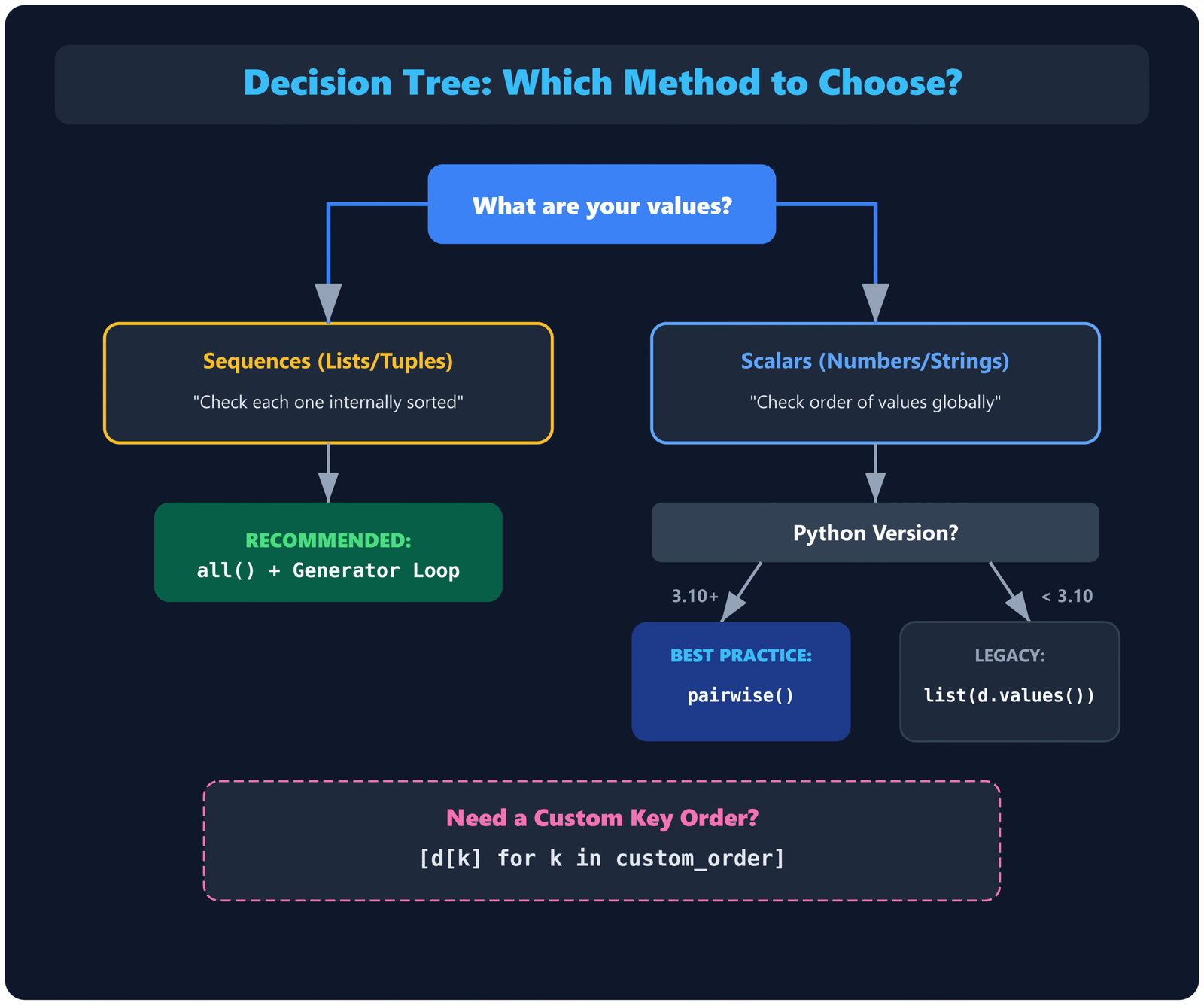
- Scenario 1: Values are sequences — Each dictionary value is itself a list or tuple, and you want to verify that each one is internally sorted. Example:
{"a": [1, 2, 3], "b": [4, 5, 6]}— check if both [1, 2, 3] and [4, 5, 6] are sorted. - Scenario 2: Values are scalars — Dictionary values are numbers or strings, and you want to check if they form a sorted sequence when iterated in key order. Example:
{"x": 10, "y": 20, "z": 15}— check if the values 10, 20, 15 are sorted when taken in that iteration order.
Both scenarios are common in real code. The first appears when you’re storing collections indexed by some category. The second appears when the dictionary itself represents an ordered mapping — timestamps to values, ranks to scores, sequential IDs to metrics. We will cover both, starting with Scenario 1 because it is the more frequent case.
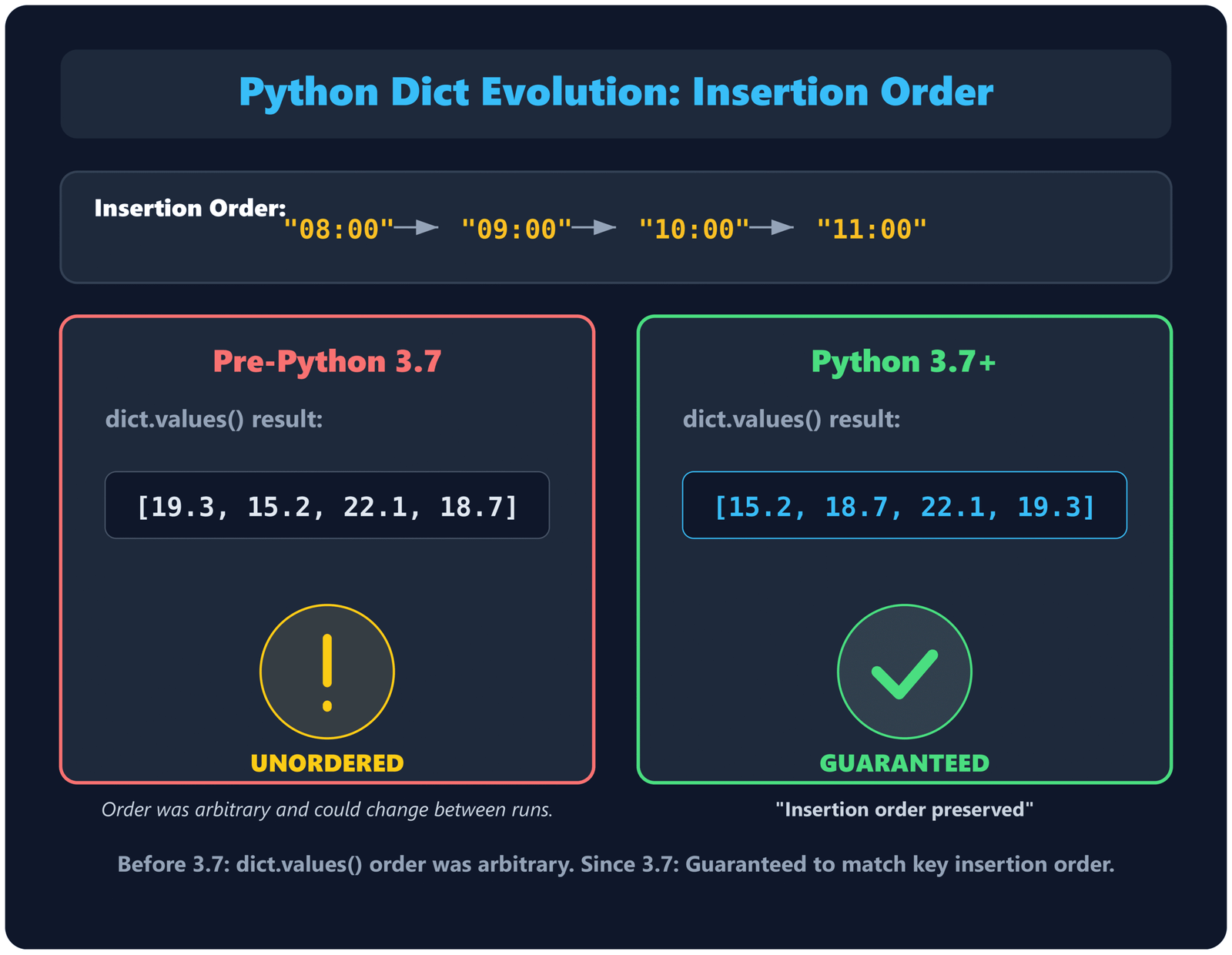
dict.values() returns values in the order keys were added. Before 3.7, dictionaries were unordered, so checking “sorted values” only made sense for Scenario 1 (values as sequences). Scenario 2 — treating the dict as an ordered mapping — only became practical in 3.7+.
Scenario 1: Checking If Each Value (a Sequence) Is Sorted
Your dictionary values are lists, tuples, or other sequences, and you need to verify that each one is internally sorted.
Method 1: Using all() with a generator
Time: O(n·m)Space: O(1)
def all_values_sorted(d):
    return all(
        all(x <= y for x, y in zip(val, val[1:]))
        for val in d.values()
    )

# Example
data = {
    "a": [1, 2, 3, 4],
    "b": [10, 20, 30],
    "c": [5, 7, 9, 11],
}

print(all_values_sorted(data))  # True

data["c"] = [5, 9, 7, 11]       # unsort one value
print(all_values_sorted(data))  # False
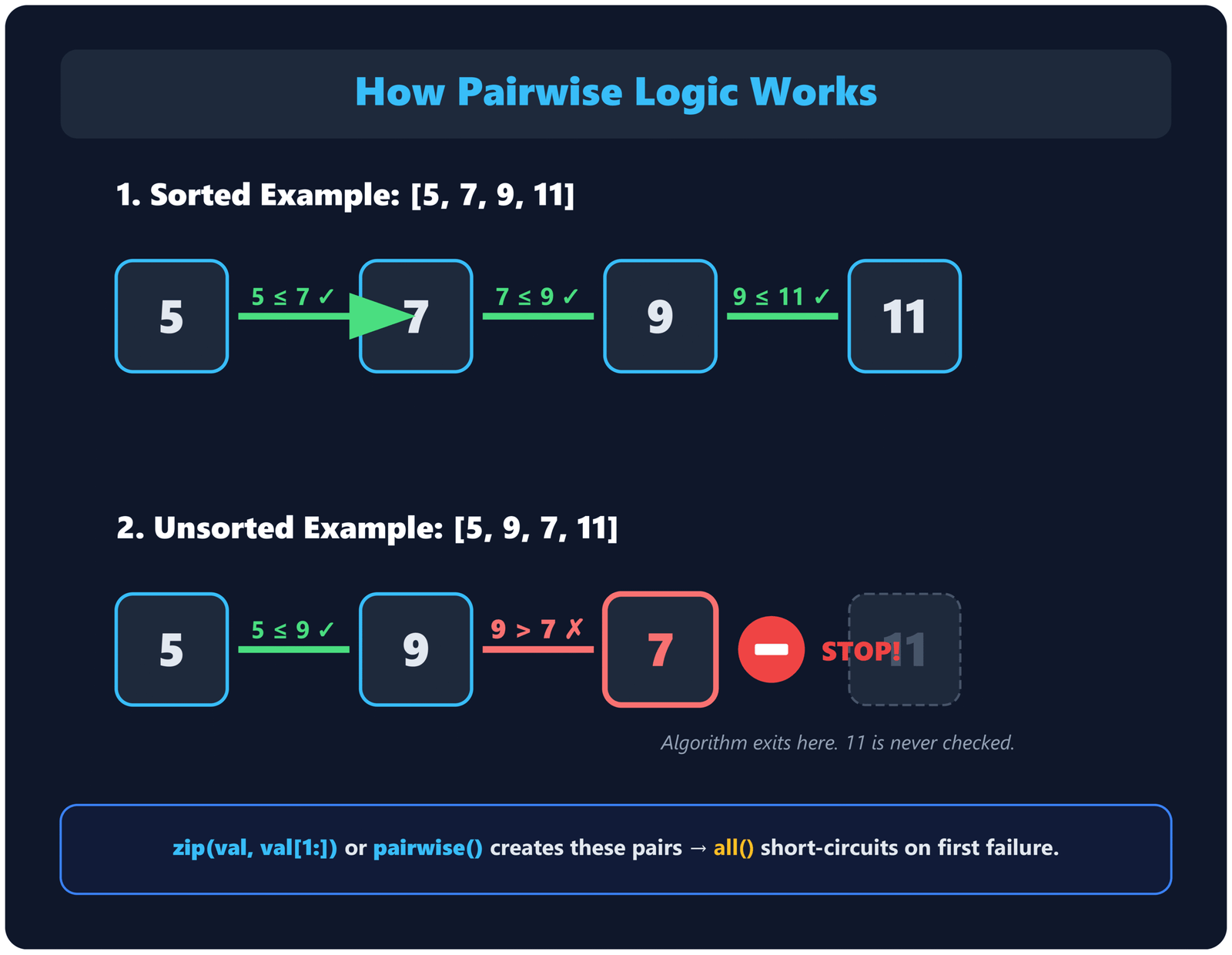
The outer all() iterates over every value in the dictionary. The inner all() checks if that value is sorted using the standard pairwise comparison pattern. Both layers short-circuit on the first failure, so if any value is unsorted, the function exits immediately without checking the rest.
Check d["a"] = [1, 3, 2]
→ Pair (1, 3): 1 <= 3 → True
→ Pair (3, 2): 3 <= 2 → False → inner all() returns False
Outer all() receives False → returns False immediately
d["b"] is never checked
Time complexity is O(n·m) where n is the number of dictionary entries and m is the average length of each value. Space complexity is O(1) because no intermediate structures are built — everything is evaluated lazily through generators.
<=, which allows duplicate values (non-decreasing order). If you need strictly increasing order where duplicates are not allowed, change the operator to <: all(x < y for x, y in zip(val, val[1:])). The same principle applies throughout this article — use <= for allowing duplicates, < for requiring strict increases.
Method 2: Explicit loop for more control
Time: O(n·m)Space: O(1)
def all_values_sorted(d):
    for key, val in d.items():
        for i in range(len(val) - 1):
            if val[i] > val[i + 1]:
                return False
    return True
This is more explicit and easier to extend. For example, if you want to return which key contains the first unsorted value:
def find_unsorted_key(d):
    for key, val in d.items():
        for i in range(len(val) - 1):
            if val[i] > val[i + 1]:
                return key  # returns first key with unsorted value
    return None              # all values are sorted

d = {"a": [1, 2, 3], "b": [5, 3, 7], "c": [10, 20]}
print(find_unsorted_key(d))  # "b"
The explicit loop version is clearer in interviews and when debugging. The generator version is more concise for production code where the logic is straightforward.
Try Scenario 1 — dict with list values
Enter a dict in JSON format, e.g. {"a": [1, 2, 3], "b": [4, 3, 5]}
Scenario 2: Checking If Values Form a Sorted Sequence in Iteration Order
Your dictionary values are scalars (numbers, strings, etc.), and you want to check if they form a sorted sequence when iterated. Since Python 3.7+ preserves insertion order, dict.values() returns an iterable that reflects the order in which keys were added.
Method 1: Convert values() to a list and check
Time: O(n)Space: O(n)
def dict_values_sorted(d):
    vals = list(d.values())
    return all(vals[i] <= vals[i + 1] for i in range(len(vals) - 1))

# Example
timestamps = {
    "08:00": 15.2,
    "09:00": 18.7,
    "10:00": 22.1,
    "11:00": 19.3,
}

print(dict_values_sorted(timestamps))  # False — 22.1 > 19.3
This materializes the values into a list first, then applies the standard sorted check. The list() conversion costs O(n) time and space, but it makes the subsequent check straightforward and readable. If your dictionary is large and you want to avoid the list allocation, use the generator-based approach below.
Method 2: Direct pairwise on values() — Recommended for Python 3.10+
Time: O(n)Space: O(1)
from itertools import pairwise

def dict_values_sorted(d):
    return all(x <= y for x, y in pairwise(d.values()))
dict.values() returns a view object that supports iteration but not indexing. pairwise() works on any iterable, so it pairs up consecutive values directly without converting to a list. Since pairwise() has been available since Python 3.10 (October 2021), most production codebases in 2026 can use this as the default approach. It is cleaner and more memory-efficient than list conversion.
Supports indexing
O(n) space
Use for Python < 3.10
No intermediate list
O(1) space
Standard for Python 3.10+ (2026 baseline)
Try Scenario 2 — dict with scalar values
Enter a dict with number values, e.g. {"a": 10, "b": 20, "c": 15}
Checking Sorted Order on Specific Keys
Sometimes you do not want to check all values — only the values corresponding to a specific subset of keys, or in a specific key order rather than insertion order. This is common when the dictionary has metadata keys you want to ignore, or when you want to verify sorted order by some criterion other than insertion.
Checking specific keys in a defined order
def values_sorted_by_keys(d, keys):
    vals = [d[k] for k in keys if k in d]
    return all(vals[i] <= vals[i + 1] for i in range(len(vals) - 1))

data = {"z": 30, "a": 10, "m": 20}
keys_order = ["a", "m", "z"]

print(values_sorted_by_keys(data, keys_order))  # True — 10, 20, 30
This extracts values in the specified key order, skipping any keys not present in the dictionary, then checks if those values are sorted. Useful for validating that a configuration dictionary has values in the expected order for a predefined sequence of settings.
Checking keys sorted alphabetically, then values
def values_sorted_by_sorted_keys(d):
    sorted_keys = sorted(d.keys())
    vals = [d[k] for k in sorted_keys]
    return all(vals[i] <= vals[i + 1] for i in range(len(vals) - 1))

d = {"c": 30, "a": 10, "b": 20}
print(values_sorted_by_sorted_keys(d))  # True — keys sorted to ["a","b","c"], vals are [10,20,30]
This is less common but appears when you need to verify that a dictionary's values, when accessed in alphabetical key order, form a sorted sequence. For more on sorting techniques in Python, including custom key functions, that article covers the fundamentals.
Edge Cases and Type Handling
Empty dictionaries
An empty dictionary has no values to check. Both all()-based methods return True by definition (empty iterables vacuously satisfy the condition). This is the mathematically correct answer and consistent with how Python handles empty sequences elsewhere.
all_values_sorted({})        # True
dict_values_sorted({})       # True
Single-entry dictionaries
For Scenario 1 (values are sequences), a single dictionary entry with one sequence returns True if that sequence is sorted. For Scenario 2 (values are scalars), a single-entry dictionary always returns True because there is no second value to compare against.
all_values_sorted({"a": [1, 2, 3]})     # True — single sorted list
all_values_sorted({"a": [3, 2, 1]})     # False — single unsorted list
dict_values_sorted({"x": 42})           # True — only one value, trivially sorted
Values are empty sequences
If a dictionary value is an empty list or tuple, the sorted check on that value returns True (no pairs to compare). The outer check continues to other values.
all_values_sorted({"a": [], "b": [1, 2, 3]}) # True
Mixed types in values
Python 3 raises TypeError when comparing incompatible types. If your dictionary contains mixed-type values (some lists, some strings, some numbers), you need to decide how to handle it. Wrapping in a try-except is one approach:
def all_values_sorted_safe(d):
    try:
        return all(
            all(x <= y for x, y in zip(val, val[1:]))
            for val in d.values()
        )
    except (TypeError, AttributeError):
        return False  # or raise a more specific error
AttributeError catches cases where a value is not iterable (e.g., an integer when you expected a list). TypeError catches comparison failures. For more on handling type issues in Python, type checking before operations is often cleaner than catching exceptions after the fact.
None in values
None cannot be compared with numbers or strings in Python 3. If your values might contain None, handle it explicitly:
def compare_with_none(x, y):
    if x is None: return True   # None sorts first
    if y is None: return False
    return x <= y

def dict_values_sorted_with_none(d):
    vals = list(d.values())
    return all(compare_with_none(vals[i], vals[i + 1]) for i in range(len(vals) - 1))
For strategies on dealing with missing data more broadly, see our guide on handling missing values in data science.
Performance Comparison
| Scenario | Method | Time | Space | Early Exit |
|---|---|---|---|---|
| 1: Sequence values | all() with generator | O(n·m) | O(1) | Yes |
| Explicit loop | O(n·m) | O(1) | Yes | |
| 2: Scalar values | Convert to list | O(n) | O(n) | Yes (after conversion) |
| Direct pairwise | O(n) | O(1) | Yes |
For Scenario 1, n is the number of dictionary entries and m is the average length of each sequence value. Both methods have identical complexity — the generator version is more concise, the explicit loop is clearer for debugging and extension.
all() for Scenario 1 is often marginally faster than the explicit double loop (typically 5-15% faster) due to improved bytecode optimizations for generator expressions. The difference is small enough that readability should be your primary consideration unless you are in a performance-critical hot path processing millions of dictionaries.
For Scenario 2, n is the number of dictionary entries. The direct pairwise approach has better space complexity because it does not materialize a list. On Python 3.10+, use pairwise() as the default. For earlier versions, the list conversion approach is simpler and the O(n) space cost is usually acceptable unless the dictionary is extremely large.
Benchmarking yourself
Here is a timeit script you can run to measure the difference on your machine:
import timeit
from itertools import pairwise

# Scenario 1: Dictionary with list values
d1 = {f"key{i}": list(range(100)) for i in range(1000)}
d1["key500"][50] = 999  # introduce one unsorted value at position 500

def check_s1_gen(d):
    return all(all(x <= y for x, y in zip(v, v[1:])) for v in d.values())

def check_s1_loop(d):
    for val in d.values():
        for i in range(len(val) - 1):
            if val[i] > val[i + 1]:
                return False
    return True

print("Scenario 1 (1000 keys, 100-element lists each):")
print(f"  Generator: {timeit.timeit(lambda: check_s1_gen(d1), number=10)*100:.2f} ms")
print(f"  Loop:      {timeit.timeit(lambda: check_s1_loop(d1), number=10)*100:.2f} ms")

# Scenario 2: Dictionary with scalar values
d2 = {f"k{i}": i for i in range(100000)}
d2["k50000"] = -1  # violation at position 50k

def check_s2_list(d):
    v = list(d.values())
    return all(v[i] <= v[i+1] for i in range(len(v) - 1))

def check_s2_pair(d):
    return all(x <= y for x, y in pairwise(d.values()))

print("\nScenario 2 (100k scalar values):")
print(f"  List conv: {timeit.timeit(lambda: check_s2_list(d2), number=10)*100:.2f} ms")
print(f"  Pairwise:  {timeit.timeit(lambda: check_s2_pair(d2), number=10)*100:.2f} ms")
Run this directly in your Python environment or paste it into Online Python. The exact numbers depend on your hardware and Python version, but the relative differences will be consistent. Both Scenario 1 methods should perform similarly. For Scenario 2, pairwise() will be slightly faster due to avoiding the list allocation.
Type Hints for Type-Checked Codebases (Optional)
If you are working in a codebase that uses mypy or other type checkers, you can add type annotations to make the sorted-checking functions more robust. Here are typed versions of the main methods:
from collections.abc import Mapping, Sequence
from typing import TypeVar
from itertools import pairwise

K = TypeVar("K")
V = TypeVar("V", bound=Sequence)

# Scenario 1: Values are sequences
def all_values_sorted(d: Mapping[K, V]) -> bool:
    return all(
        all(x <= y for x, y in zip(val, val[1:]))
        for val in d.values()
    )

# Scenario 2: Values are scalars
def dict_values_sorted(d: Mapping[K, int | float | str]) -> bool:
    return all(x <= y for x, y in pairwise(d.values()))
The TypeVar with bound=Sequence ensures that Scenario 1 only accepts mappings where values are sequences (lists, tuples, etc.). For Scenario 2, the union type int | float | str restricts values to comparable scalar types. These annotations are optional but help catch type errors at development time in large projects.
Quick Reference: Which Method Should You Use?
| Your Goal | Recommended Approach | When to Use |
|---|---|---|
| Each value is a list/tuple — check each is sorted | all(all(x <= y for x,y in zip(v,v[1:])) for v in d.values()) |
Most common case. Clean, fast, works everywhere. |
| Same, but want to know which key fails | Explicit double loop with return key |
Debugging, validation reports, error messages. |
| Scalar values, check in insertion order | all(x <= y for x,y in pairwise(d.values())) |
Python 3.10+. Cleanest, O(1) space. |
| Scalar values, Python 3.9 or earlier | vals = list(d.values()); all(vals[i] <= vals[i+1] for i in range(len(vals)-1)) |
Readable, acceptable space cost for most dicts. |
| Values in custom key order | vals = [d[k] for k in order]; ... |
Config validation, protocol checking. |
| Strictly increasing (no duplicates) | Change <= to < in any method |
When equal consecutive values should fail the check. |
External Resources
- Python Docs — Dictionary type — Official documentation on dictionaries, including the guarantee of insertion order preservation since Python 3.7.
- Python Docs — dict.values() — Reference for the values() method, which returns a view object in insertion order.
- Python Docs — itertools.pairwise() — Documentation for pairwise(), useful for Scenario 2 checks on Python 3.10+.
- Python Docs — all() — Explains the short-circuit behavior that makes nested all() checks efficient.
- PEP 468 — Preserving Keyword Argument Order — Background on why Python 3.7 made dict insertion order part of the language spec.
- Real Python — Dictionaries in Python — Comprehensive guide covering dict operations, views, and iteration patterns.
- Stack Overflow — How to iterate through two lists in parallel — Discussion on zip(), pairwise(), and related iteration techniques applicable to checking sorted order.
- Python Wiki — Time Complexity — Reference for the time complexity of dict operations including iteration over values().
Frequently Asked Questions
How do you check if all dictionary values are sorted in Python?
It depends on what your values are. If values are lists or tuples, use all(all(x <= y for x, y in zip(v, v[1:])) for v in d.values()) to check if each sequence is internally sorted. If values are scalars (numbers, strings), use all(x <= y for x, y in pairwise(d.values())) (Python 3.10+) or convert to a list first: vals = list(d.values()) then check pairs. Both approaches run in O(n) or O(n·m) depending on structure and exit early on first violation.
Are Python dictionary values always in order?
Since Python 3.7, dictionaries preserve insertion order as part of the language specification. dict.values() returns values in the order their keys were added to the dictionary. Before Python 3.7 (including 3.6 CPython where it was an implementation detail), dictionaries were unordered and values() could return elements in any order. If your code needs to support Python 3.6 or earlier, do not rely on value ordering.
Can you check if dictionary values are sorted without converting to a list?
Yes. Use itertools.pairwise() (Python 3.10+) directly on dict.values() without converting to a list: all(x <= y for x, y in pairwise(d.values())). For earlier Python versions, manually iterate with an iterator: it = iter(d.values()); a = next(it, None); all(a <= (a := b) or True for b in it) or write a simple loop. Both avoid materializing a list and use O(1) space instead of O(n).
What happens if dictionary values contain None when checking sorted order?
Python 3 raises TypeError when comparing None with numbers or strings. You must handle None explicitly. One common approach is to treat None as negative infinity (sorts first): def cmp(x, y): return True if x is None else (False if y is None else x <= y). Alternatively, filter out None values before checking, or raise a validation error if None appears unexpectedly in your data.
How do you check if dictionary values are sorted by a specific set of keys?
Extract values in your specified key order, then check them: vals = [d[k] for k in keys if k in d]; all(vals[i] <= vals[i+1] for i in range(len(vals)-1)). The if k in d condition skips keys not present in the dictionary. This is useful when you want to validate sorted order for a subset of keys, ignoring others, or when you need to check keys in an order different from insertion order (e.g., alphabetical).
Test Your Understanding
Ten questions on checking sorted dictionary values in Python. Each answer is verified individually when you submit.
1. What does "check if dictionary values are sorted" typically mean when values are lists?
2. Since which Python version do dictionaries preserve insertion order as part of the language spec?
3. What does dict.values() return?
4. For a dictionary with scalar values, which method has O(1) space complexity?
5. What happens when you check sorted order on an empty dictionary?
6. For Scenario 1 (sequence values), what is the time complexity where n = dict entries and m = average sequence length?
7. What happens if a dictionary value is an empty list when checking if all values are sorted?
8. Which Python version introduced itertools.pairwise()?
9. What happens if you try to compare None with an integer when checking sorted dict values?
10. To check if values are sorted when extracted in a specific key order, what should you do?






Leave a Reply