

Mastering Python Regex (Regular Expressions): A Step-by-Step Guide
Introduction to Python Regex
What is a Python Regular Expression (Regex)?
A regular expression is a special sequence of characters that defines a search pattern.
This is like a super-powered “find” tool. Instead of just searching for an exact word like “cat”, a regex lets you describe a pattern of text you’re looking for, such as:
- Any word that starts with “c” and ends with “t” (cat, cot, cut, etc.)
- All email addresses in a big block of text
- All phone numbers in a certain format
- Only strings that look like valid dates
In short: Regex = a mini-language for describing patterns in text.
Why are Regular Expressions useful?
Regex is incredibly powerful because it helps you do three main things with text:
- Search / Matching
- “Does this string contain a pattern I’m looking for?” Example: Check if a user’s input contains the word “error”.
- Data Validation
- “Is this piece of text in the correct format?” Example: Is this a valid email? Is this a strong password? Is this a properly formatted phone number?
- Extraction & Manipulation
- “Find and pull out specific pieces of information.” Example: Extract all phone numbers from a long document.
- “Replace parts of text.” Example: Redact all email addresses by replacing them with “[EMAIL REDACTED]”.
Almost every programming language (including Python) supports regex because working with text is so common.
The re Module in Python
Python has a built-in module called re that gives us all the regex superpowers.
To use it, you first need to import it:
import reThat’s it! Once you import re, you can start using regex functions.
Important Tip: Raw Strings (r”pattern”)
In regex, the backslash \ is a very special character. It’s used for things like:
- \d → means “any digit”
- \s → means “any whitespace”
- \w → means “any word character”
But here’s the problem: Python’s normal strings also use \ for escape sequences. For example, \n means “newline”, \t means “tab”.
So if you write a normal string like “\d”, Python thinks you’re trying to make a special character and gets confused.
Solution: Use raw strings by putting an r in front of the quotes:
pattern = r"\d"        # Correct way for regex (raw string)
# NOT this:
pattern = "\d" # Wrong — Python treats this strangelyRule of thumb: Always use raw strings for regex patterns in Python → r”your pattern here”
It prevents Python from misinterpreting your backslashes.
Your First Match: Basic Matching (Literal Characters)
Let’s start with the simplest kind of regex: matching literal characters.
“Literal” means exact text — what you see is what you search for.
We’ll use the most common function: re.search()
- re.search(pattern, string) → Looks for the first occurrence of the pattern in the string. → Returns a Match object if found, or None if not found.
Example 1: Searching for the exact word “hello”
import re

text = "Hello world, hello again!"

# Pattern: exact word "hello" (using raw string)
pattern = r"hello"

# Search for the pattern
match = re.search(pattern, text)

if match:
    print("Found it!")
    print("Matched text:", match.group())   # Shows what was matched
    print("Starts at index:", match.start())  # Position where it starts
    print("Ends at index:", match.end())      # Position where it ends
else:
print("Not found.")Output:
Found it!
Matched text: hello
Starts at index: 13
Ends at index: 18
Notice:
- It found “hello” (lowercase) in “hello again!”
- It ignored “Hello” at the beginning because regex is case-sensitive by default.
Example 2: Case-sensitive vs case-insensitive
text = "Hello world, hello again!"

pattern = r"hello"
match = re.search(pattern, text)
print(match)  # Finds the second "hello"

pattern = r"Hello"
match = re.search(pattern, text)
print(match.group()) # Outputs: Hello (finds the first one)To make it case-insensitive, add a third argument:
pattern = r"hello"
match = re.search(pattern, text, re.IGNORECASE)  # or re.I
if match:
print(match.group()) # Will find "Hello" or "hello"Example 3: What if it’s not found?
text = "Hi there!"

pattern = r"python"
match = re.search(pattern, text, re.IGNORECASE)

if match:
    print("Found!")
else:
print("Not found.") # This will printEssential Python Regex Functions for Beginners
We’ll go through each function one by one, with clear explanations, code examples you can run yourself, and comparisons so you really understand the differences.
Using re.search() to Find Patterns Anywhere in a String
re.search() is your go-to tool when you want to find the first occurrence of a pattern anywhere in a string.
Basic Syntax
import re

match = re.search(pattern, string)- pattern: Your regex (as a raw string: r”…”)
- string: The text you’re searching in
- Returns: A Match object if found, or None if not found
Simple Example
import re

text = "The rain in Spain stays mainly in the plain"

# Search for the word "Spain"
match = re.search(r"Spain", text)

if match:
    print("Found!")
    print("Matched text:", match.group())    # Spain
    print("Start position:", match.start())  # 12
    print("End position:", match.end())      # 17
    print("Span:", match.span())             # (12, 17)
else:
print("Not found")Output:
Found!
Matched text: Spain
Start position: 12
End position: 17
Span: (12, 17)
Using Character Classes with re.search()
Let’s make it more powerful!
text = "Contact: john.doe123@example.com or 555-123-4567"

# Find the first sequence of digits (phone or part of email)
match = re.search(r"\d+", text)

if match:
print("First number sequence:", match.group()) # 123 (from email)# Find the first word (sequence of word characters)
match = re.search(r"\w+", text)
print(match.group()) # Contact# Find the first email-like pattern
match = re.search(r"\w+@\w+\.\w+", text)
if match:
print("First email:", match.group()) # john.doe123@example.comCase-Insensitive Search
By default, regex is case-sensitive.
text = "Python is great, python is fun"

match = re.search(r"python", text)
print(match.group())  # python (second one)

# To ignore case:
match = re.search(r"python", text, re.IGNORECASE)  # or re.I
print(match.group()) # Python (finds first occurrence)Using Square Brackets in re.search()
text = "Room 42, Building B-15, Floor 3"

# Find the first sequence of only digits
match = re.search(r"[0-9]+", text)
print(match.group())  # 42

# Find the first sequence with letters and hyphens (like B-15)
match = re.search(r"[A-Za-z-]+", text)
print(match.group())  # Room (first word)

# Find something with mixed letters and numbers (like B-15)
match = re.search(r"[A-Za-z0-9-]+", text)
print(match.group())  # Room (still first)

# Better: find the building code specifically
match = re.search(r"[A-Z]-\d+", text)
print(match.group()) # B-15What If Nothing Is Found?
text = "No numbers here!"

match = re.search(r"\d+", text)

if match:
    print("Found:", match.group())
else:
print("No digits found") # This will printAlways check if match: before using .group()!
Practical Real-World Examples
# 1. Check if a string contains a valid year (19xx or 20xx)
text = "Copyright 2025 Company Inc."
if re.search(r"\b(19|20)\d{2}\b", text):
    print("Contains a valid year")
# 2. Find the first hashtag
tweet = "Loving #Python and #Regex today!"
match = re.search(r"#\w+", tweet)
if match:
print("First hashtag:", match.group()) # #Python# 3. Detect if a password contains at least one special character
password = "MyPass123!"
if re.search(r"[^a-zA-Z0-9]", password): # or r"\W"
print("Has special character")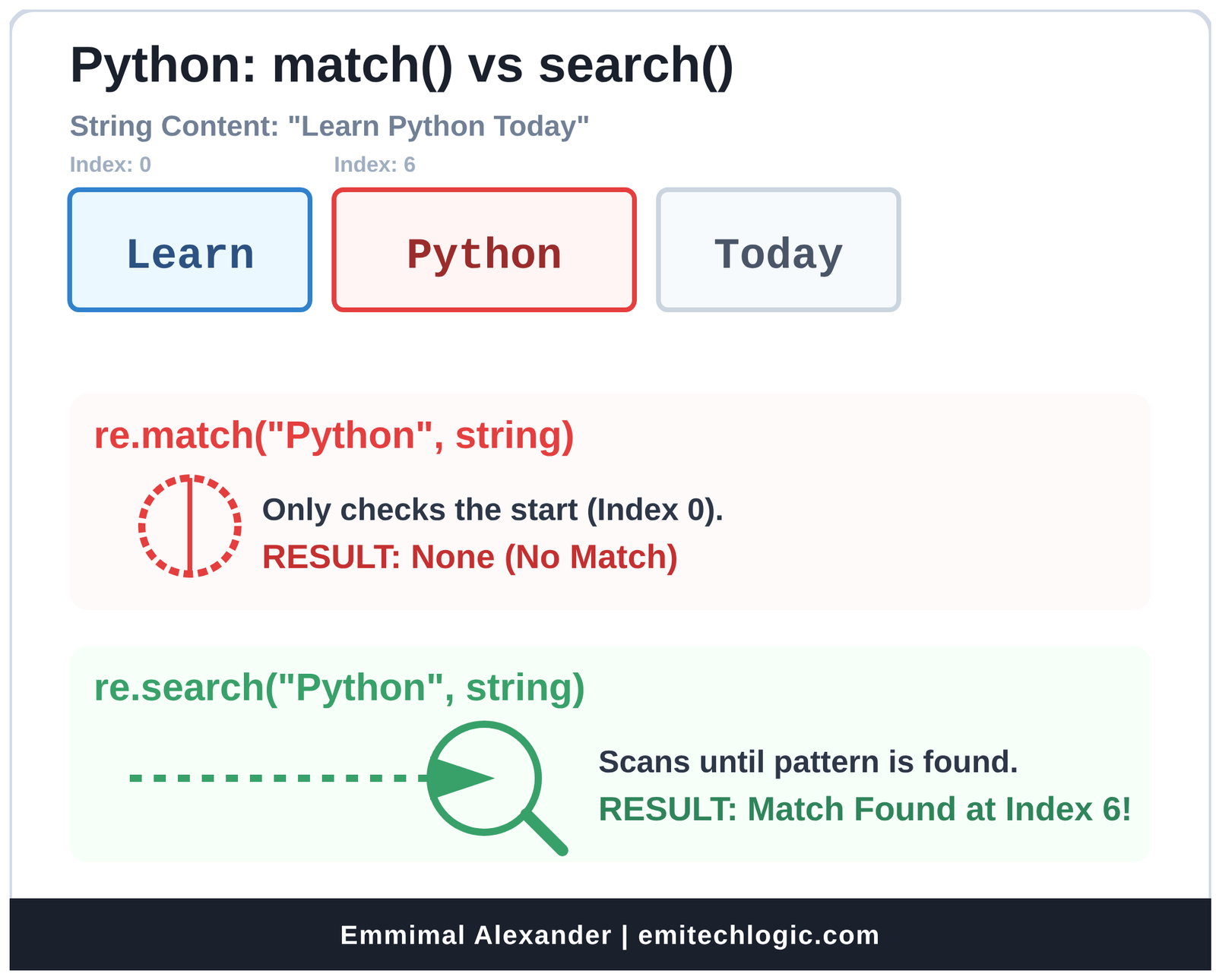
Using re.match() for Beginning-of-String Validation
Great job mastering re.search()! Now let’s look at its close cousin: re.match().
re.match() is perfect when you want to check if a pattern matches at the very beginning of the string — and only at the beginning.
This makes it ideal for strict validation where the entire string (or at least the start) must follow a specific format.
Basic Syntax
import re

match = re.match(pattern, string)- Just like re.search(), it returns a Match object if there’s a match, or None if not.
- But it only tries to match at the start of the string.
Key Difference: re.match() vs re.search()
| Function | Where it looks for a match | Returns match if pattern is… | Common Use Case |
|---|---|---|---|
| re.search() | Anywhere in the string | Found anywhere | Finding patterns in text |
| re.match() | Only at the beginning of the string | At the very start | Validating format (e.g., input, codes) |
Visual Example
text = "123-456-7890 is my phone number"

# Using re.search() — finds digits anywhere
print(re.search(r"\d{3}", text).group())   # 123 (first three digits)

# Using re.match() — only checks the start
print(re.match(r"\d{3}", text).group())    # 123 (it starts with 123)

# Now change the text
text2 = "Phone: 123-456-7890"

print(re.search(r"\d{3}", text2).group())  # 123 (finds it after "Phone: ")
print(re.match(r"\d{3}", text2)) # None — doesn't start with digits!Strict Validation with re.match()
This is where re.match() really shines.
Example 1: Validate a string that must start with a protocol
urls = [
    "https://example.com",
    "http://site.org",
    "ftp://old.com",
    "www.example.com"   # No protocol!
]

for url in urls:
    if re.match(r"https?://", url):
        print(url, "→ Valid (starts with http or https)")
    elif re.match(r"ftp://", url):
        print(url, "→ Valid FTP")
    else:
print(url, "→ Missing protocol")Example 2: Validate a US phone number format from the start
phones = [
    "555-123-4567",
    "(555) 123-4567",
    "555.123.4567",
    "123-456-7890 extra text"   # Has extra stuff
]

pattern = r"(\(\d{3}\)|\d{3})[-.\s]\d{3}[-.\s]\d{4}"

for phone in phones:
    if re.match(pattern, phone):
        print(phone, "→ Valid format at start")
    else:
print(phone, "→ Invalid or extra text before")Wait — the last one fails! That’s good — re.match() ensures nothing comes before the pattern.
But what if the phone number is clean but has trailing text?
"555-123-4567".match(pattern) → Yes
"555-123-4567 extra" → No (because match only checks start, but pattern doesn't reach end)Note: When using ^ and $ with no multiline flag, re.match() + ^ is redundant because match() already anchors at start. But adding $ ensures the whole string matches.
Best Practice for Full Validation: Use re.fullmatch() (Python 3.4+) for exact whole-string match:
if re.fullmatch(pattern, phone):
print("Exact match — no extra text!")Or with anchors:
re.match(r"^\d{3}-\d{3}-\d{4}$", phone)More Real-World Validation Examples
# 1. Check if a string is a valid Python identifier (starts with letter/underscore)
def is_valid_identifier(s):
    return bool(re.match(r"^[a-zA-Z_]\w*$", s))

print(is_valid_identifier("my_var"))     # True
print(is_valid_identifier("123var"))     # False — starts with digit
print(is_valid_identifier("my-var"))     # False — hyphen not in \w

# 2. Validate hexadecimal color code (must start with # and be exact)
colors = ["#FF0000", "#abc", "#GGG", "FF0000", "#12345G"]

for color in colors:
    if re.match(r"^#[0-9A-Fa-f]{6}$", color) or re.match(r"^#[0-9A-Fa-f]{3}$", color):
        print(color, "→ Valid hex color")
    else:
print(color, "→ Invalid")re.findall()
This function finds ALL non-overlapping matches and returns them as a list of strings.
Perfect when you want every occurrence.
Example:
text = "My numbers are 123, 456, and 789."

# Find all sequences of digits
pattern = r"\d+"    # \d means digit, + means one or more → we'll learn this soon!

numbers = re.findall(pattern, text)
print(numbers) # Output: ['123', '456', '789']Another example:
email_text = "Contact us at support@example.com or sales@company.org"

emails = re.findall(r"\w+@\w+\.\w+", email_text)
print(emails) # Output: ['support@example.com', 'sales@company.org']If no matches → returns empty list [].
Key Difference:
- re.search() → returns first match as a Match object (or None)
- re.findall() → returns all matches as a list of strings
re.split()
This splits a string into a list, using the regex pattern as the separator.
Like string.split(), but way more powerful because you can split on complex patterns.
Example:
text = "apple, banana; orange  grape"

# Split on comma, semicolon, or multiple spaces
pattern = r"[,\s;]+"

fruits = re.split(pattern, text)
print(fruits)
# Output: ['apple', 'banana', 'orange', 'grape']Note: It removes the separators completely.
Another useful one:
sentence = "Hello!!! How are you???"

words = re.split(r"[!?.]+", sentence)
print(words) # ['Hello', ' How are you', '']You can also limit the number of splits:
re.split(r"\s+", "one two three four", maxsplit=2)
# Output: ['one', 'two', 'three four']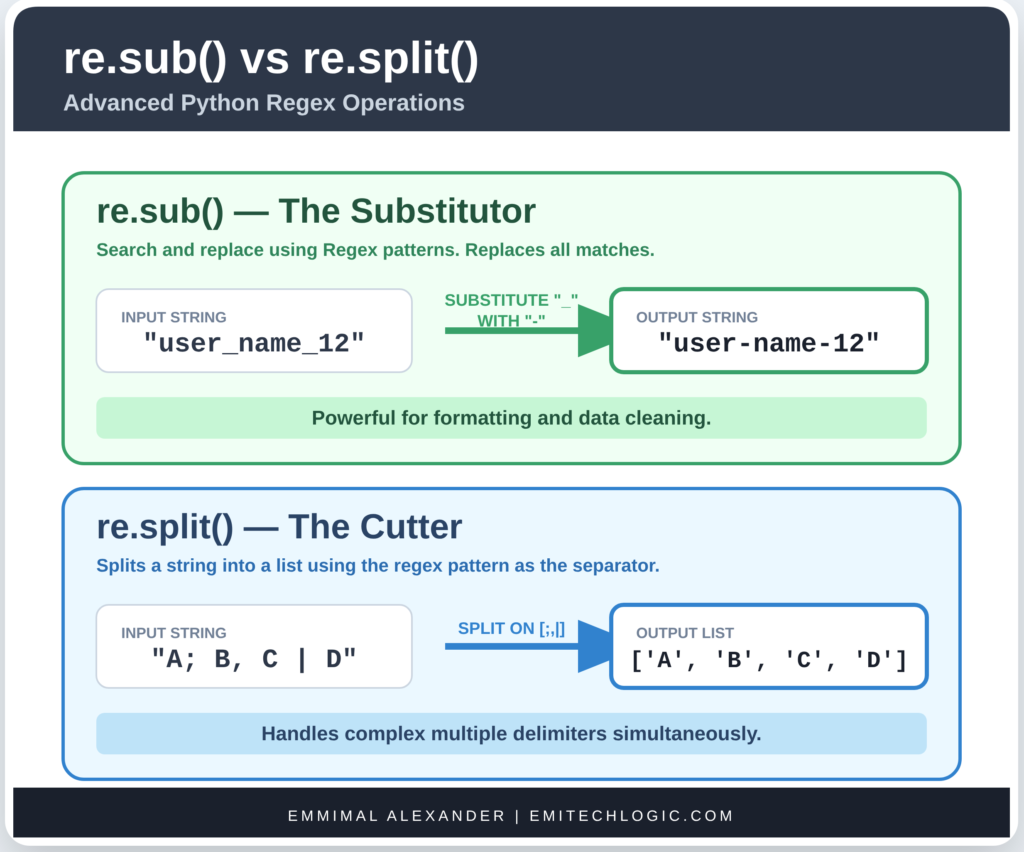
re.sub()
Short for “substitute” → search and replace using regex.
Replaces all matches with a replacement string.
Syntax:
re.sub(pattern, replacement, string)Example:
text = "I have 5 apples and 10 oranges."

# Replace all numbers with the word "FRUIT"
new_text = re.sub(r"\d+", "FRUIT", text)
print(new_text)
# Output: I have FRUIT apples and FRUIT oranges.Another example – redacting emails:
text = "Email me at john@example.com or jane@site.org"

redacted = re.sub(r"\w+@\w+\.\w+", "[EMAIL REDACTED]", text)
print(redacted)
# Output: Email me at [EMAIL REDACTED] or [EMAIL REDACTED]You can also limit the number of replacements:
re.sub(r"\d+", "X", "123 456 789", count=2)
# Output: X X 789re.compile() – Optional but Highly Recommended
If you’re going to use the same pattern multiple times, it’s better to compile it once.
Compiling turns the pattern into a regex object that can be reused → faster and cleaner.
Example:
# Without compile
text1 = "abc123"
text2 = "xyz456"

print(bool(re.search(r"\d+", text1)))
print(bool(re.search(r"\d+", text2)))

# With compile → better if using many times
pattern = re.compile(r"\d+")    # Compile once

print(bool(pattern.search(text1)))
print(bool(pattern.search(text2)))You can use the compiled pattern with all functions:
pattern = re.compile(r"\d+")

print(pattern.findall("Numbers: 12, 34, 56"))    # ['12', '34', '56']
print(pattern.sub("NUM", "Age: 25 years")) # Age: NUM yearsWhy use compile()?
- Faster when reusing the pattern many times
- Cleaner code
- You can give the pattern a name (good for complex ones)
Python Regex Syntax: Metacharacters and Special Sequences

Metacharacters and Special Sequences — this is where regex goes from “basic search” to “super powerful pattern machine.”
Think of metacharacters as the magic symbols that let you describe flexible patterns instead of exact text.
Let’s go through each one slowly, with lots of examples and code you can try right away.
Common Metacharacters
1. The Dot ( . )
The period . is the wildcard: it matches any single character except a newline (\n).
Examples:
import re

text = "cat hat bat rat sat"

# Pattern: any 3-letter word ending with "at"
pattern = r".at"

matches = re.findall(pattern, text)
print(matches)
# Output: ['cat', 'hat', 'bat', 'rat', 'sat']It matches:
- cat → “c” is one character
- hat → “h”
- even if it were “@at” or “3at” — the dot accepts almost anything.
What it does NOT match:
- “at” (only 2 characters)
- “flat” (that’s 4 characters — dot is only one)
Another example:
text2 = "abc def\nghi"

pattern = r"a.c"    # a, then any char, then c
print(re.findall(pattern, text2)) # ['abc'] — doesn't cross newlineThe dot stops at newline by default.
Key: One dot = exactly one character (anything except \n).
2. Anchors: ^ and $
These don’t match characters — they match positions.
- ^ → start of the string (or start of each line with special flag)
- $ → end of the string (or end of each line)
Example with ^ (start):
lines = ["python", "Python", "java", "PYTHON"]

for line in lines:
    if re.match(r"^python", line, re.IGNORECASE):
        print(line, "→ starts with python")
    if re.match(r"^Python", line):
print(line, "→ starts exactly with capital P")Output:
python → starts with python
Python → starts with python
Python → starts exactly with capital P
PYTHON → starts with pythonre.match() already checks the start, but ^ is useful with re.search() too.
Example with $ (end):
text = "email: user@example.com\nphone: 123-456-7890\nend"

pattern = r".com$"   # ends with .com
match = re.search(pattern, text)
print(match)  # None — because text ends with "0\nend"

# To match multiline, use re.MULTILINE flag
matches = re.findall(r".com$", text, re.MULTILINE)
print(matches) # ['example.com']Super useful for validation:
- r”^\d{3}-\d{3}-\d{4}$” → exact phone number format like 123-456-7890
Character Classes in Python: \d, \w, \s, and \b
These are the most useful shorthand character classes in Python’s re module. They act like pre-built sets of characters.
| Shorthand | Meaning | Equivalent to | Example Pattern | Matches in “Hello 123_world!” |
|---|---|---|---|---|
| \d | Any digit (0–9) | [0-9] | r”\d+” | “123” |
| \D | Any non-digit | [^0-9] | r”\D+” | “Hello “, “_world!” |
| \w | Any word character (letter, digit, underscore) | [a-zA-Z0-9_] | r”\w+” | “Hello”, “123”, “world” |
| \W | Any non-word character | [^a-zA-Z0-9_] | r”\W+” | ” “, “!” |
| \s | Any whitespace (space, tab, newline, etc.) | [ \t\n\r\f\v] | r”\s+” | ” ” (the space) |
| \S | Any non-whitespace | [^ \t\n\r\f\v] | r”\S+” | “Hello”, “123_world!” |
| \b | Word boundary (position between \w and \W) | — | r”\bcat\b” | whole word “cat” only |
| \B | Non-word boundary | — | r”\Bcat\B” | “cat” inside “scatter” |
Practical Examples
import re

text = "Hello 123_world!   email@site.com"

print(re.findall(r"\d+", text))     # ['123']
print(re.findall(r"\w+", text))     # ['Hello', '123_world', 'email', 'site', 'com']
print(re.findall(r"\s+", text))     # [' ', '   ']
print(re.findall(r"\S+", text))     # ['Hello', '123_world!', 'email@site.com']

# Word boundaries in action
text2 = "the cat scattered the scattercat"

print(re.findall(r"cat", text2))          # ['cat', 'cat', 'cat'] (all occurrences)
print(re.findall(r"\bcat\b", text2))      # ['cat'] (only whole word "cat")
print(re.findall(r"\Bcat\B", text2)) # ['cat'] (only inside "scattercat")Tip: Always use raw strings (r””) with these — backslashes are common!
Using Square Brackets [] for Custom Character Sets
Square brackets let you define your own set of characters to match exactly one character from that set.
Basic Syntax
- [abc] → matches a or b or c
- [^abc] → matches anything except a, b, or c (negation)
Ranges
You can use hyphens for ranges:
| Pattern | Meaning | Example Matches |
|---|---|---|
| [a-z] | Any lowercase letter | a, b, …, z |
| [A-Z] | Any uppercase letter | A, B, …, Z |
| [0-9] | Any digit | 0 through 9 |
| [a-zA-Z] | Any letter (case-insensitive) | a–z or A–Z |
| [a-z0-9] | Lowercase letter or digit | |
| [a-zA-Z0-9_] | Same as \w |
Examples in Code
text = "abc123XYZ!@#"

print(re.findall(r"[aeiou]", text))        # [] (no lowercase vowels)
print(re.findall(r"[a-z]", text))          # ['a', 'b', 'c']
print(re.findall(r"[0-9]", text))          # ['1', '2', '3']
print(re.findall(r"[A-Z]", text))          # ['X', 'Y', 'Z']
print(re.findall(r"[!@#]", text))          # ['!', '@', '#']

# Negation
print(re.findall(r"[^0-9]", text))         # All non-digits: ['a','b','c','X','Y','Z','!','@','#']
print(re.findall(r"[^a-zA-Z0-9_]", text)) # Same as \W: ['!', '@', '#']Real-World Uses
# Extract all vowels (case-insensitive)
re.findall(r"[aeiouAEIOU]", "Education")

# Match hexadecimal digits
re.findall(r"[0-9A-Fa-f]+", "Color: #FF8800 and A1B2C3")

# Match only letters (no numbers or symbols)
re.findall(r"[a-zA-Z]+", "Room 42 has Wi-Fi!")
# → ['Room', 'has', 'Wi', 'Fi']Quick Mix-and-Match
You can combine literals, ranges, and special chars:
# Match valid characters in a username (letters, digits, hyphen, underscore)
pattern = r"[a-zA-Z0-9_-]+"Mini Practice (Try These!)
- Extract all lowercase letters from “Hello World 123!”
- Find all sequences of exactly 3 digits: “12 123 1234 56789” → only “123”
- Match punctuation marks only: “, . ! ? ; :”
- Find whole words consisting only of uppercase letters in “NASA and USA are acronyms”
You’ve got the tools to match almost any character pattern now!
Advanced Python Regex Techniques for 2026
Quantifiers (Repetitions)
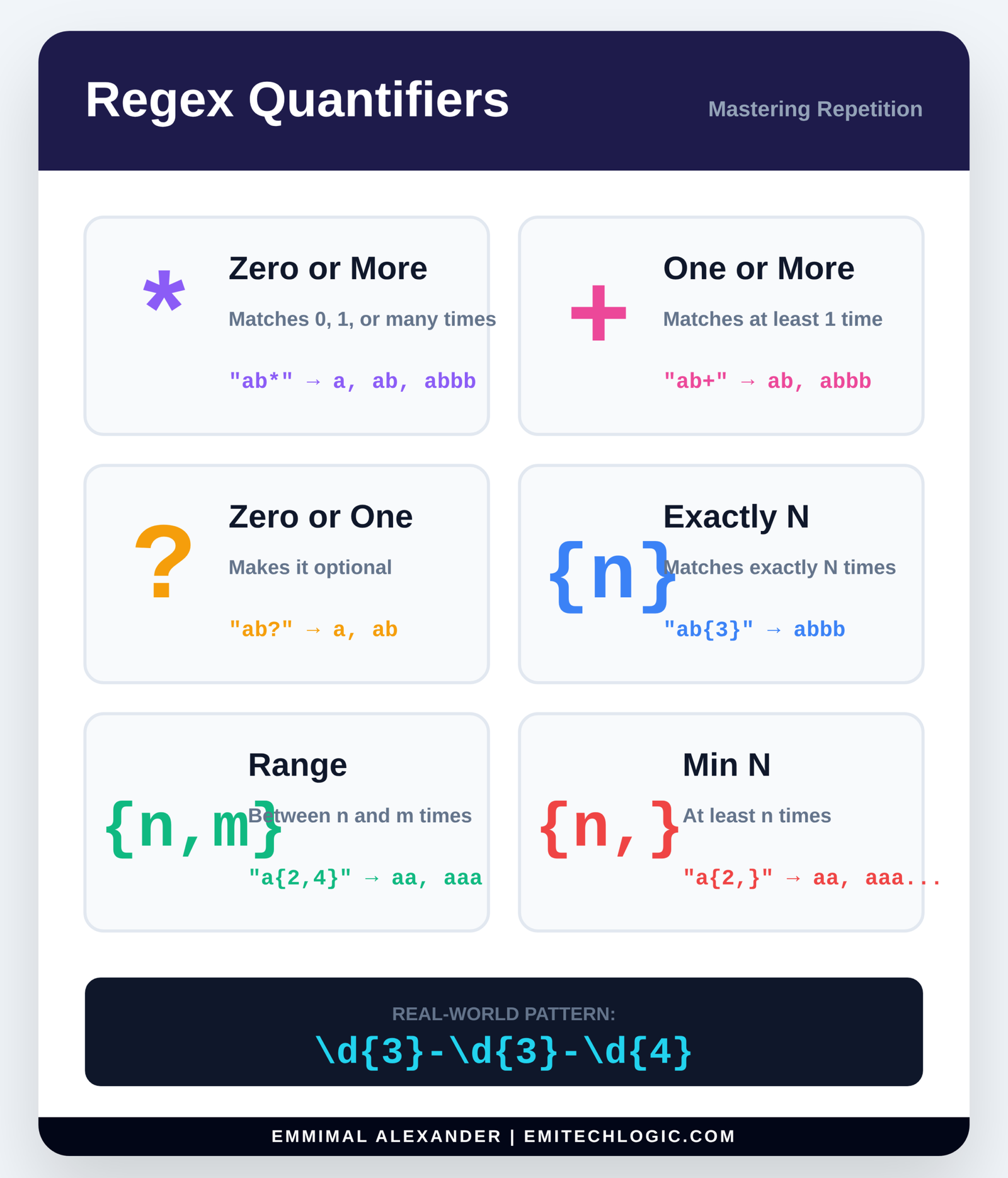
You’ve mastered the building blocks — now we’re adding quantifiers, the tools that let you say “how many times” something should appear.
Quantifiers come right after a character, class, or group, and control repetition.
Let’s learn them one by one with clear examples.
1. Zero or One: ? (Question Mark)
The ? makes the preceding item optional — it can appear 0 or 1 time.
Classic example: British vs American spelling
import re

text = "color colour coloring coloured"

pattern = r"colou?r"    # 'u' is optional

matches = re.findall(pattern, text)
print(matches)
# Output: ['color', 'colour', 'color', 'colou'] (wait — "colou" from "coloured"?)Actually, better example:
print(re.findall(r"\bcolou?r\b", text))
# Output: ['color', 'colour']The \b ensures whole words.
Another great use: optional file extensions
filenames = ["report.pdf", "image.jpg", "document", "script.py"]

for name in filenames:
    if re.search(r"\.pdf?$", name):   # .pdf or .pd (no, wait — better example below)
        print(name)

# Better: optional "s" for plural
re.findall(r"cat?s", "cat cats catss") # ['cat', 'cats']Key: ? = exactly 0 or 1 of the thing before it.
2. Zero or More: * (Asterisk)
Matches zero or more repetitions of the preceding item.
It will match as many as possible (we’ll talk about “greedy” soon).
Examples:
text = "ab acb aacb aaacb"

pattern = r"a*b"    # zero or more 'a's followed by 'b'

matches = re.findall(pattern, text)
print(matches)
# Output: ['b', 'ab', 'aab', 'aaab']From “ab” → “ab”, From “acb” → “ab” (the ‘c’ stops it) Wait — actually re.findall grabs each match:
Better text:
text = "b ab aab aaab aaaab"

print(re.findall(r"a*b", text))
# ['b', 'ab', 'aab', 'aaab', 'aaaab']Yes! It matches any number of ‘a’s (including zero) before ‘b’.
Another common use: matching spaces
text = "hello     world  python"

print(re.split(r"\s*", text))   # Splits on any number of spaces (including zero)
# But be careful — this can create empty strings!More practical:
# Match HTML tags (simple version)
re.findall(r"<.*>", "<p>Hello</p> <b>bold</b>")
# ['<p>Hello</p> <b>bold</b>'] — wait, actually one big match (greedy!)We’ll fix that with non-greedy later.
3. One or More: + (Plus)
Matches one or more repetitions — must appear at least once.
Example:
text = "b ab aab aaab"

pattern = r"a+b"

print(re.findall(pattern, text))
# ['ab', 'aab', 'aaab'] — no plain "b" because at least one 'a' requiredSuper useful for grabbing numbers, words, etc.
text = "Prices: $5, $100, $2500"

prices = re.findall(r"\$\d+", text)
print(prices) # ['$5', '$100', '$2500']Or email local part:
re.findall(r"\w+@\w+\.\w+", "john.doe@example.com")4. Specific Counts: {m,n}
This is the most precise quantifier.
- {m} → exactly m times
- {m,} → at least m times (no upper limit)
- {m,n} → between m and n times (inclusive)
Examples:
# Exactly 4 digits (like a year 0000-9999)
text = "Years: 1999 2025 12345 850"

print(re.findall(r"\b\d{4}\b", text))
# ['1999', '2025']

# At least 3 digits
print(re.findall(r"\d{3,}", text))
# ['1999', '2025', '12345']

# Between 2 and 4 digits
print(re.findall(r"\b\d{2,4}\b", text))
# ['1999', '2025', '85'] (12345 has 5 → not included, 850 has 3 → '850')Real-world uses:
- Phone numbers: \d{3}-\d{3}-\d{4}
- ZIP codes: \d{5}(-\d{4})?
- Hex colors: #[0-9A-Fa-f]{6} or #[0-9A-Fa-f]{3}
Putting It All Together
# Validate a simple password: 8-16 characters, at least one digit and one letter
pattern = r"^(?=.*[a-zA-Z])(?=.*\d).{8,16}$"

# We'll learn lookaheads later — but this is powerful!
Or extract repeated patterns:
text = "haha hahaha haaaaha"

print(re.findall(r"ha+", text))     # ['ha', 'haha', 'haaaa']
print(re.findall(r"(ha){2,}", text)) # ['haha', 'haha'] — groups of "ha" repeated5. Greedy vs Non-Greedy (Lazy) Matching
By default, *, +, and {m,n} are greedy — they match as much as possible.
Greedy example (problem!):
text = '<p>Hello <b>world</b></p>'

print(re.findall(r"<.*>", text))
# Output: ['<p>Hello <b>world</b></p>'] — one huge match!
# It grabbed everything from first < to last >We wanted separate tags.
Fix: Make it non-greedy with ?
Add ? after the quantifier → matches as little as possible.
print(re.findall(r"<.*?>", text))
# Output: ['<p>', '<b>', '</b>', '</p>'] — perfect!Works with all:
- *? → zero or more, lazily
- +? → one or more, lazily
- {m,n}? → lazily
Another example:
text = "12345"

print(re.search(r"\d{2,4}", text).group())   # '1234' (greedy — takes 4)
print(re.search(r"\d{2,4}?", text).group()) # '12' (lazy — takes minimum 2)Rule:
- Greedy (default): match as much as possible while still allowing overall match
- Non-greedy (? after): match as little as possible
Grouping and Alternation
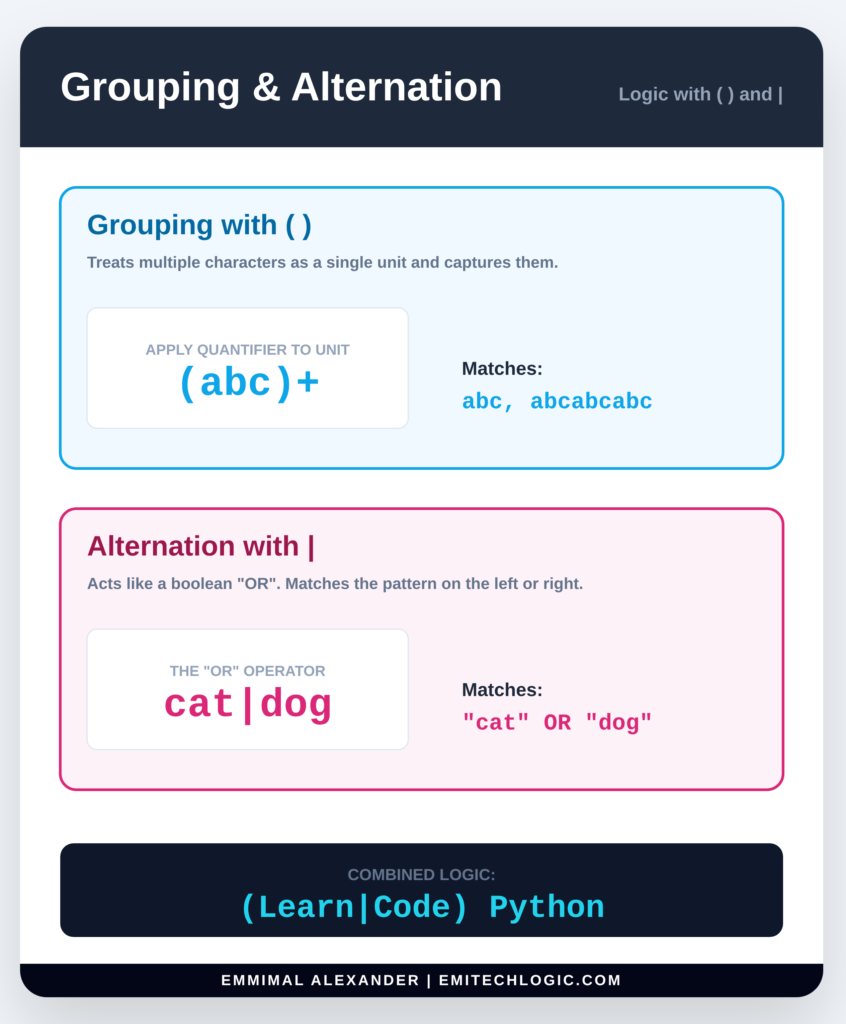
You’ve already learned how to find patterns and control repetitions. Now we’re stepping into one of the most powerful parts of regex: Grouping and Alternation.
This is where regex turns from “find stuff” into “extract and organize specific pieces of information.”
Let’s go step by step, as always!
1. Grouping with Parentheses (())
Parentheses () do two important things:
- Group sub-patterns together so you can apply quantifiers to the whole group.
- Capture the matched text inside the group so you can retrieve it later.
A. Grouping to apply quantifiers
Without parentheses, quantifiers only apply to the single character before them.
With parentheses, they apply to the entire group.
Example:
import re

text = "ab abc abab ababab"

# Without grouping
print(re.findall(r"ab+", text))
# ['ab', 'ab', 'abab', 'ababab']  → + only applies to 'b'

# With grouping
print(re.findall(r"(ab)+", text))
# ['ab', 'ab', 'abab', 'abab'] → + applies to the whole "ab"See the difference? (ab)+ means “one or more repetitions of the sequence ‘ab'”.
Other examples:
re.findall(r"(ha)+", "ha haha hahaha")     # ['ha', 'ha', 'haha']
re.findall(r"(wo)+", "wo wowowo")          # ['wo', 'wowo']
re.findall(r"(\d{3})-?", "123-456 789") # ['123', '456'] (optional dash)B. Capturing groups to extract parts
Every time you use (), the matched text inside that group is saved (captured).
You can access them using .group(n) where:
- .group(0) or .group() → the entire match
- .group(1) → first group
- .group(2) → second group, etc.
Real-world example: Extract username and domain from email
text = "Contact: john.doe@example.com"

pattern = r"(\w+)@(\w+\.\w+)"

match = re.search(pattern, text)

if match:
    print("Full match:", match.group(0))   # john.doe@example.com
    print("Username:", match.group(1))     # john.doe
print("Domain:", match.group(2)) # example.comYou can also use .groups() to get all captured groups as a tuple:
print(match.groups()) # ('john.doe', 'example.com')Or .groupdict() (we’ll see this with named groups soon).
Multiple groups example: Parsing dates
date_text = "Today's date: 2025-12-29"

pattern = r"(\d{4})-(\d{2})-(\d{2})"

match = re.search(pattern, date_text)

if match:
    year = match.group(1)
    month = match.group(2)
    day = match.group(3)
    print(f"Year: {year}, Month: {month}, Day: {day}")
# Output: Year: 2025, Month: 12, Day: 292. Alternation: | (The OR operator)
The pipe means OR — match this or that.
It has low precedence, so it applies to the parts on either side unless grouped.
Simple example:
text = "I like cats and dogs"

pattern = r"cat|dog"

print(re.findall(pattern, text))
# ['cat', 'dog']With grouping for more control:
text = "The gray cat and the grey dog"

# Match American OR British spelling
pattern = r"gr(e|a)y"

print(re.findall(pattern, text))
# ['grey', 'gray']  Wait — actually finds 'ey' and 'ay' because of capture

# Better: group the whole word
pattern = r"gr(e|a)y\b"   # \b for whole word

matches = re.findall(pattern, text)
print(matches) # ['grey', 'gray']More complex alternation:
# Match different phone number formats
text = "Call me at 123-456-7890 or (123) 456-7890 or 123.456.7890"

pattern = r"\(?(\d{3})\)?[.\s-]?(\d{3})[.\s-]?(\d{4})"

# This captures the three parts regardless of separators
matches = re.findall(pattern, text)
print(matches)
# [('123', '456', '7890'), ('123', '456', '7890'), ('123', '456', '7890')]Alternation with different lengths:
# Match "http", "https", or "ftp"
pattern = r"https?|ftp"

# https? means http or https (s is optional)
# | ftp adds ftp as another option

re.findall(pattern, "https://site.com ftp://old.com http://example.org")
# ['https', 'ftp', 'http']Important: Alternation tries options from left to right and stops at the first one that works.
3. Named Groups (Highly Recommended!)
When you have many groups, remembering group(1), group(2) gets confusing.
Named groups let you give each group a meaningful name.
Syntax: (?P<name>pattern)
Access with .group(‘name’) or .groupdict()
Example: Improved email extraction
pattern = r"(?P<username>\w+)@(?P<domain>\w+\.\w+)"

match = re.search(pattern, "alice@wonderland.org")

if match:
    print(match.group('username'))   # alice
    print(match.group('domain'))     # wonderland.org
    print(match.groupdict())
# {'username': 'alice', 'domain': 'wonderland.org'}Date example with names:
pattern = r"(?P<year>\d{4})-(?P<month>\d{2})-(?P<day>\d{2})"

match = re.search(pattern, "Event: 2025-12-29")

if match:
    data = match.groupdict()
    print(data)
    # {'year': '2025', 'month': '12', 'day': '29'}
    print(f"{data['month']}/{data['day']}/{data['year']}")
# 12/29/2025Pro tip: Always use named groups in real projects — your future self will thank you!
Practical Python Regex Examples and Real-World Use Cases
You’ve learned all the core concepts. Now it’s time for the fun part: Practical Real-World Examples and Exercises.
We’ll bring everything together with real-world tasks you’ll encounter in programming, data processing, web scraping, form validation, and more. I’ll show complete code examples, explain the patterns step-by-step, and then give you challenges to try yourself.
Let’s dive in!
How to Validate an Email Address in Python
Regex shines for checking if input is in the correct format.
A. Email Address Validation
A solid (but not overly complex) email pattern:
import re

email_pattern = r"^[a-zA-Z0-9._%+-]+@[a-zA-Z0-9.-]+\.[a-zA-Z]{2,}$"

def is_valid_email(email):
    return bool(re.match(email_pattern, email.strip()))

# Test it
test_emails = [
    "test@example.com",          # Valid
    "john.doe@sub.domain.co.uk", # Valid (multiple parts)
    "bad@email",                 # Invalid (no TLD)
    "noat.com",                  # Invalid
    "@missinglocal.com",         # Invalid
    "spaces @ example.com",      # Invalid
    "good+filter@my-site.org"    # Valid (plus addressing)
]

for email in test_emails:
print(f"{email:30} → {is_valid_email(email)}")Explanation of the pattern:
- ^ → start of string
- [a-zA-Z0-9._%+-]+ → one or more allowed local-part characters
- @ → literal @
- [a-zA-Z0-9.-]+ → domain name
- \. → literal dot
- [a-zA-Z]{2,}$ → TLD at least 2 letters, end of string
This catches most real emails without being too strict.
B. Phone Number Validation (US format)
Common formats: 123-456-7890, (123) 456-7890, 123.456.7890
phone_pattern = r"^(\(\d{3}\)|\d{3})[-.\s]?\d{3}[-.\s]?\d{4}$"

def is_valid_phone(phone):
    return bool(re.match(phone_pattern, phone))

tests = ["123-456-7890", "(123) 456-7890", "123.456.7890", "1234567890", "bad"]
for p in tests:
print(p, "→", is_valid_phone(p))C. Password Strength Checking
Example: At least 8 characters, with at least one uppercase, one lowercase, one digit.
password_pattern = r"^(?=.*[a-z])(?=.*[A-Z])(?=.*\d).{8,}$"

# This uses positive lookahead (advanced, but useful!)
# (?=.*[a-z]) → must contain lowercase somewhere
# etc.

def check_password_strength(pw):
    if re.match(password_pattern, pw):
        return "Strong enough"
    else:
        return "Too weak"

print(check_password_strength("Weak123"))     # Too short → weak
print(check_password_strength("StrongPass1")) # Strong enoughExtracting Phone Numbers and Dates (YYYY-MM-DD)
A. Extracting Dates from Log Files
Common formats: 2025-12-29, 12/29/2025, Dec 29, 2025
log_line = "ERROR [2025-12-29 14:30:45] Database connection failed on 12/29/2025"

# Extract ISO format dates (YYYY-MM-DD)
iso_dates = re.findall(r"\b\d{4}-\d{2}-\d{2}\b", log_line)
print("ISO dates:", iso_dates)  # ['2025-12-29']

# Extract MM/DD/YYYY
slash_dates = re.findall(r"\b\d{2}/\d{2}/\d{4}\b", log_line)
print("Slash dates:", slash_dates) # ['12/29/2025']With named groups:
date_pattern = r"(?P<iso>\d{4}-\d{2}-\d{2})|(?P<slash>\d{2}/\d{2}/\d{4})"

matches = re.finditer(date_pattern, log_line)
for m in matches:
    if m.group('iso'):
        print("Found ISO:", m.group('iso'))
    if m.group('slash'):
print("Found slash:", m.group('slash'))B. Parsing Information from a Simple CSV String
csv_line = 'John Doe,john@example.com,25,New York,NY'

# Split and extract with groups
pattern = r'^([^,]+),([^,]+),(\d+),([^,]+),([A-Z]{2})$'

match = re.match(pattern, csv_line)
if match:
    name, email, age, city, state = match.groups()
print(f"Name: {name}, Email: {email}, Age: {age}")Cleaning Scraped Data and Removing Special Characters
A. Removing Extra Whitespace
messy_text = "Too   many     spaces    here\n\n\nAnd empty lines."

clean = re.sub(r"\s+", " ", messy_text)   # All whitespace → single space
clean = clean.strip()                    # Remove leading/trailing
print(clean)
# "Too many spaces here And empty lines."B. Reformatting Dates (MM-DD-YYYY → YYYY/MM/DD)
text = "Event on 12-29-2025 and another on 01-15-2026."

def reformat_date(match):
    month, day, year = match.groups()
    return f"{year}/{month}/{day}"

new_text = re.sub(r"(\d{2})-(\d{2})-(\d{4})", reformat_date, text)
print(new_text)
# "Event on 2025/12/29 and another on 2026/01/15."4. Practice Exercises (Your Turn!)
Now test your skills! Try writing the regex yourself, then run the code to check.
Exercise 1: Find All Hashtags in a Tweet
tweet = "Loving #Python regex today! #Regex #programming #100DaysOfCode is fun."

# Write pattern to find all hashtags (including the #)
pattern = r"#\w+"   # Your pattern here

hashtags = re.findall(pattern, tweet)
print(hashtags)
# Expected: ['#Python', '#Regex', '#programming', '#100DaysOfCode']Exercise 2: Extract All URLs from HTML/Text
text = '<a href="https://example.com">Visit</a> or http://old.site.org/path?query=1#fragment'

# Basic HTTP/HTTPS URLs (no quotes issue)
pattern = r"https?://[^\s<>\"]+"

urls = re.findall(pattern, text)
print(urls)
# Expected: ['https://example.com', 'http://old.site.org/path?query=1#fragment']Exercise 3: Validate Strong Password (8-20 chars, upper, lower, digit, special char)
Try this pattern:
strong_pw_pattern = r"^(?=.*[a-z])(?=.*[A-Z])(?=.*\d)(?=.*[@$!%*?&]).{8,20}$"

# Test with: "Passw0rd!", "weak", "SuperStrong123!"Exercise 4: Extract Quoted Text
text = 'She said "Hello world" and then "Goodbye" quietly.'

# Extract text inside double quotes
pattern = r'"(.*?)"'   # Non-greedy!

quotes = re.findall(pattern, text)
print(quotes)
# Expected: ['Hello world', 'Goodbye']Bonus Challenge: Redact All Email Addresses
text = "Contact john@example.com or support@site.org for help."

redacted = re.sub(r"\b\w+@\w+\.\w+\b", "[EMAIL REDACTED]", text)
print(redacted)Python Regex Best Practices
You’ve built some serious skills, and now we’re wrapping up with Best Practices and Debugging — the secrets that turn “it works… sometimes” into reliable, maintainable regex magic.
Let’s go through this like always: clear, practical, and teacher-to-student. 😊
1. Tips for Writing Readable and Efficient Regex
Regex can quickly become a tangled mess (the infamous “write-only” code). Here’s how to keep yours clean and fast.
Why You Should Use Raw Strings (r"") for Regex Patterns
Always use r”” for patterns.
For complex patterns, use the re.VERBOSE (or re.X) flag to add whitespace and comments:
import re

email_pattern = re.compile(r"""
    ^[a-zA-Z0-9._%+-]+   # Local part
    @                    # At symbol
    [a-zA-Z0-9.-]+       # Domain name
    \.                   # Dot
    [a-zA-Z]{2,}$        # Top-level domain
""", re.VERBOSE)

text = "test@example.com"
print(bool(email_pattern.match(text))) # TrueThis makes long patterns readable!
B. Use Named Groups Instead of Numbered Ones
We touched on this — always prefer named groups:
pattern = r"(?P<year>\d{4})-(?P<month>\d{2})-(?P<day>\d{2})"
# Much better than remembering group(1) is year!C. Be Specific, Not Overly Greedy
Avoid overly broad patterns like .* when you can be more precise.
Bad (greedy and slow):
r"<.*>" # Matches from first < to last > on the whole page!Good:
r"<[^>]*>" # Matches only within one tagD. Start Simple, Then Build Up
Test small pieces first:
- Does \d{4} match years? Yes.
- Add dashes: \d{4}-\d{2}-\d{2}
- Add anchors: ^\d{4}-\d{2}-\d{2}$
E. Reuse with re.compile()
If using the same pattern multiple times:
url_pattern = re.compile(r"https?://\S+")
# Then reuse: url_pattern.findall(text)Faster and cleaner.
2. Using Online Regex Testers/Debuggers
Regex101.com is your best friend! (Highly recommend bookmarking it)
Why it’s amazing:
- Real-time testing as you type
- Explains each part of your pattern
- Supports Python flavor (choose “Python” in the flavor dropdown)
- Shows match information, groups, and errors
- Has a debugger and quick reference
Other good ones:
- https://regexr.com (great for visualization)
- https://pythex.org (Python-specific, simple)
Pro tip: Always test your regex on Regex101 with the Python flavor before using it in code.
3. Using Flags
Flags modify how regex behaves. Pass them as the third argument or with re.compile().
Common and useful flags:
| Flag | Meaning | Example Use Case |
|---|---|---|
| re.IGNORECASE (re.I) | Case-insensitive matching | Matching “python” or “Python” |
| re.MULTILINE (re.M) | ^ and $ match start/end of each line | Processing multi-line logs |
| re.DOTALL (re.S) | . matches newline too | Matching across multiple lines |
| re.VERBOSE (re.X) | Allow whitespace and comments in pattern | Long, readable patterns |
Example: Combining flags
text = """
Error in line 1
WARNING: low memory
Error in line 3
"""

# Find lines starting with "Error"
pattern = re.compile(r"^Error.*", re.MULTILINE | re.IGNORECASE)

matches = pattern.findall(text)
print(matches)
# ['Error in line 1', 'Error in line 3']With re.compile:
pattern = re.compile(r"""
    ^               # Start of line
    \w+             # Word
    \s+             # Spaces
    \d+             # Number
""", re.MULTILINE | re.VERBOSE)4. When NOT to Use Regex
Regex is powerful, but not always the best tool. Sometimes simple string methods are faster, clearer, and less error-prone.
Use string methods when:
- Checking if a substring exists:
# Better than regex
if "error" in log_line.lower():- Splitting on fixed delimiters:
# Use str.split() instead of re.split(r",")
parts = line.split(",")- Simple replacements:Python
# Often better
cleaned = text.replace(" ", " ").strip()- Parsing structured data: Use json.loads(), csv module, datetime.strptime(), etc.
Rule of thumb:
Use regex when you need flexible pattern matching. Use built-in string methods or parsers when the format is simple and predictable.
Example: Validating a date?
- Simple cases → datetime.strptime() with try/except
- Complex/varying formats → regex
Summary: Best Practices Checklist
| Do This | Avoid This |
|---|---|
| Use raw strings r”” | Forgetting r and escaping backslashes |
| Use named groups | Relying only on numbered groups |
| Use re.VERBOSE for complex patterns | Writing long one-line regex |
| Test on Regex101.com | Debugging only in your code |
| Use re.compile() for reuse | Re-writing the pattern every time |
| Be specific (avoid greedy .*) | Overly broad patterns |
| Consider simple alternatives first | Using regex for everything |
Final Thoughts
You’ve now completed a full regex journey — from “what is this wizardry?” to building real-world, maintainable patterns!
You can now:
- Validate inputs
- Extract data from messy text
- Clean and transform strings
- Write readable and efficient patterns
Next steps:
- Practice on real data (logs, CSVs, user inputs)
- Try challenges on sites like Regex Crossword or Exercism
- Use regex in your projects confidently
Python Regex Master Cheat Sheet
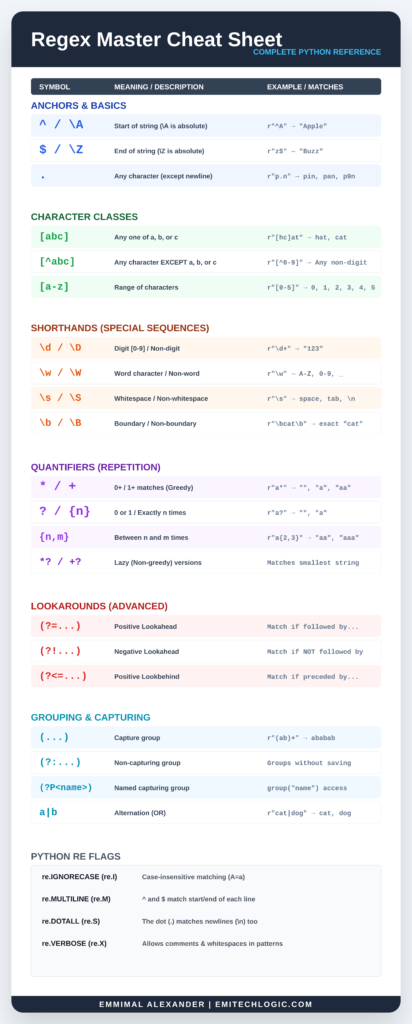
Download the High-Res Version
While the image above is great for a quick glance, you can download the png file for infinite zooming and perfect printing.
Click here to download the Master Cheat Sheet (Link this to the .png file you saved from the canvas)
External Resources
Official Python Documentation
1. Python re Module Documentation
The authoritative reference for all regex functions, syntax, flags, and detailed behavior in Python.
https://docs.python.org/3/library/re.html
2. Python Regular Expression HOWTO
A beginner-friendly tutorial from Python’s own documentation explaining regex basics, usage, and examples.
https://docs.python.org/3/howto/regex.html
3. Google Python Education: Regular Expressions
An official Google educational resource that breaks down how regex works in Python with simple examples.
https://developers.google.com/edu/python/regular-expressions
Interactive Learning & Practice
4. RegexOne – Interactive Regex Lessons
Step-by-step interactive exercises for learning regex from scratch. Works for all regex flavors and helps build pattern intuition.
https://regexone.com/
5. RegexLearn – Step by Step Regex Tutorials
A dedicated online tutorial platform where users learn regex basics, syntax, and examples with practice challenges.
https://regexlearn.com/
6. Regex101 – Python Flavor Regex Tester
Not a tutorial site, but a real-time regex tester that supports Python regex syntax. It shows matched groups, explains patterns, and visualizes matches — extremely useful for building and debugging regex.
https://regex101.com/
Python Regex FAQs (Frequently Asked Questions)
What is Python regex and where is it used?
Python regex refers to regular expressions implemented through Python’s built-in
remodule. It is used to search, match, extract, replace, and validate text based on defined patterns. Common use cases include email validation, log file analysis, data cleaning, text preprocessing for machine learning, and parsing structured or semi-structured text.What does
re.compile()do in Python regex?re.compile()converts a regex pattern into a compiled regular expression object. This object can be reused multiple times without recompiling the pattern. It improves performance when the same pattern is applied repeatedly and makes code more readable and maintainable in large projects.What is the difference between
re.search()andre.match()in Python?re.search()scans the entire string and returns the first match it finds anywhere in the text.re.match()attempts to match the pattern only at the beginning of the string.
This difference is important because many beginners mistakenly usere.match()when they actually needre.search().What are greedy and lazy quantifiers in Python regex?
Greedy quantifiers match as much text as possible while still allowing the pattern to succeed. By default, all quantifiers in Python regex are greedy. Lazy quantifiers match as little text as possible and are created by adding a
?after the quantifier. Lazy matching is especially useful when working with HTML or nested text structures.What is the difference between
re.findall()andre.finditer()?re.findall()returns all matches as a list of strings or tuples, depending on capturing groups.re.finditer()returns an iterator of Match objects, providing access to match positions and detailed metadata.re.finditer()is preferred when working with large texts or when index information is required.
Essential Foundations (Highly Recommended)
These articles cover the mechanics of how Python handles text, which is critical for understanding why we use r"" (raw strings) in Regex.
- Escape Sequences and Raw Strings in Python: Regex patterns are full of backslashes. This article explains how to handle them without errors. Read Article
- The Complete Guide to Python String Methods Why link it: Sometimes Regex is overkill. This guide helps users decide when to use simple methods like
.find()or.replace()instead. Read Article
Advanced Data Manipulation
Regex article focuses on data extraction (scraping or cleaning), these are the perfect “next steps.”
- A Guide to Web Scraping in Python using Beautiful Soup: Regex is often used inside web scrapers to find specific patterns in HTML. Read Article
- Mastering Input and Output Operations in Python: For users who need to read a file, run a Regex search, and save the results. Read Article
Practice & Projects
For readers who want to see Regex logic applied to real-world code.
- How to Build a Python Port Scanner from Scratch: Shows practical string parsing and network logic. Read Article
- Python Terminology Cheat Sheet for Interviews: Regex is a common “live coding” topic; this helps them prep for the surrounding theory. Read Article
Regex Live Playground
Test your Python patterns instantly
Quick Reference
\d+
Match digits (numbers)
[a-zA-Z]+
Match any words
^\w+
Start of string
\(.*?\)
Content inside brackets
Use re.findall() in Python to get these matches as a list!
Emmimal Alexander | Emitechlogic.com





Leave a Reply