
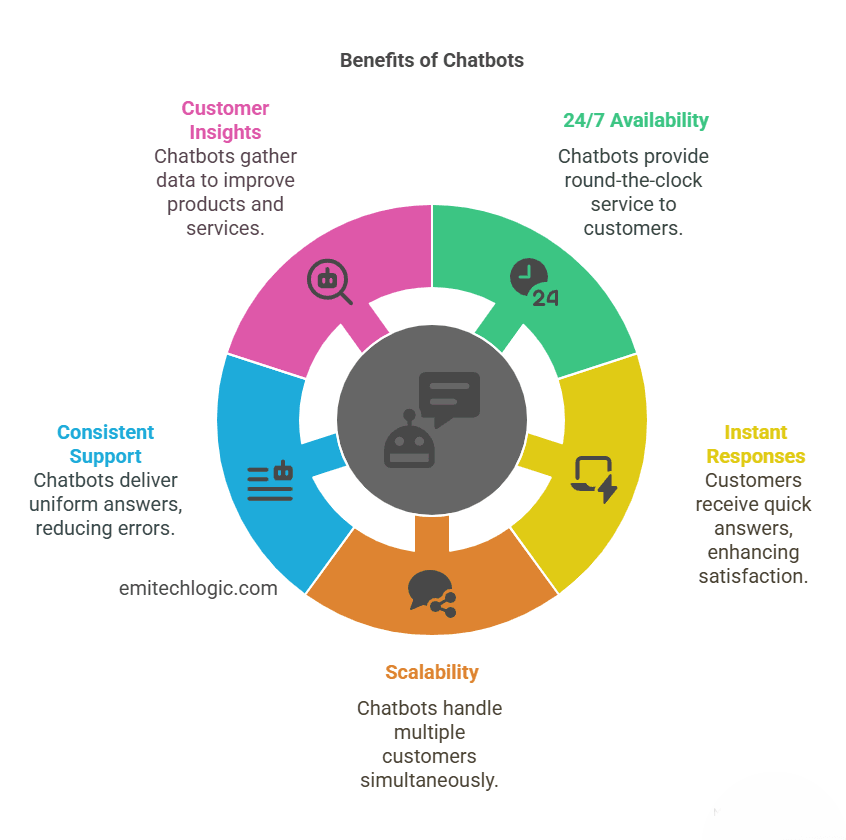
How to Create Customer Service Chatbots
How to Build a Python-Based Customer Service Chatbot That Handles Real Conversations Without Breaking in Production
A developer’s field guide to the 3-layer architecture that separates working chatbots from the ones your users close after two messages.
Most articles on this topic start by asking you to install Rasa or open a Dialogflow account, then walk you through configuration files. That approach teaches you how to use a specific tool. It does not teach you how to think about the problem.
This guide takes a different approach. Before touching a single line of code, I want to show you the three-layer architecture that every working customer service chatbot shares, regardless of whether it runs on Rasa, LangChain, Dialogflow, or a hand-rolled solution. Once you understand the layers, the framework choice becomes a straightforward decision based on your constraints, not a guess.
I will also show you the failure patterns I have seen repeatedly in production, the ones that do not show up in tutorials because they only emerge when real users start sending unexpected messages at two in the morning.
Why the Majority of Customer Service Chatbots Get Abandoned by Users Within Six Months
Before building anything, it helps to understand what you are trying to avoid. Research from Gartner and several independent studies consistently shows that the primary reason users abandon chatbots is not that the bot fails to answer. It is that the bot answers the wrong question with complete confidence.
A user types: “My order from last week hasn’t moved, should I be worried?”
A poorly designed chatbot reads the word “order” and responds with shipping policy. The user asked a judgment question. The bot answered a factual one. That gap, between what the user actually meant and what the bot thought they meant, is where trust breaks down.
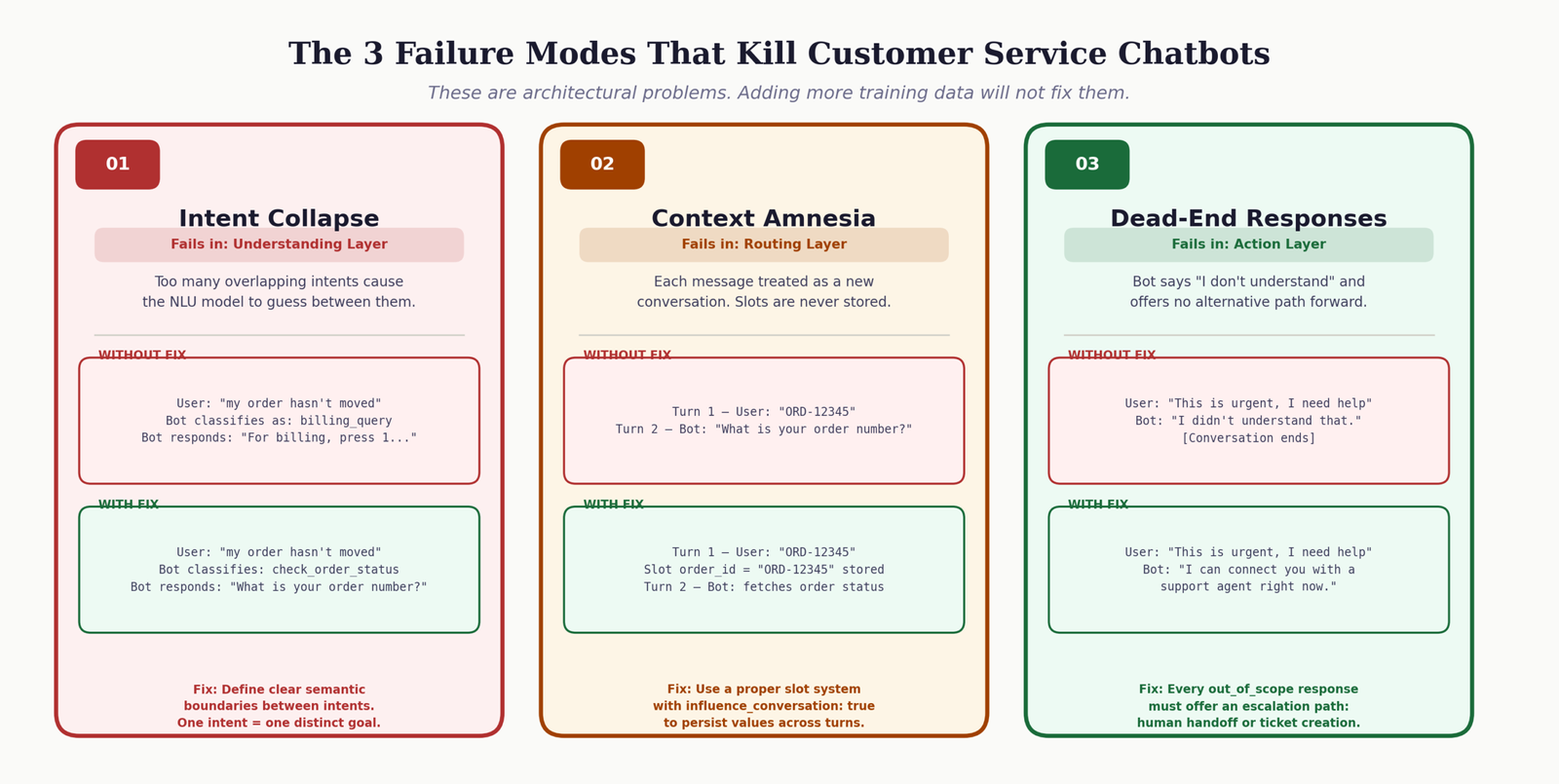
The three failure modes I see in almost every abandoned chatbot
- 1 Intent collapse: Too many intents that overlap in meaning, leading the NLU model to guess between “check_order” and “order_problem” and getting it wrong consistently. Users feel unheard.
- 2 Context amnesia: The bot forgets what was said two messages ago. A user provides their order number, the bot asks for it again. This single failure destroys user trust faster than a wrong answer would.
- 3 Dead ends without escalation: When the bot cannot help, it says nothing useful and offers no path forward. No human handoff, no ticket creation, no acknowledgment that the problem is real. Users leave feeling worse than before they started.
The 3-Layer Architecture That Every Working Customer Service Chatbot Actually Uses
Strip away every framework, every configuration file, and every API call, and what remains is a pipeline with three distinct responsibilities. These map to the same layers whether you are looking at a Rasa project from 2019 or a GPT-4o agent deployed this week.
Layer 1: The Understanding Layer
This layer converts raw user text into structured data. Its job is to answer two questions: what does the user want (intent), and what specific things did they mention (entities). An intent might be “check_order_status.” An entity within that intent might be the order ID “ORD-12345” that the user included in their message.
In machine learning-based systems, this layer contains an NLU model trained on examples. In LLM-based systems, this layer is handled by a language model with a carefully written prompt. In rule-based systems, this layer is a set of keyword patterns. The technology differs. The responsibility stays the same.
For a deeper look at how natural language processing powers this layer, the article on developing real-time natural language processing systems covers the underlying mechanics in detail.
Layer 2: The Routing Layer (Dialog Management)
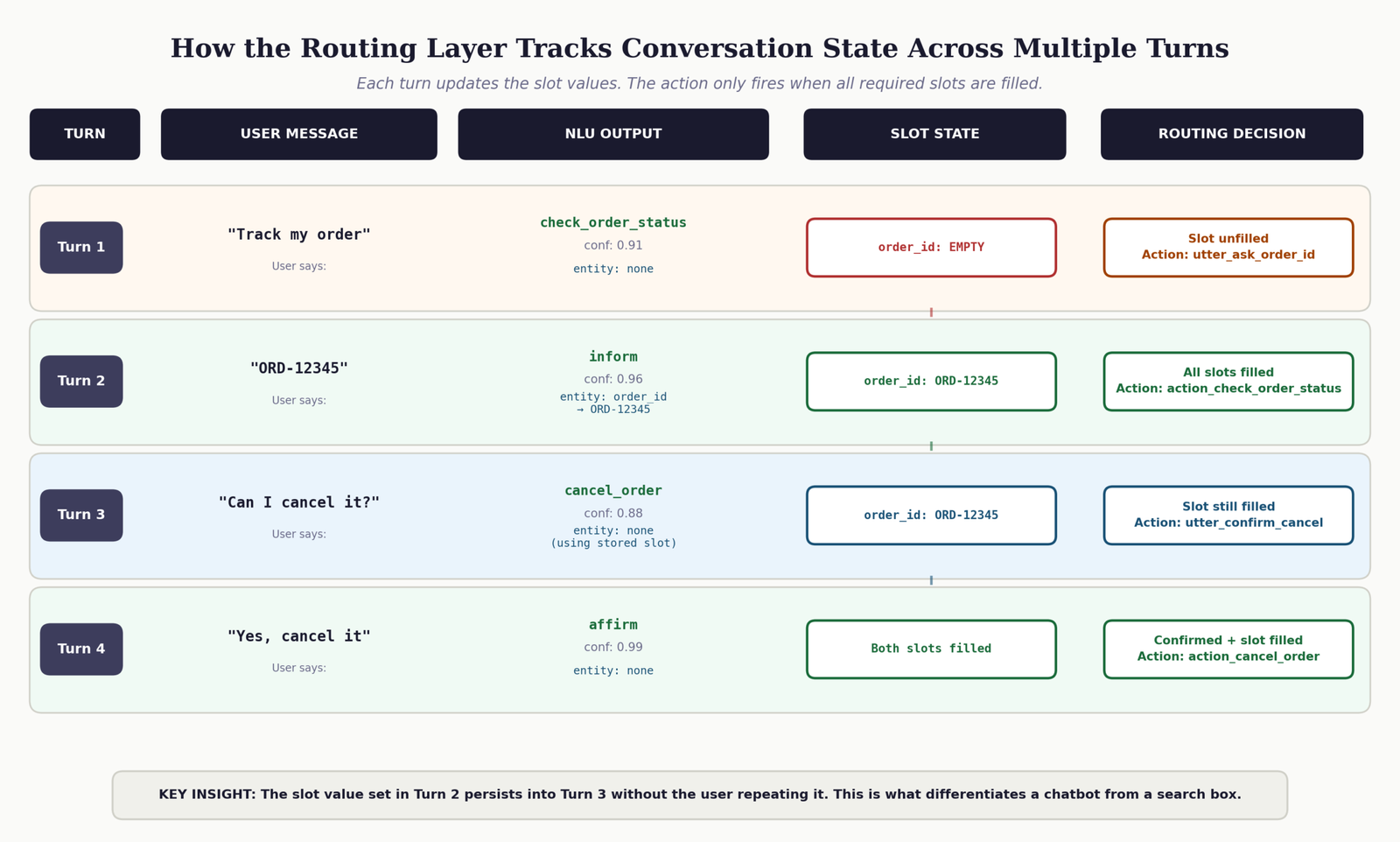
This layer takes the structured output from Layer 1 and decides what happens next. It tracks conversation state, knows which information slots have been filled, and determines whether the bot should ask a follow-up question, call a backend action, or hand off to a human agent. This is the layer most developers underestimate.
A bot without proper dialog management handles each message as if the conversation just started. That is the source of context amnesia. The routing layer is what makes a multi-turn conversation possible.
Layer 3: The Action Layer
This layer does real work. It queries your order database, calls your CRM API, creates support tickets, sends confirmation emails. The routing layer decides that an action is needed. The action layer executes it and returns a result. This is also where failures need to be handled gracefully, because external APIs fail, databases time out, and data is sometimes missing.
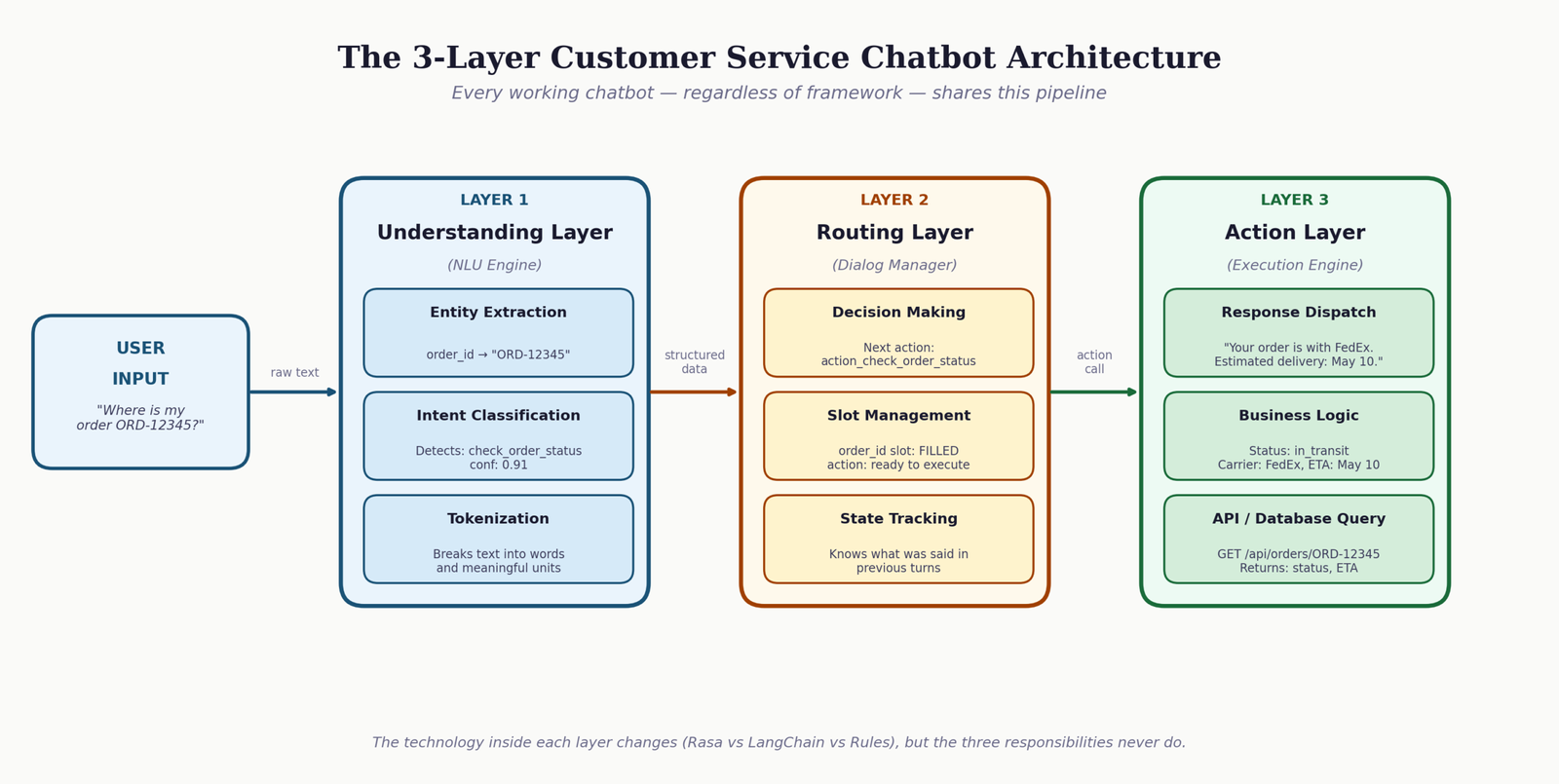
The interactive diagram below lets you type a message and watch it move through all three layers. Use a realistic customer service message like “my order 12345 still hasn’t arrived” to see entity extraction in action.
How to Choose the Right Chatbot Framework for Your Specific Business Requirements
The framework decision is not about which one is “best.” It is about which one matches the combination of constraints you actually have. I have seen teams spend three months building in Rasa when they should have used LangChain, and teams spend API costs on GPT-4o for a bot that could have been ten if-statements. The tool should match the problem.
Use the selector below to identify which approach fits your situation. Check every requirement that applies to your project.
Honest Framework Comparison for Customer Service Bots in 2025
| Framework | Best Use Case | Time to First Deploy | Privacy | Language Quality | Ongoing Cost |
|---|---|---|---|---|---|
| Rule-Based (Python) | Simple FAQ bots with under 15 intents | 1-2 days | Full control | Poor | Near zero |
| Rasa Open Source | Complex flows, regulated industries, custom NLU training | 2-4 weeks | Full control | Good | Infrastructure only |
| LangChain + GPT-4o | Natural language quality, rapid deployment, RAG pipelines | 2-5 days | Data leaves infra | Excellent | Per-token API fees |
| Dialogflow CX | Enterprise scale, GCP ecosystem, visual flow editor | 1-2 weeks | Google handles data | Good | Session-based fees |
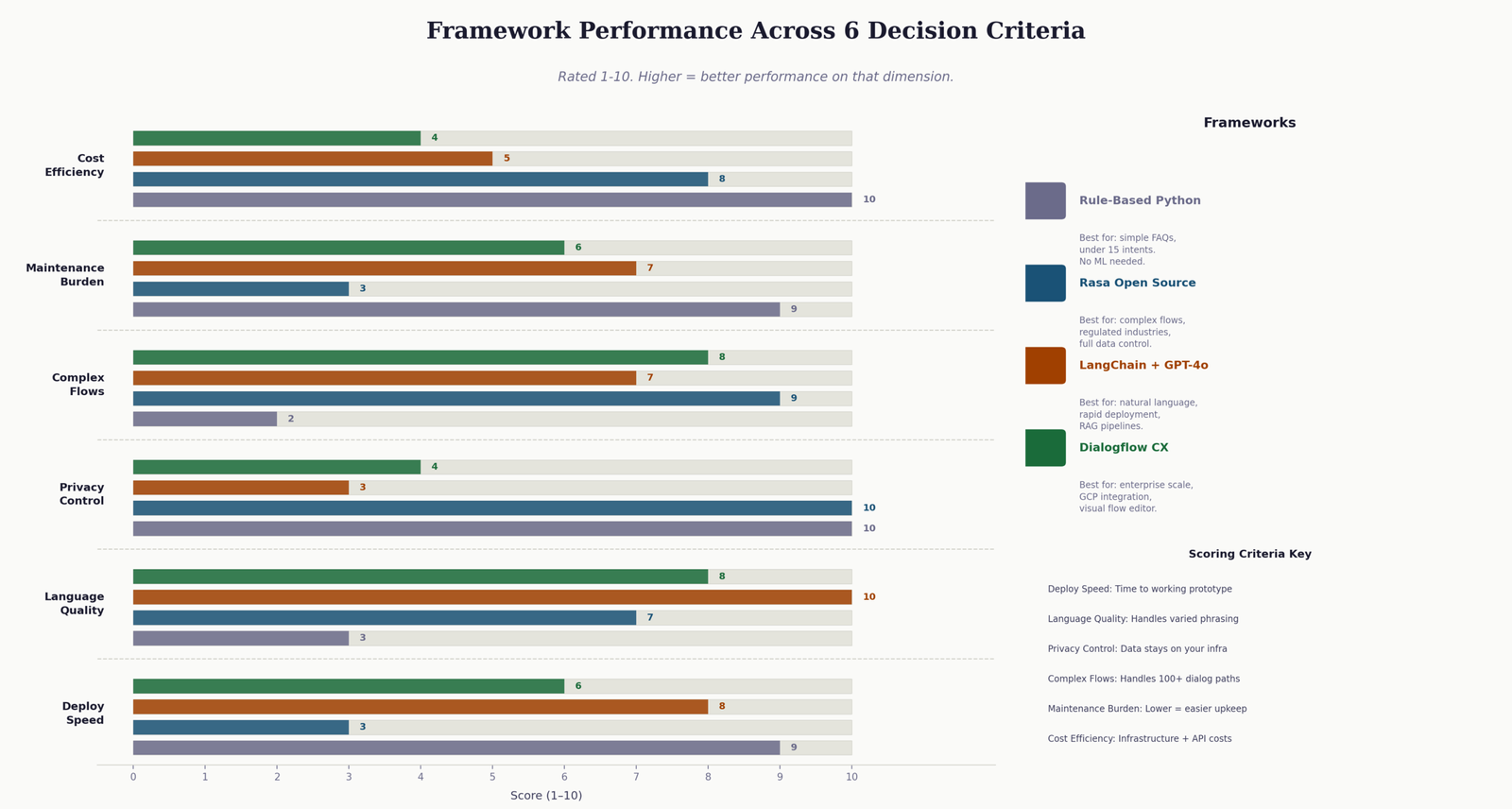
One thing that table cannot capture: maintenance cost. Rasa gives you the most control, but that control comes with the responsibility of retraining the model as language patterns change, managing the action server, and debugging dialog flows that fail in unexpected ways. LangChain offloads most of that to the LLM provider. Neither answer is wrong. They just have different trade-offs.
How to Build the Understanding Layer: Intent Recognition That Generalizes Beyond Your Training Examples
The understanding layer is where most chatbot projects invest too little time. It is common to write 5 training examples per intent, train the model once, and move on. Then a user sends a message phrased in a way you did not anticipate and the model confidently classifies it as the wrong intent.
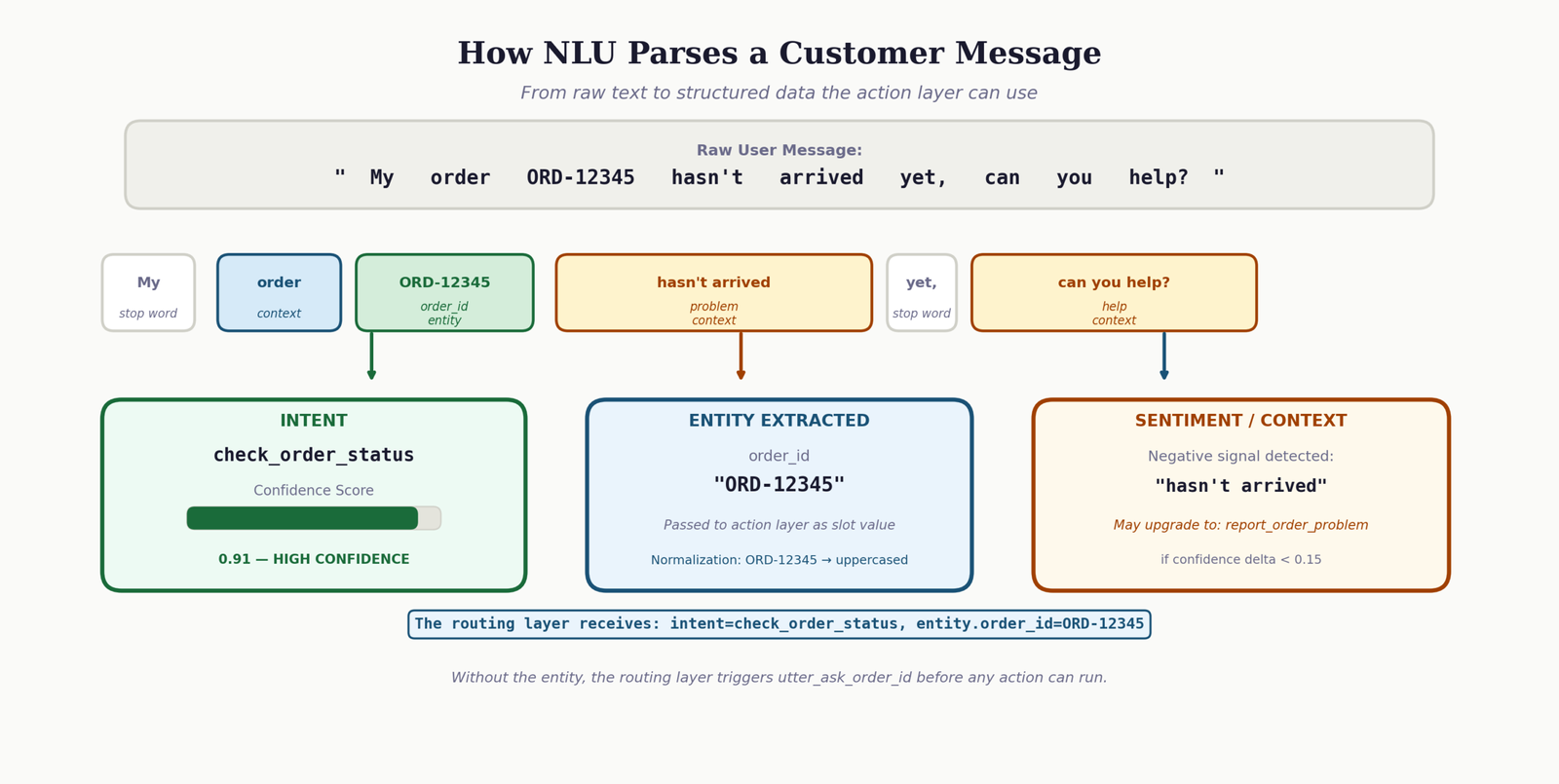
The rule I use: every intent needs at least 15 varied examples before I consider the model ready for testing. Varied means different sentence structures, different levels of formality, different word choices, and a few examples with deliberate typos. Real users type exactly as they think. They do not write clean, grammatical sentences.
Designing intent boundaries that do not overlap
Intent overlap is the single biggest cause of NLU failure. If you have both a check_order_status intent and a order_delivery_problem intent, there will be messages that legitimately fit both. The model will flip between them unpredictably.
The test I apply before finalizing any pair of intents: can I write a sentence that could reasonably be classified as either? If yes, those intents need to be merged or one needs to be redefined. The goal is intents that are semantically distinct enough that the line between them is clear in 95 percent of real messages.
version: "3.1"

nlu:

  # Intent: check_order_status
  # Covers: tracking requests, delivery ETA questions, shipment location
  # Does NOT cover: problems with the order (separate intent below)
- intent: check_order_status
  examples: |
    - where is my order
    - track my order [ORD-12345](order_id)
    - what's the status of [ORD-7621](order_id)
    - has my package shipped yet
    - when will my order arrive
    - can you check order [9981](order_id) for me
    - I want to know where my package is
    - wheres my stuff
    - order [12345](order_id) tracking
    - any update on my delivery
    - is [ORD-4432](order_id) on its way
    - still waiting for my order
    - need delivery update for [ORD-0012](order_id)
    - check my shipment
    - how long until my order gets here

  # Intent: report_order_problem
  # Covers: damaged goods, wrong item, missing items from order
  # Key distinction from above: involves a problem, not just a status check
- intent: report_order_problem
  examples: |
    - my order arrived damaged
    - I got the wrong item
    - my package is missing items
    - order [ORD-5512](order_id) is wrong
    - what I received is not what I ordered
    - the product is broken
    - something is missing from my delivery
    - I need to report a problem with order [ORD-3310](order_id)
    - received wrong product
    - my parcel was damaged when it arrived
    - the item doesn't match what I ordered
    - there's a problem with my recent delivery
    - wrong size in my order
    - item is defective
    - delivery issue with [ORD-7788](order_id)
Notice the comment on each intent block explaining what it covers and what it explicitly does not cover. This discipline is worth more than any amount of retraining. The comments force you to think about the boundaries during design, not after the model starts getting them wrong.
Entity extraction: getting specific values out of user messages
An intent tells you what the user wants. An entity tells you the specific value that the action layer needs to fulfill the request. Order ID, product name, date, quantity, account number: these are all entities. In Rasa, you annotate them inline with square bracket syntax. The model learns to extract them from patterns.
For a related deep dive into machine learning concepts that underpin NLU models, the complete guide to machine learning algorithms covers classification techniques that directly apply to intent recognition.
Building the Routing Layer: Conversation State Management That Holds Context Across Multiple Messages
This is the layer that separates a chatbot from a glorified search box. A search box answers one query. A chatbot conducts a conversation, and that requires memory of what has already been said.
In Rasa, the routing layer is implemented through stories and rules, backed by a slot system that persists values across turns. Understanding Python classes and object-oriented patterns will help you reason about how Rasa’s tracker object maintains state across the conversation lifecycle.
What a story actually represents in Rasa
A story is not a script. It is a training example for the dialog management model. It shows the model a sequence of user intents and bot actions that represents a valid conversation path. From multiple stories, the model generalizes to handle variations it was not explicitly shown.
version: "3.1"

stories:

  # Happy path: user provides order ID in their first message
- story: order status check with ID provided upfront
  steps:
  - intent: check_order_status
    entities:
    - order_id: "ORD-12345"
  - action: action_check_order_status

  # Slot-filling path: user does not provide the order ID
  # The bot asks, the user responds, then the action runs
- story: order status check requiring order ID collection
  steps:
  - intent: check_order_status
  - action: utter_ask_order_id
  - intent: inform
    entities:
    - order_id: "ORD-12345"
  - action: action_check_order_status

  # Escalation path: bot cannot resolve the issue
- story: unresolved issue escalation to human agent
  steps:
  - intent: report_order_problem
  - action: action_check_order_status
  - action: utter_offer_human_handoff
  - intent: affirm
  - action: action_create_support_ticket

  # Context switch: user changes topic mid-conversation
- story: user asks about order then asks about cancellation
  steps:
  - intent: check_order_status
    entities:
    - order_id: "ORD-12345"
  - action: action_check_order_status
  - intent: cancel_order
  - action: utter_confirm_cancellation_request
The fourth story in that file matters more than it looks. Context switching, when a user mid-conversation moves to a completely different topic, is where many dialog managers break. Without a story that handles this transition, the model has no training signal for it and will produce unpredictable behavior. I always add context-switching stories for any pair of intents that users are likely to move between in the same session.
Domain configuration: the single source of truth for your chatbot
version: "3.1"

intents:
  - greet
  - goodbye
  - check_order_status
  - cancel_order
  - report_order_problem
  - ask_product_info
  - affirm
  - deny
  - inform
  - out_of_scope

entities:
  - order_id
  - product_name

slots:
  order_id:
    type: text
    influence_conversation: true
    mappings:
      - type: from_entity
        entity: order_id

  pending_issue_type:
    type: categorical
    values:
      - delivery_problem
      - wrong_item
      - billing
    influence_conversation: true
    mappings:
      - type: custom

responses:
  utter_greet:
    - text: "Hello. I can help with order status, cancellations, and product questions. What do you need?"
    - text: "Hi there. What can I help you with today?"

  utter_ask_order_id:
    - text: "What is your order number? You will find it in your confirmation email, formatted like ORD-12345."

  utter_offer_human_handoff:
    - text: "I want to connect you with a support agent who can resolve this properly. Would that help?"

  utter_out_of_scope:
    - text: "That is outside what I can help with directly. I can connect you with our support team for that. Would you like me to do that?"

  utter_goodbye:
    - text: "Thanks for getting in touch. Hope that sorted things out."

actions:
  - action_check_order_status
  - action_cancel_order
  - action_create_support_ticket
  - action_get_product_info
utter_out_of_scope response. Every production chatbot needs this. When a user asks something your bot cannot handle, the response must acknowledge the limitation and offer a path forward. “I don’t understand that” is a dead end. “I can’t help with that directly, but I can connect you with someone who can” keeps the user engaged and maintains trust.
Building the Action Layer: Python Custom Actions That Connect Your Chatbot to Live Business Data
The action layer is where the routing layer’s decisions become real outcomes. A custom action in Rasa is a Python class that runs when the dialog manager triggers it. It can query a database, call a REST API, write to a CRM, send an email, or do anything else your Python runtime can do. The bot’s response is determined by what the action returns.
Most tutorials show you the action class, demonstrate the happy path where everything works, and stop there. I want to show you the full version, including the error handling that makes the difference between a bot that recovers gracefully and one that silently fails.
from typing import Any, Text, Dict, List
from rasa_sdk import Action, Tracker
from rasa_sdk.executor import CollectingDispatcher
from rasa_sdk.events import SlotSet
import requests
import logging

logger = logging.getLogger(__name__)


class ActionCheckOrderStatus(Action):
    """
    Retrieves live order status from the internal orders API.

    Called when: intent is check_order_status and order_id slot is filled.
    Returns:     Dispatcher message with status, carrier, and ETA.
                 Graceful error messages when the API is unavailable.
    """

    def name(self) -> Text:
        return "action_check_order_status"

    def run(
        self,
        dispatcher: CollectingDispatcher,
        tracker: Tracker,
        domain: Dict[Text, Any]
    ) -> List[Dict[Text, Any]]:

        order_id = tracker.get_slot("order_id")

        # Guard: should not be called without an order ID, but defend anyway
        if not order_id:
            dispatcher.utter_message(
                text="I need your order number to look that up. "
                     "It should be in your confirmation email."
            )
            return []

        try:
            response = requests.get(
                f"http://localhost:5000/api/orders/{order_id}",
                timeout=5  # Never omit this. A missing timeout stalls the action server.
            )
            response.raise_for_status()
            data = response.json()

            status = data.get("status")
            carrier = data.get("carrier")
            eta = data.get("estimated_delivery")

            if status == "delivered":
                dispatcher.utter_message(
                    text=f"Order {order_id} was delivered on {eta}. "
                         "If you did not receive it, let me know and I will open an investigation."
                )
            elif status == "in_transit":
                dispatcher.utter_message(
                    text=f"Order {order_id} is with {carrier} and is on its way. "
                         f"Estimated delivery: {eta}."
                )
            elif status == "processing":
                dispatcher.utter_message(
                    text=f"Order {order_id} is still being prepared. "
                         "It has not shipped yet. I will note this if you are concerned about a delay."
                )
            else:
                dispatcher.utter_message(
                    text=f"Order {order_id} has a status of '{status}'. "
                         "Would you like me to connect you with a support agent for more details?"
                )

        except requests.exceptions.Timeout:
            # Backend is slow. Tell the user honestly, not with a generic error.
            logger.warning(f"Order API timeout for order_id={order_id}")
            dispatcher.utter_message(
                text="Our order system is responding slowly right now. "
                     "Try again in a minute or check your confirmation email for tracking details."
            )

        except requests.exceptions.HTTPError as err:
            if err.response.status_code == 404:
                dispatcher.utter_message(
                    text=f"I could not find order {order_id}. "
                         "Can you double-check the number? It should start with ORD-"
                )
            else:
                logger.error(f"Order API HTTP error: {err}")
                dispatcher.utter_message(
                    text="Something went wrong on our end. I have flagged this for the team. "
                         "Would you like me to connect you with a support agent instead?"
                )

        except Exception as err:
            # Catch-all: never let an unhandled exception return nothing to the user
            logger.error(f"Unexpected error in ActionCheckOrderStatus: {err}")
            dispatcher.utter_message(
                text="I ran into an unexpected problem. Let me connect you with a support agent."
            )

        return []  # Return empty list unless you need to set/unset slots


class ActionCancelOrder(Action):
    """
    Cancels an order if it is within the cancellation window.
    Always confirms intent before executing. Irreversible actions need confirmation.
    """

    def name(self) -> Text:
        return "action_cancel_order"

    def run(
        self,
        dispatcher: CollectingDispatcher,
        tracker: Tracker,
        domain: Dict[Text, Any]
    ) -> List[Dict[Text, Any]]:

        order_id = tracker.get_slot("order_id")

        try:
            response = requests.post(
                "http://localhost:5000/api/orders/cancel",
                json={"order_id": order_id},
                timeout=5
            )
            result = response.json()

            if result.get("success"):
                dispatcher.utter_message(
                    text=f"Done. Order {order_id} has been cancelled. "
                         "Your refund will appear within 3 to 5 business days."
                )
                return [SlotSet("order_id", None)]
            else:
                reason = result.get("reason", "the cancellation window has passed")
                dispatcher.utter_message(
                    text=f"I was not able to cancel order {order_id} because {reason}. "
                         "Would you like me to open a support ticket instead?"
                )

        except Exception as err:
            logger.error(f"Cancellation error for {order_id}: {err}")
            dispatcher.utter_message(
                text="The cancellation did not go through due to a system issue. "
                     "A support agent can handle this manually. Should I connect you?"
            )

        return []
The thing I want you to notice in that code is the response variation based on status. Most examples show a single response string regardless of what the API returns. That produces a bot that tells users their delivered order “is on its way.” Status-aware responses are a small addition that dramatically improves perceived intelligence.
The Flask backend that serves your chatbot’s data needs
Your action classes call an internal API. That API needs to exist. Here is a minimal Flask backend that provides the endpoints the actions above depend on. For a more complete introduction to Flask architecture, the guide on building web applications with Flask covers routing, request handling, and application structure in detail.
from flask import Flask, request, jsonify
from flask_cors import CORS
import os

app = Flask(__name__)
CORS(app, origins=["http://localhost:5005"])  # Restrict CORS in production

# In a real deployment, replace this with actual database queries.
# The structure stays identical. Your query replaces the dict lookup.
ORDERS_DB = {
    "ORD-12345": {
        "status": "in_transit",
        "carrier": "FedEx",
        "estimated_delivery": "May 10, 2025",
        "cancellable": False,
        "placed_at": "2025-05-06T09:00:00"
    },
    "ORD-67890": {
        "status": "processing",
        "carrier": None,
        "estimated_delivery": "May 14, 2025",
        "cancellable": True,
        "placed_at": "2025-05-06T15:30:00"
    },
}

PRODUCTS_DB = {
    "pro-plan": {
        "name": "Pro Plan",
        "price": "$49 per month",
        "features": ["Unlimited API calls", "Priority support", "Advanced analytics"],
        "trial": "14 days free"
    },
}


@app.route("/api/orders/<order_id>", methods=["GET"])
def get_order(order_id):
    order = ORDERS_DB.get(order_id.upper())
    if not order:
        return jsonify({"error": "Order not found"}), 404
    return jsonify(order), 200


@app.route("/api/orders/cancel", methods=["POST"])
def cancel_order():
    data = request.get_json()
    order_id = data.get("order_id", "").upper()
    order = ORDERS_DB.get(order_id)

    if not order:
        return jsonify({"success": False, "reason": "order not found"}), 404

    if not order["cancellable"]:
        return jsonify({
            "success": False,
            "reason": "this order has already shipped and cannot be cancelled"
        }), 200

    order["status"] = "cancelled"
    order["cancellable"] = False
    return jsonify({"success": True, "order_id": order_id}), 200


@app.route("/api/products", methods=["GET"])
def get_product():
    name = request.args.get("name", "").lower().replace(" ", "-")
    product = PRODUCTS_DB.get(name)
    if not product:
        return jsonify({"error": "Product not found"}), 404
    return jsonify(product), 200


if __name__ == "__main__":
    app.run(
        host="0.0.0.0",
        port=5000,
        debug=os.getenv("FLASK_DEBUG", "false") == "true"
    )
The LangChain and OpenAI Approach: When Conversation Quality Matters More Than Determinism
There are situations where Rasa is the wrong choice. If your users ask highly varied questions, if the phrasing of requests is unpredictable, or if you need the bot to synthesize answers from a knowledge base rather than follow fixed paths, then a large language model approach will produce significantly better results.
LangChain provides the scaffolding around the LLM: memory management, tool calling, prompt templates, and output parsing. You define the tools your agent can call, write a system prompt that establishes behavior, and the LLM decides which tool to use based on the user’s message. If you have already built the Flask backend above, the tools simply call those same endpoints.
For a complete walkthrough of building a LangChain chatbot with conversation memory, the guide to building a LangChain chatbot with memory covers conversation history management, session persistence, and context window strategies in detail.
from langchain.agents import AgentExecutor, create_openai_tools_agent
from langchain_openai import ChatOpenAI
from langchain.memory import ConversationBufferWindowMemory
from langchain_core.prompts import ChatPromptTemplate, MessagesPlaceholder
from langchain.tools import tool
import requests, os
from dotenv import load_dotenv

load_dotenv()


# Tools are what give the LLM access to real data.
# The docstring is read by the model to understand when to call each tool.

@tool
def get_order_status(order_id: str) -> str:
    """
    Retrieves the current shipping status and delivery estimate for a customer order.
    Use this when a customer asks where their order is, when it will arrive,
    or for any tracking-related question. Requires an order ID.
    """
    try:
        r = requests.get(f"http://localhost:5000/api/orders/{order_id}", timeout=5)
        if r.status_code == 404:
            return "Order not found. Customer may have the wrong number."
        d = r.json()
        return (f"Order {order_id}: status={d['status']}, "
                f"carrier={d.get('carrier','not assigned yet')}, "
                f"ETA={d.get('estimated_delivery','not available')}")
    except Exception as e:
        return f"Could not retrieve order status: {str(e)}"


@tool
def cancel_order(order_id: str) -> str:
    """
    Cancels a customer order. Only call this after the customer has explicitly
    confirmed they want to cancel. Do not call this speculatively.
    """
    try:
        r = requests.post(
            "http://localhost:5000/api/orders/cancel",
            json={"order_id": order_id},
            timeout=5
        )
        result = r.json()
        return (f"Cancellation successful: {result}"
                if result.get("success")
                else f"Cancellation failed: {result.get('reason')}")
    except Exception as e:
        return f"Error during cancellation: {str(e)}"


# The system prompt is your brand voice, your behavioral rules, and your escalation policy.
# Invest time in writing it precisely. Vague system prompts produce vague responses.
SYSTEM_PROMPT = """You are a customer service assistant for EmiTechLogic.

You help customers with order tracking, order cancellations, and product questions.

Rules:
- Always ask for an order ID before looking up any order information.
- Always confirm before cancelling an order. Say exactly what will happen and ask for a yes.
- If you cannot help with something, say so clearly and offer to escalate to a human agent.
- Keep responses direct and specific. Do not pad answers with unnecessary text.
- If an API call fails, tell the customer something went wrong and offer an alternative.

Escalation: If the customer's issue cannot be resolved through the available tools,
tell them you will connect them with a support agent and provide the ticket reference they should use.
"""

prompt = ChatPromptTemplate.from_messages([
    ("system", SYSTEM_PROMPT),
    MessagesPlaceholder("chat_history"),
    ("human", "{input}"),
    MessagesPlaceholder("agent_scratchpad"),
])

llm = ChatOpenAI(
    model="gpt-4o",
    temperature=0.3,  # Low temperature: consistent, factual, predictable
    api_key=os.getenv("OPENAI_API_KEY")
)

tools = [get_order_status, cancel_order]

memory = ConversationBufferWindowMemory(
    memory_key="chat_history",
    k=12,           # Keep 12 turns. More than this inflates token costs without benefit.
    return_messages=True
)

agent = create_openai_tools_agent(llm, tools, prompt)
agent_executor = AgentExecutor(
    agent=agent,
    tools=tools,
    memory=memory,
    max_iterations=5,             # Prevent runaway loops
    handle_parsing_errors=True  # Recover gracefully from malformed LLM output
)


def chat(user_message: str) -> str:
    result = agent_executor.invoke({"input": user_message})
    return result["output"]
If you want to extend this chatbot to search a knowledge base or documentation, the guide on retrieval-augmented generation (RAG) explains how to add document retrieval to an LLM pipeline. For teams building knowledge-intensive support bots, the implementation guide for RAG systems with vector databases shows the complete pipeline from document ingestion to query-time retrieval.
For chatbots that need to handle more than one language, the guide to building multilingual chatbots with large language models covers language detection, locale-aware responses, and model selection for non-English languages.
If your requirements go beyond a single agent handling one conversation at a time, the articles on advanced types of AI agents and designing and implementing multi-agent systems cover the architectures for routing complex requests across specialized agents.
How to Test Your Customer Service Chatbot Against the Scenarios That Will Actually Break It in Production
There are two kinds of chatbot testing. The first kind is the only kind most tutorials mention: does the bot respond correctly to well-formed messages that look like your training examples? The second kind is the kind that actually predicts production quality: what happens when users behave in ways you did not anticipate?
The five test scenarios that reveal real-world readiness
-
1
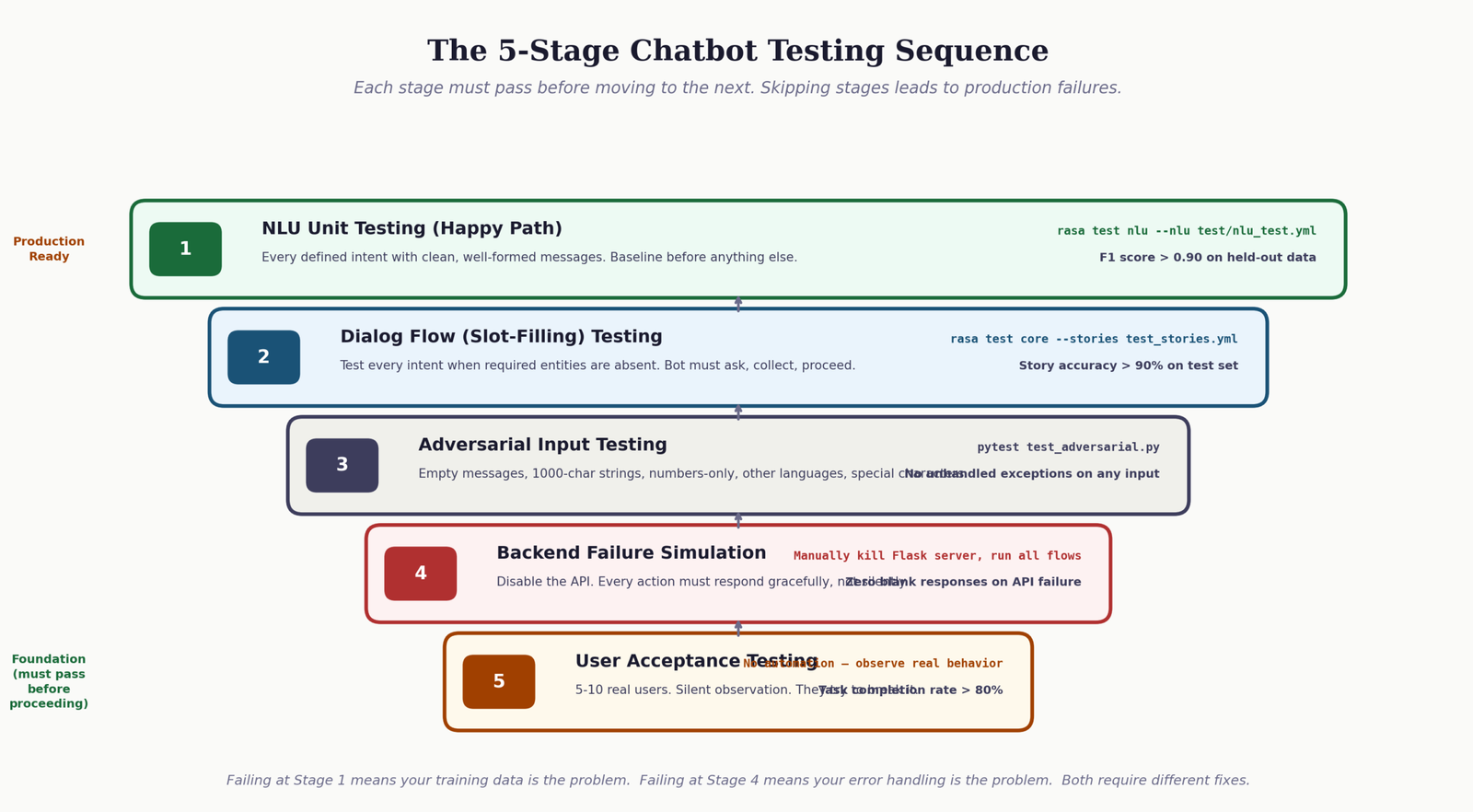
Happy path coverage. Every defined intent with a clean, properly phrased message. This catches obvious NLU failures and missing stories. For Rasa, run
rasa test nluandrasa test coreand review the reports. Target: above 90 percent F1 score on NLU before proceeding. - 2 Slot-filling paths. Test every intent that requires an entity when the entity is absent from the opening message. The bot should ask for the missing value, receive it correctly, and proceed without re-asking. This is where context amnesia failures surface first.
-
3
Boundary message testing. Messages that sit on the border between two intents. For example, “my order hasn’t arrived” sits between
check_order_statusandreport_order_problem. How the bot classifies this message determines whether the response is useful. Log and review all borderline classifications during testing. - 4 Backend failure simulation. Temporarily disable your Flask backend and run the conversation flows again. Every action that calls a backend endpoint should return a graceful message, not an unhandled exception. If any action returns nothing to the user when the API fails, it is not production-ready.
- 5 Adversarial inputs. Empty messages, very long messages (1,000+ characters), messages in different languages, messages that are just numbers, messages with special characters. These inputs will arrive in production. The bot should handle all of them without crashing or returning a blank response.
For teams looking to build more autonomous testing and issue resolution workflows, the guide to agentic RAG systems explains how to build AI systems that can identify and resolve knowledge gaps autonomously.
Test Your Understanding: 10 Questions on Customer Service Chatbot Architecture
Work through these questions to check your understanding of the concepts covered in this guide. Each question includes an explanation of the correct answer so you can learn from mistakes as you go.
Chatbot Development Knowledge Check
10 questions. Select your answer to see the explanation.
Further Reading and Official Documentation for Building Customer Service Chatbots
The following are the primary official documentation sources and reference materials for the tools and frameworks covered in this guide. These links open in a new tab.
Frequently Asked Questions About Building Customer Service Chatbots
What is the difference between a rule-based customer service chatbot and an AI-powered one, and which is better for a small business?
A rule-based chatbot matches user input against predefined keywords or patterns and returns a fixed response. It is fast to build and predictable in behavior, but it fails whenever a user phrases something in a way the rules do not anticipate. An AI-powered chatbot uses machine learning or a large language model to understand intent from natural language, handling phrasing variations without explicit rules. For small businesses with fewer than 15 common customer questions and a limited budget, a rule-based approach using Python pattern matching is often the most practical starting point. As query volume and variety grow, the investment in NLU training or an LLM integration becomes worthwhile. The key question is not which is better in the abstract, but whether the complexity of your customers’ actual language justifies the added development overhead.
How long does it realistically take to build and deploy a customer service chatbot from scratch using Python?
With LangChain and OpenAI, a functional chatbot that handles order tracking and basic FAQs can be production-ready in three to five days for a developer with Python experience. With Rasa, the same scope takes two to four weeks, accounting for NLU data collection, training, story design, and integration testing. Both estimates assume you already have the backend API or data source ready. The most common delays are in data preparation, not framework setup: collecting enough training examples, defining intent boundaries precisely, and testing against realistic user language. If you are building a chatbot for the first time, add 50 percent to any estimate you make for how long the testing phase will take.
How do I prevent my customer service chatbot from giving confidently wrong answers?
In Rasa-based chatbots, set a confidence threshold below which the bot falls back to an out_of_scope response instead of responding with the best-guess intent. A threshold of 0.65 is a reasonable starting point. In LangChain-based chatbots, the system prompt should explicitly instruct the model to say it does not know rather than speculate, and to offer escalation when it cannot use one of its defined tools. For both approaches, responses that depend on live data should always fetch that data at runtime rather than rely on the LLM’s training knowledge, which may be outdated. The architectural principle is: factual responses come from your database, not from the model’s internal state.
What is the estimated monthly cost of running a customer service chatbot powered by GPT-4o via the OpenAI API?
As of mid-2025, GPT-4o is priced at approximately $5 per million input tokens and $15 per million output tokens. A typical customer service conversation uses between 600 and 1,500 tokens including the system prompt, conversation history, and tool call responses. At 5,000 conversations per month, you are looking at roughly $20 to $50 in API costs. At 50,000 conversations per month, that scales to $200 to $500. If this budget is a concern, GPT-4o-mini provides significantly lower costs at approximately one-tenth the price, with a moderate reduction in response quality for complex queries. Track your actual token usage in the OpenAI dashboard for the first two weeks of deployment before committing to a cost projection.
Can I build a customer service chatbot without any machine learning or AI experience?
Yes, with the LangChain and OpenAI approach. You do not train any models, define any NLU pipelines, or manage any dialog management configuration. You write Python code that calls the OpenAI API, define tool functions that connect to your data sources, and write a system prompt that describes desired behavior. The primary skills needed are Python fundamentals, REST API consumption, and basic prompt engineering. If you are comfortable writing a Flask route and calling a third-party API, you have sufficient technical background to deploy a working LangChain-based chatbot. The guide to building your own AI virtual assistant is a practical starting point for building AI-powered conversational tools without needing machine learning expertise.



[…] AI-powered application that can interact with users through text or voice. They are widely used in customer service, personal assistance, and other applications to provide quick responses and automate […]