

Model Versioning in Production Machine Learning: How to Track, Roll Back, and Manage Models
Series: Production ML Engineering — Article 04 of 15 (Cluster 1: Foundation & Pipeline): Model Versioning in Production Machine Learning
Before you read this: This article is part of a 15-part series on building production-grade ML systems. If you have not read the series hub yet, start with the Production ML Engineering guide — it maps out the five pillars every production system rests on and explains where this article fits. Article 02 covered containerization and deployment. Article 03 covered automated retraining pipelines. This article covers the system that makes both of those safe to operate: model versioning in production machine learning
Three months into a production fraud detection deployment, a monitoring alert fires at 11pm. Score distribution has shifted. Recall is falling. The on-call engineer needs to roll back to the previous model — fast.
She opens the artifacts folder. There are six files named model.pkl, model_v2.pkl, model_final.pkl, model_final_v2.pkl, model_gb.pkl, and model_best.pkl. There is no record of which one is currently serving traffic. There is no record of what metrics each was trained on. There is no documented rollback procedure.
By the time she has reconstructed enough context to act, it is 1am. The model has been degrading for two hours.
This is not a story about a bad engineer. It is a story about a team that skipped model versioning because it felt like overhead, and discovered at 11pm on a Tuesday that it was load-bearing infrastructure.
Model versioning is not about keeping old files around. It is about maintaining a complete, queryable record of every model that has ever been in production — what it was trained on, what it performed, what it replaced, and how to get back to it in under five minutes. Without that record, every production incident is harder than it needs to be, and some of them are unrecoverable.
This article documents the model versioning system built for this series — a file-system-backed registry that runs without a database, works on Windows and POSIX, and integrates with the retraining pipeline from Article 03. By the end, you will have a versioning system with atomic promotions, tested rollbacks, SHA-256 artifact integrity, side-by-side metric comparison, and a clean path to MLflow if you outgrow the file-system approach.
Complete Code: https://github.com/Emmimal/ml-versioning/
Why Model Versioning in Production Machine Learning Matters More Than Code
Code versioning is well understood. Every software team uses Git. The mental model is clear: commits track changes, branches isolate work, tags mark releases, and git revert undoes a bad change. The entire history of every file is preserved indefinitely.
Model versioning is harder, and the difficulty is structural rather than technical.
A trained model is not source code. You cannot diff two model artifacts the way you diff two Python files. A model.pkl from last Tuesday and one from this Tuesday may differ by millions of floating-point weights, but that difference tells you nothing about whether the newer model is better, worse, or simply different. To understand the difference, you need the metrics, the training data, the hyperparameters, and the preprocessing configuration — not the weight matrix.
This is the gap that model versioning fills. When you version a model correctly, you are not just storing the artifact. You are storing the complete provenance record that makes the artifact interpretable: what data it was trained on, what metrics it achieved, what model it replaced, and what happened when it was deployed.
Three reasons this matters more than most teams expect until they have an incident:
Rollback requires more than a file copy. Rolling back a software deployment means pointing traffic at an older container image. Rolling back a model deployment means restoring the model artifact, its preprocessor, its metadata, and updating the serving layer to load the correct version. If any of those components are missing or mismatched, the rollback produces a system that runs without errors and makes wrong predictions.
Audit trails are not optional. In regulated industries — financial services, healthcare, insurance — the model that made a decision on a particular date must be reconstructable on demand. That means knowing exactly which version was in production at any given time, what it was trained on, and who promoted it. A folder of files named model_final.pkl satisfies none of these requirements.
Debugging requires historical comparison. When production metrics start degrading, the first question is whether the degradation started with a specific model version. Without versioning, answering that question requires reconstructing history from logs, deployment notes, and memory. With versioning, it is a single registry query.
What to Version: The Four Artifacts That Matter
Versioning the model weights is necessary. It is not sufficient. A complete model version record has four components, and the absence of any one of them creates a failure mode that the others cannot compensate for.
The model artifact is the trained model serialized to disk — model.pkl for scikit-learn, model.pt for PyTorch, saved_model/ for TensorFlow. This is what most teams version, and it is the minimum viable starting point. Without the other three components, it is not enough.
The preprocessor artifact is the fitted transformation pipeline — the StandardScaler, the SimpleImputer, the LabelEncoder. This is the component teams most often neglect to version separately, and it is the source of the most silent failures in production. The preprocessor must be versioned alongside the model it trained with. A model served with a preprocessor from a different training run will receive inputs on a different distribution than it was trained on, produce systematically biased predictions, and raise no errors while doing it. The failure is invisible until it shows up in business metrics.
The reason this is emphasized throughout this series — it appeared in the training code in Article 02, in the deployment code in Article 02, and in the retraining pipeline in Article 03 — is that training-serving skew is the most common silent failure mode in production ML, and versioning the preprocessor separately from the model is the structural safeguard against it.
The manifest is the provenance record for the version: when it was registered, what SHA-256 checksums the artifacts have, what metrics it achieved, what metadata tags it carries (git commit hash, data window, model class), and what its current status is (registered, staging, production, or archived). The manifest is what makes the artifact interpretable and auditable. Without it, you have a binary file. With it, you have a versioned model.
The pointer is the record of which version is currently in production. This is what makes promotion and rollback atomic — instead of moving or copying files, you update a single JSON file that points to the current version. The pointer is written with a write-to-temp-then-rename operation that is atomic on both Windows and POSIX filesystems, preventing the partial-write state that would leave the system pointing at a version that has not finished copying.
What Is a Model Registry in Production Machine Learning? (And Do You Need One?)
A model registry is a versioned store for trained model artifacts, their metadata, and their deployment history. It answers the question “what model is running in production right now, and how did it get there?” at any point in time.
The term is used loosely in the industry, ranging from a folder with a naming convention to a managed cloud service with access controls, approval workflows, and lineage tracking. The right registry for your team depends on where you are in the ML maturity curve.
You do not need a registry if you have one model, it is retrained rarely, your team is small enough that everyone knows which file is deployed, and you are in an industry with no audit requirements. In that case, a folder and a shared document describing the deployment process is adequate — and adding a registry before you need one creates maintenance overhead without delivering value.
You need a registry when any of the following become true: you are retraining on a schedule and multiple versions accumulate over time; rollback is a documented requirement rather than a theoretical one; you need to demonstrate to an auditor which model made a decision on a specific date; or the team is large enough that not everyone knows the current deployment state.
For most teams that have shipped one production model and are thinking about the second, the right time to add a registry is now — before the retraining cycle starts and before the incident that makes you wish you had one.
The registry built in this article is a file-system-backed implementation that requires no database, no external service, and no cloud account. It runs identically on a developer laptop, a CI runner, and a production VM. For teams that grow beyond it, there is a direct migration path to MLflow, documented in the MLflow Bridge section below.
Building a File-System Registry from Scratch
The registry design follows four principles that were established when the production failures this series is designed to prevent became clear:
One directory per version, so every artifact is self-contained and can be copied or archived without touching other versions. Atomic pointer writes using write-to-temp-then-rename, so there is no window where the registry is in a partially updated state. Append-only archived versions, so nothing is deleted without an explicit purge call. SHA-256 checksums on every artifact, so artifact integrity can be verified at any time.
The directory layout after two registrations and a promotion looks like this:
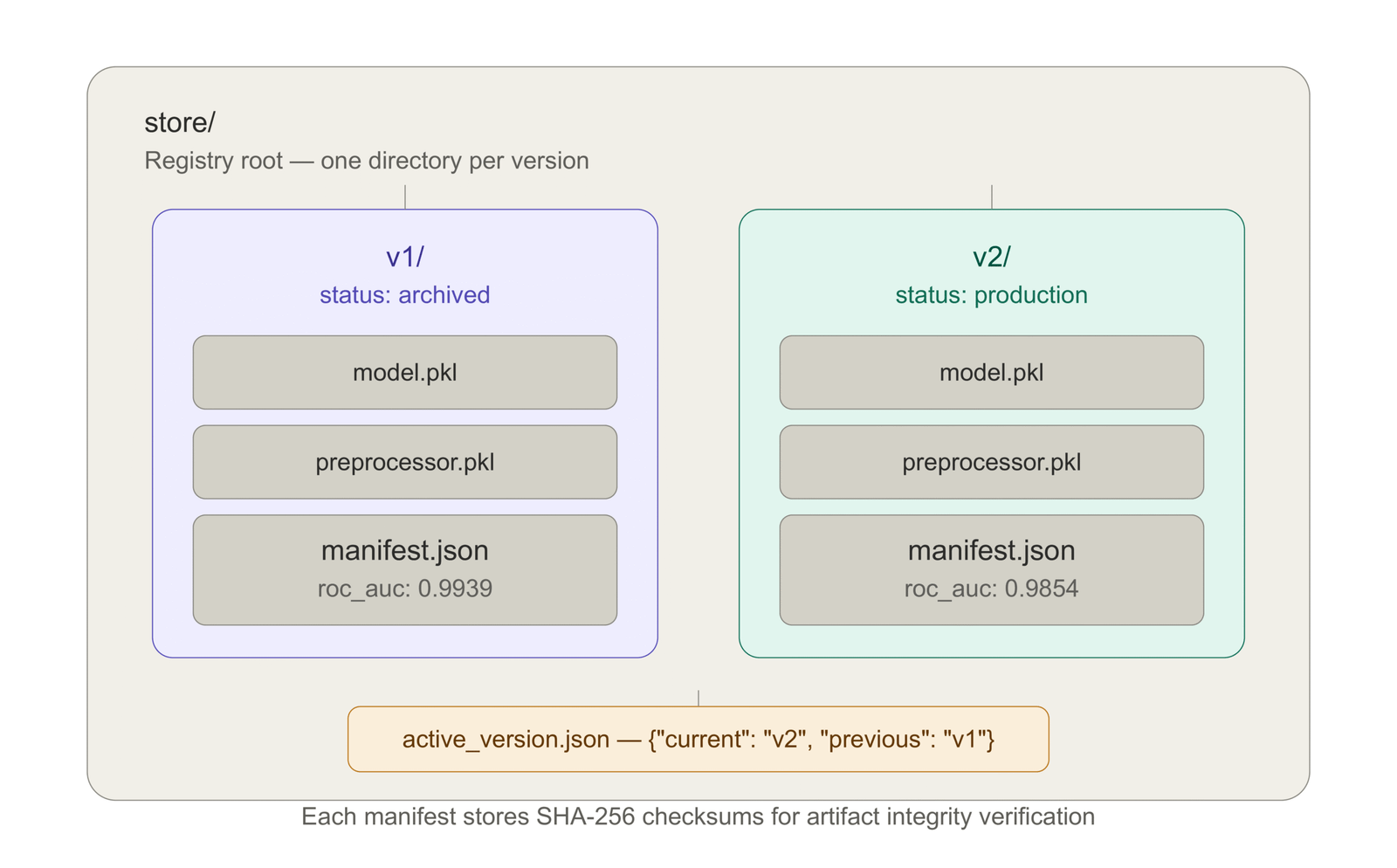
The active_version.json file controls which model is currently in production.
Registration
Every call to register() copies the model and preprocessor artifacts into a new versioned directory, computes SHA-256 checksums, and writes a manifest. The original source files are copied, not moved — the calling code always retains its artifacts.
from mlregistry.model_registry import ModelRegistry

reg = ModelRegistry("store")

v1 = reg.register(
    model_path="artifacts/model_v1.pkl",
    preprocessor_path="artifacts/preprocessor.pkl",
    metrics={"roc_auc": 0.9939, "recall": 0.9561},
    metadata={
        "model_class": "RandomForestClassifier",
        "git_commit": "abc1234",
        "data_window": "last_90_days"
    }
)
# Returns: "v1"The manifest written to store/v1/manifest.json:
{
  "version": "v1",
  "registered_at": "2026-05-01T08:05:47Z",
  "model_sha256": "a3f1b2c4d5e6f7...",
  "preprocessor_sha256": "9b8c7d6e5f4a3...",
  "metrics": {"roc_auc": 0.9939, "recall": 0.9561},
  "metadata": {
    "model_class": "RandomForestClassifier",
    "git_commit": "abc1234",
    "data_window": "last_90_days"
  },
  "status": "registered"
}The SHA-256 checksums are computed by streaming the artifact file in 8KB chunks — memory-safe for arbitrarily large model files. They serve two purposes: integrity verification (if a checksum does not match the artifact on disk, the artifact has been corrupted or tampered with) and deduplication (if two registrations produce identical checksums, you know the model weights did not change between training runs, which is useful for debugging non-deterministic training).
Promotion
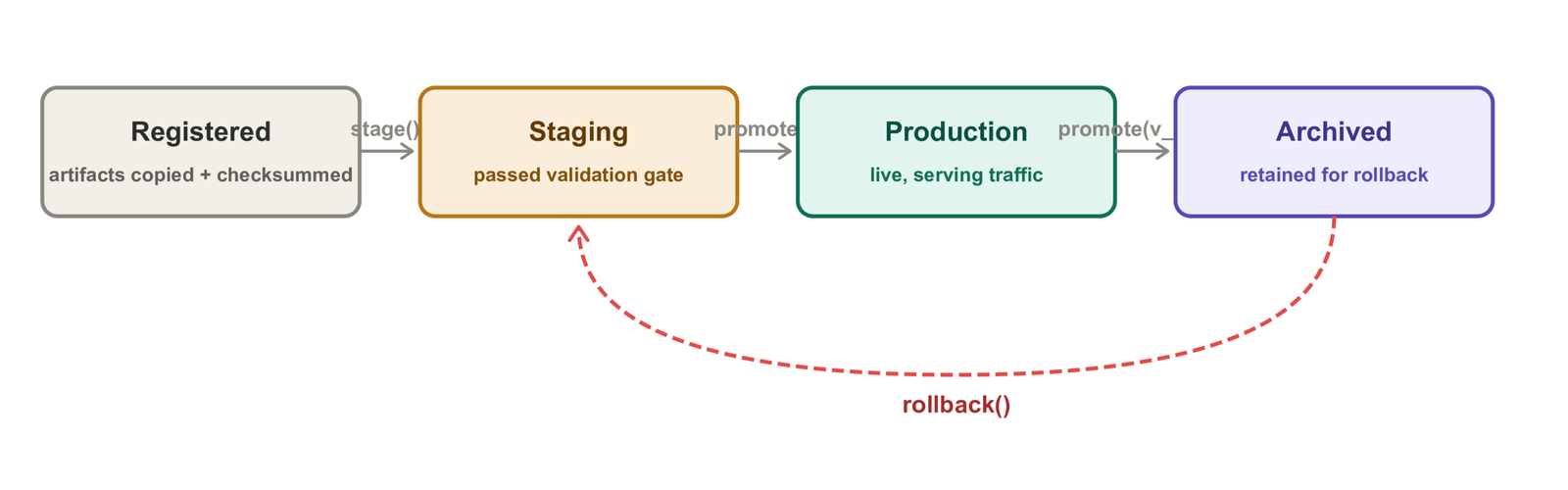
promote() reads the current pointer, archives the old production version, and atomically writes the new pointer in a single operation. No two-phase commit, no locking — the atomic rename guarantees that any read of active_version.json sees either the old state or the new state, never a partially written intermediate.
reg.promote(v1)
# INFO: Promoted v1 -> production | previous = none

reg.promote(v2)
# INFO: Promoted v2 -> production | previous = v1
# v1 status is now: "archived"The promotion sequence that produces the registry state in the demo output:
2026-05-01 08:05:47  INFO  Promoted v1 -> production | previous = none
2026-05-01 08:05:47  INFO  Current: v1
2026-05-01 08:05:47  INFO  v2 -> staging
2026-05-01 08:05:47  INFO  Promoted v2 -> production | previous = v1
2026-05-01 08:05:47  INFO  Current after challenger promotion: v2
The staging step between registration and promotion is optional but recommended: it marks the version as having passed validation, awaiting promotion to production. In an automated pipeline, this is where your evaluation gate (from Article 03) runs.
Metric Comparison
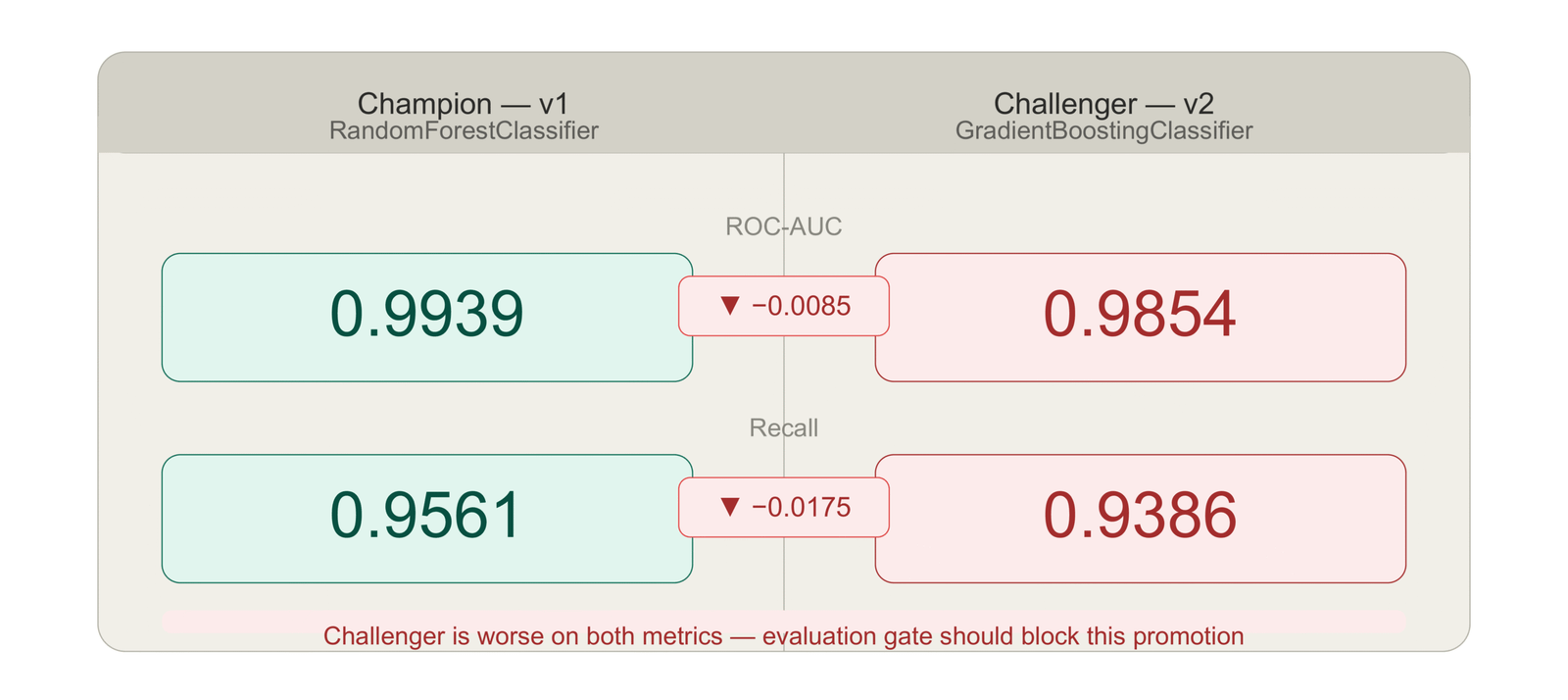
Before promoting a challenger, you want to see the numbers side by side. compare() produces a structured delta:
comparison = reg.compare(v1, v2){
"v1": {"roc_auc": 0.9939, "recall": 0.9561},
"v2": {"roc_auc": 0.9854, "recall": 0.9386},
"delta (b - a)": {
"roc_auc": -0.0085,
"recall": -0.0175
}
}The negative delta is the signal that something is worth investigating before promoting v2. In this demo, the GradientBoosting challenger is actually performing worse than the RandomForest champion on this specific dataset — which is why the demo immediately simulates a bad deployment and rolls back. The comparison step is where that signal should have stopped the promotion.
In a fully automated pipeline, the evaluation gate in Stage 4 of Article 03 runs this comparison automatically and blocks promotion if the regression exceeds the configured threshold (5% by default). In a manual workflow, this is where the engineer reviews the numbers before clicking “promote.”
The Full Registry State After Demo
The output produced by running demo.py:
-- Registry State -----------------------------------------------
  v1    status=production    roc_auc=0.9939
  v2    status=archived      roc_auc=0.9854

  Live version : v1
v1 is back in production. v2 has been archived. The rollback took two function calls and ran in under one second. The serving code that loaded the rolled-back model in the smoke test produced a valid prediction without any manual intervention.
How to Implement Model Rollback in Under Five Minutes
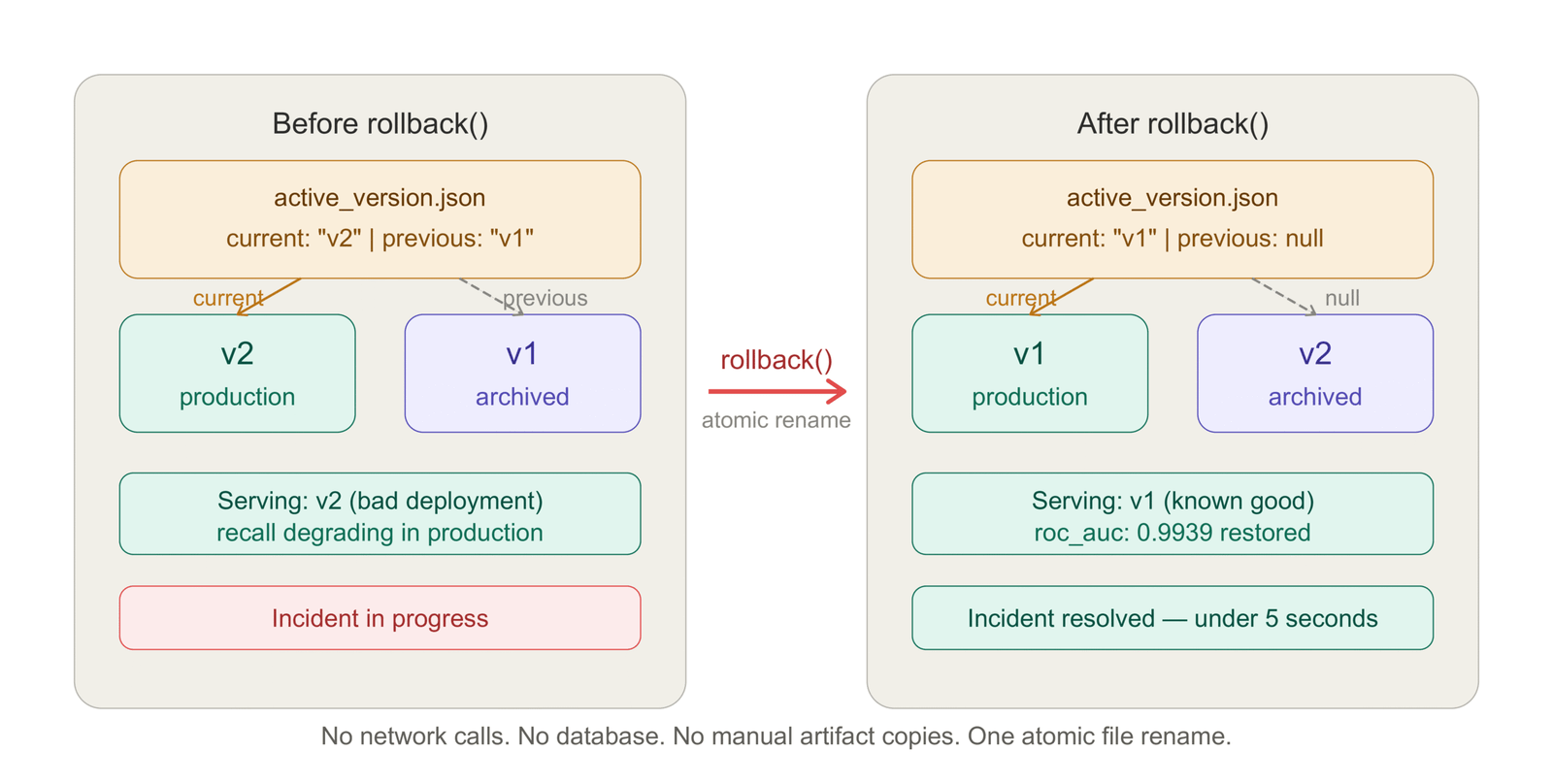
Rollback is the capability that justifies the entire versioning system. Everything else in the registry — manifests, checksums, comparison — is useful. Rollback is load-bearing.
The rollback mechanism in this registry is a pointer swap. active_version.json always contains two keys: current and previous. Rollback reads the pointer, promotes previous to current, archives the old current, and writes the pointer atomically.
rolled_back_to = reg.rollback()
# WARNING: ROLLBACK: v2 -> v1
# INFO: Rolled back to: v1That is the complete rollback operation. No network calls. No database transactions. No manual artifact copies. The serving code that reads current_artifacts() immediately sees the rolled-back model:
paths = reg.current_artifacts()
model_live = joblib.load(paths["model"])
prep_live  = joblib.load(paths["preprocessor"])

sample = prep_live.transform(X_test[:1])
pred   = model_live.predict(sample)[0]
# INFO: Smoke test prediction from rolled-back model: class=0The smoke test at the end of the demo confirms that the serving code loads the rolled-back model correctly and produces a valid prediction. This is the same smoke test pattern used in the CI/CD pipeline from Article 02 — confirm the artifact loads, confirm the preprocessor transforms correctly, confirm a prediction is returned.
What rollback cannot do is worth being explicit about. Rollback restores the model artifacts to the registry. It does not automatically restart or update the serving process that is currently running. In a containerized deployment (Article 02), rolling back means pulling the container image that corresponds to the previous version and redeploying it — which is what the CI/CD pipeline’s rollback step does. In a local or VM deployment where the serving process loads artifacts from disk, a process restart is needed to pick up the restored artifacts.
The pattern that works in both cases: after calling reg.rollback(), trigger a health check against /ready. If the serving process has not reloaded, restart it. The /ready endpoint returns 503 until the new artifacts are loaded, so the deployment pipeline knows when the rollback is complete.
Rollback without a previous version raises RegistryError: No previous version to roll back to. This happens on the first promotion — there is nothing to roll back to. The test suite covers this case:
def test_rollback_without_previous_raises(self, store, artifacts):
    reg = ModelRegistry(store)
    v1 = reg.register(**artifacts, metrics=GOOD_METRICS)
    reg.promote(v1)
    with pytest.raises(RegistryError, match="No previous version"):
reg.rollback()The registry stores only one level of rollback history — the current version and the one before it. This is intentional. Multi-level rollback (rolling back to v3 when v5 is current) requires knowing which version to target and why. In practice, when a deployment is bad enough to require rollback, you want to go back one step — to the version that was working before the bad deployment. If the previous version is also bad, you have a more serious problem that requires investigation rather than automated rollback.
MLflow vs DVC vs Weights & Biases: Which Registry Is Right for You?
The file-system registry in this series is the right starting point for most teams. It has no dependencies, runs anywhere, and requires no configuration beyond pointing it at a directory. But as teams grow, two categories of requirements emerge that the file-system registry does not address: experiment tracking across many training runs, and collaboration across a team with different roles and access levels.
This is where MLflow, DVC, and Weights & Biases come in. The right choice depends on what you need most.
MLflow Model Registry
MLflow is the most widely deployed open-source MLOps platform. Its model registry provides version tracking, stage transitions (Staging → Production → Archived), and a web UI for browsing experiments and model versions. It is self-hosted, which means you control the data and there are no per-seat costs, but you need to run and maintain a tracking server.
The bridge between the file-system registry in this series and MLflow is provided by registry/mlflow_bridge.py. It logs a training run — the run_log.json from Article 03 — to MLflow and registers the winner model in the MLflow Model Registry. The file-system registry remains the source of truth for deployment; MLflow is the experiment tracking and audit layer.
from registry.mlflow_bridge import log_to_mlflow

run_id = log_to_mlflow(
    model_path="artifacts/model.pkl",
    preprocessor_path="artifacts/preprocessor.pkl",
    run_log_path="artifacts/run_log.json",
    experiment_name="ml-versioning-demo",
    registry_name="fraud-classifier",
)When you are ready to promote a version in MLflow:
from registry.mlflow_bridge import transition_model_stage

transition_model_stage(
    registry_name="fraud-classifier",
    version=3,
    stage="Production",  # Staging, Production, or Archived
)MLflow is the right choice when: you are running many training experiments and need to compare them systematically; your team has data scientists who want a UI to explore experiment results; or your organization already has MLflow infrastructure.
DVC (Data Version Control)
DVC takes a different approach. It versions data and model artifacts using Git as the metadata store and a remote storage backend (S3, GCS, Azure Blob, SSH) for the actual files. A DVC-tracked model is a small .dvc file in your Git repository that points to the artifact in remote storage. Checking out a specific Git commit and running dvc pull reproduces the exact dataset and model artifact for that commit.
# Track a model artifact with DVC
dvc add model/artifacts/model.pkl

# Push to remote storage
dvc push

# On another machine or in CI:
git checkout v1.0.0
dvc pull # restores the exact model.pkl for that commitDVC is the right choice when: your data is large and needs to be versioned alongside code; your team is already Git-native and wants data versioning to feel like code versioning; or you need to reproduce the exact training data for a specific model version, not just the model artifact.
Weights & Biases
Weights & Biases (W&B) is the experiment tracking tool most commonly used by teams doing active ML research alongside production deployment. Its strength is visualization — training curves, hyperparameter sweeps, model comparisons, and artifact lineage are all rendered interactively in a hosted dashboard. The W&B Artifact system tracks model versions with metadata and lineage.
W&B is the right choice when: your team runs many experiments and needs rich visualization to compare them; you want hosted infrastructure without managing a server; or your team spans data scientists and ML engineers who need a shared view of model performance over time.
Which Should You Use?
| File-System Registry | MLflow | DVC | W&B | |
|---|---|---|---|---|
| Setup complexity | None | Medium | Low | Low |
| Infrastructure required | None | Tracking server | Git + remote storage | Hosted (SaaS) |
| Experiment tracking | No | Yes | No | Yes |
| Data versioning | No | No | Yes | Partial |
| Collaboration UI | No | Yes | No | Yes |
| Rollback support | Built-in | Via stage transitions | Via Git + dvc pull | Via artifacts |
| Best for | Any team starting out | Self-hosted MLOps | Data-heavy pipelines | Research + production |
The progression that works for most teams: start with the file-system registry, integrate MLflow experiment tracking when you have more than one engineer running training experiments, add DVC when you need to version training data alongside model artifacts. W&B is worth evaluating alongside MLflow — the choice between them is often a team preference rather than a technical requirement.
Model Lineage and Reproducibility: Best Practices
Lineage is the answer to the question: given this model artifact, what produced it? A complete lineage record makes any model artifact independently verifiable — you can reproduce the training run, confirm the artifacts match their checksums, and trace every transformation from raw data to deployed model.
The manifest in this registry captures the components of lineage that are under the registry’s control: the artifact checksums, the registration timestamp, the metrics, and the metadata tags. The metadata tags are where you encode the components that require input from the training code.
Four metadata fields that should be standard in every production model version:
git_commit is the commit hash of the training code that produced the model. Combined with the manifest timestamp and the data window, it gives you the complete specification needed to reproduce the training run. If your training code has changed since the model was trained, the git commit tells you exactly what version of the code to check out.
data_window describes the temporal slice of data used for training: last_90_days, 2025-Q4, 2026-01-01_to_2026-03-31. Together with the registered_at timestamp, this tells you what the model knew about and what it did not. When a production incident correlates with an external event — a product change, a fraud pattern shift, a seasonal anomaly — the data window tells you whether that event was in the training data or not.
model_class is the algorithm: RandomForestClassifier, GradientBoostingClassifier. This is redundant with the artifact itself but makes the manifest human-readable without deserializing the model.
cv_roc_auc_mean and cv_roc_auc_std from cross-validation are more informative than hold-out metrics alone. High mean with low standard deviation indicates a stable model. High mean with high standard deviation is a warning sign — the model’s performance is sensitive to the specific data split, which often indicates overfitting or insufficient training data.
v1 = reg.register(
    model_path="artifacts/model_v1.pkl",
    preprocessor_path="artifacts/preprocessor.pkl",
    metrics={"roc_auc": 0.9939, "recall": 0.9561},
    metadata={
        "model_class": "RandomForestClassifier",
        "git_commit": "abc1234",
        "data_window": "last_90_days",
        "cv_roc_auc_mean": 0.9912,
        "cv_roc_auc_std": 0.0063,
        "training_samples": 3200,
        "feature_count": 12
    }
)Artifact Integrity Verification
The SHA-256 checksums in the manifest provide a lightweight integrity check that can be run at any time without deserializing the artifact. A mismatch between the stored checksum and the computed checksum of the artifact on disk indicates either corruption (disk error, partial write) or tampering.
import hashlib
from pathlib import Path

def verify_artifact(artifact_path: Path, expected_sha256: str) -> bool:
    h = hashlib.sha256()
    with open(artifact_path, "rb") as f:
        for chunk in iter(lambda: f.read(8192), b""):
            h.update(chunk)
    actual = h.hexdigest()
    return actual == expected_sha256

manifest = reg.get_manifest("v1")
paths = reg.current_artifacts()

model_ok = verify_artifact(paths["model"], manifest["model_sha256"])
prep_ok   = verify_artifact(paths["preprocessor"], manifest["preprocessor_sha256"])

assert model_ok, "Model artifact checksum mismatch — possible corruption"
assert prep_ok, "Preprocessor artifact checksum mismatch — possible corruption"Running this check as part of the serving startup sequence — before loading the artifacts — adds a few milliseconds of startup time and prevents the serving process from loading a corrupted artifact silently.
Purging Archived Versions
The registry accumulates archived versions over time. Most teams want to keep the last few archived versions for potential rollback or comparison, but not the entire history indefinitely.
# Keep the 2 most recent archived versions, delete older ones
deleted = reg.purge_archived(keep_last_n=2)
# INFO: Purged archived version v1
# INFO: Purged archived version v3purge_archived() never deletes production or staging versions — only archived ones. The keep_last_n parameter is the number of archived versions to retain. Setting it to 0 deletes all archived versions; setting it to a large number effectively disables purging.
The right retention policy depends on how frequently you retrain and how much storage you have. A team retraining weekly that stores 500MB model artifacts will accumulate 26GB per year of archived versions. Keeping the last four (one month) is a reasonable starting point.
Running the Full Demo: What the Output Means
The demo script (demo.py) runs the complete registry lifecycle end-to-end. Every line of output corresponds to a specific registry operation, and reading the output as a trace of the registry state is the fastest way to understand how the pieces fit together.
2026-05-01 08:05:46  INFO  [RandomForest (v1)] ROC-AUC=0.9939  recall=0.9561
2026-05-01 08:05:47  INFO  [GradientBoosting (v2)] ROC-AUC=0.9854  recall=0.9386
Two models trained. RandomForest outperforms GradientBoosting on this dataset and split. Note that this is the opposite of what Article 03’s drift robustness analysis showed over a six-month horizon — GradientBoosting degrades faster under distribution shift even though it sometimes matches RandomForest at deployment. This is the bias-variance-drift tradeoff in action.
2026-05-01 08:05:47  INFO  Registry initialised at demo_store
2026-05-01 08:05:47  INFO  Registered v1 | ROC-AUC 0.9939
2026-05-01 08:05:47  INFO  Registered v2 | ROC-AUC 0.9854
Both models registered. The store directory now contains v1/ and v2/, each with their artifacts and manifests.
2026-05-01 08:05:47  INFO  Promoted v1 -> production | previous = none
2026-05-01 08:05:47  INFO  Current: v1
v1 promoted to production. active_version.json now contains {"current": "v1", "previous": null}.
2026-05-01 08:05:47  INFO  Comparison:
{
  "v1": {"roc_auc": 0.9939, "recall": 0.9561},
  "v2": {"roc_auc": 0.9854, "recall": 0.9386},
  "delta (b - a)": {"recall": -0.0175, "roc_auc": -0.0085}
}
The comparison shows v2 is worse on both metrics. In a production pipeline with an evaluation gate, this would block promotion. The demo proceeds to promote v2 anyway to demonstrate the rollback path — simulating the scenario where a bad model gets deployed despite monitoring signals.
2026-05-01 08:05:47  INFO  v2 -> staging
2026-05-01 08:05:47  INFO  Promoted v2 -> production | previous = v1
2026-05-01 08:05:47  INFO  Current after challenger promotion: v2
v2 is now in production. v1 has been automatically archived. active_version.json now contains {"current": "v2", "previous": "v1"}.
2026-05-01 08:05:47  WARNING  --- Simulating bad deployment: rolling back ---
2026-05-01 08:05:47  WARNING  ROLLBACK: v2 -> v1
2026-05-01 08:05:47  INFO  Rolled back to: v1
The rollback fires. previous becomes current. The pointer is updated atomically.
-- Registry State -----------------------------------------------
  v1    status=production    roc_auc=0.9939
  v2    status=archived      roc_auc=0.9854

  Live version : v1
The final state. v1 is back in production. v2 is archived. The rollback is complete and the state is exactly what the team needs to see in the incident response channel: the live version, its metrics, and confirmation that the bad version is no longer serving traffic.
2026-05-01 08:05:47  INFO  Smoke test prediction from rolled-back model: class=0
2026-05-01 08:05:47  INFO  Demo complete.
The smoke test passes. The serving code loads the rolled-back model and preprocessor, transforms a test sample, and produces a valid prediction. The rollback is operationally verified, not just logically correct.
The Test Suite: What It Covers and Why It Matters
The registry ships with 16 tests across five test classes. Every critical behavior has a corresponding test, and the failure modes that matter most — rollback without a previous version, comparison against a nonexistent version, purge logic that might accidentally delete a production version — each have explicit test cases.
Running the full suite:
cd model_registry
PYTHONPATH=. python -m pytest tests/ -vOutput:
tests/test_registry.py::TestRegistration::test_first_version_is_v1          PASSED
tests/test_registry.py::TestRegistration::test_second_version_is_v2         PASSED
tests/test_registry.py::TestRegistration::test_manifest_written             PASSED
tests/test_registry.py::TestRegistration::test_sha256_stored_in_manifest    PASSED
tests/test_registry.py::TestRegistration::test_artifacts_copied_not_moved   PASSED
tests/test_registry.py::TestPromotion::test_promote_sets_current            PASSED
tests/test_registry.py::TestPromotion::test_promote_updates_status          PASSED
tests/test_registry.py::TestPromotion::test_second_promotion_archives_first PASSED
tests/test_registry.py::TestPromotion::test_current_artifacts_returns_paths PASSED
tests/test_registry.py::TestRollback::test_rollback_restores_previous       PASSED
tests/test_registry.py::TestRollback::test_rollback_archives_bad_version    PASSED
tests/test_registry.py::TestRollback::test_rollback_without_previous_raises PASSED
tests/test_registry.py::TestComparison::test_compare_returns_delta          PASSED
tests/test_registry.py::TestComparison::test_compare_unknown_version_raises PASSED
tests/test_registry.py::TestListAndPurge::test_list_returns_all_versions    PASSED
tests/test_registry.py::TestListAndPurge::test_purge_archived_keeps_n       PASSED

16 passed in 2.64s
The test that matters most for production reliability is test_rollback_without_previous_raises. This is the edge case that bites teams during real incidents: the on-call engineer triggers a rollback, the rollback fails because there is no previous version, and the team has to debug the registry under pressure. This test ensures the failure is an explicit, descriptive error — not a silent no-op or a cryptic exception.
The test that matters most for data integrity is test_artifacts_copied_not_moved. The register operation must copy artifacts, not move them. If artifacts are moved, the calling code loses its artifacts, which breaks any workflow that registers a model and then continues to use the source artifacts for serving during the transition period.
Five Decisions, in Order
If you are building a model versioning system from scratch, or retrofitting one onto an existing production model, these are the decisions that matter most — in the order that makes the most sense to tackle them.
1. Version the preprocessor alongside the model, always. This is not optional. A model without its corresponding preprocessor is not reproducible. The failure mode — wrong scaling parameters at inference time — is silent, produces wrong predictions, and is one of the hardest production bugs to diagnose after the fact. If you do one thing from this article, it is this.
2. Write checksums at registration time. SHA-256 is cheap to compute at registration and invaluable at verification. A checksum mismatch at serving startup is a loud, immediate failure. A checksum mismatch discovered in a post-incident review — after a model has been serving wrong predictions because of artifact corruption — is an incident with a much larger blast radius.
3. Store metadata that answers “why.” Version numbers tell you what changed. Metadata tells you why. A git commit hash, a data window label, and a training sample count give you enough context to reconstruct the training conditions six months later without the engineer who ran the training being available.
4. Test rollback before you need it. The rollback path is the component that gets tested least and needed most urgently. Run a complete rollback drill in staging before your first production deployment. Confirm that the pointer updates correctly, that the serving process loads the restored artifacts, and that predictions are valid. The five minutes this takes is insurance against a much longer incident.
5. Add the registry to your retraining pipeline before the second retraining run. The first retraining run is manageable without a registry — you know which model is deployed because you just deployed it. The second run is where it starts to get unclear. Add the registry now, before the complexity of multiple
Complete Code: https://github.com/Emmimal/ml-versioning/versions accumulates.
What Is Next
This article completes Cluster 1 of the Production ML Engineering series — the foundation and pipeline cluster. You now have the five pieces that make a production ML system:
- Article 01: The five pillars framework (Pillar Post)
- Article 02: Containerized deployment with FastAPI, Docker, and CI/CD
- Article 03: Automated retraining with drift triggers and an evaluation gate
- Article 04: Model versioning with atomic promotion, rollback, and lineage tracking
The next cluster — Cluster 2 — addresses what happens when your model is retrained from new data but needs to retain what it learned from old data. This is the catastrophic forgetting problem, and it is the failure mode that makes naive retraining — fitting from scratch on recent data only — progressively worse over time as the volume of historical patterns the model needs to represent grows.
Article 05 covers Elastic Weight Consolidation, experience replay, and PackNet in PyTorch — with a head-to-head benchmark showing which strategy ages best across six months of simulated distribution shift.
If your current system is degrading and you need to understand the monitoring signals before building out Cluster 2, the ML Diagnostics Mastery series covers the complete diagnostic framework: PSI, KS statistics, SHAP drift attribution, and the evaluation gate metrics that tell you when retraining is needed and why.
References
Zaharia, M., Chen, A., Davidson, A., et al. (2018). Accelerating the machine learning lifecycle with MLflow. IEEE Data Engineering Bulletin, 41(4), 39–45. https://people.eecs.berkeley.edu/~matei/papers/2018/ieee_mlflow.pdf
Iterative AI. (2024). DVC: Data Version Control. https://dvc.org
Biewald, L. (2020). Experiment tracking with Weights and Biases. https://www.wandb.com
Sculley, D., Holt, G., Golovin, D., Davydov, E., Phillips, T., Ebner, D., Chaudhary, V., Young, M., Crespo, J.-F., & Dennison, D. (2015). Hidden technical debt in machine learning systems. Advances in Neural Information Processing Systems (NeurIPS), 28. https://proceedings.neurips.cc/paper/2015/hash/86df7dcfd896fcaf2674f757a2463eba-Abstract.html
Breck, E., Cai, S., Nielsen, E., Salib, M., & Sculley, D. (2017). The ML test score: A rubric for ML production readiness and technical debt reduction. 2017 IEEE International Conference on Big Data, 1123–1132. https://doi.org/10.1109/BigData.2017.8258038
Yurdakul, B. (2018). Statistical properties of population stability index. Western Michigan University Dissertations. https://scholarworks.wmich.edu/dissertations/3208
Webb, G. I., Hyde, R., Cao, H., Nguyen, H. L., & Petitjean, F. (2016). Characterizing concept drift. Data Mining and Knowledge Discovery, 30(4), 964–994. https://doi.org/10.1007/s10618-015-0448-4
Pedregosa, F., Varoquaux, G., Gramfort, A., Michel, V., Thirion, B., Grisel, O., … & Duchesnay, E. (2011). Scikit-learn: Machine learning in Python. Journal of Machine Learning Research, 12, 2825–2830. http://www.jmlr.org/papers/v12/pedregosa11a.html
Disclosure
Dataset: All analyses in this article use the UCI Breast Cancer Wisconsin dataset via sklearn.datasets.load_breast_cancer (Pedregosa et al., 2011) and a synthetic fraud detection dataset generated with sklearn.datasets.make_classification. No real transaction data, personal data, or proprietary financial data was used at any stage.
Code authorship: The model registry implementation, demo script, test suite, and MLflow bridge are the original work of the author. The framework builds on open-source libraries — scikit-learn, joblib, numpy, pytest — under their respective BSD and MIT licenses.
Output authenticity: The demo output shown in this article is a real run on Windows (Python 3.12, scikit-learn 1.5). Results are reproducible with random_state=42. Minor floating-point variation may occur across operating systems.
No affiliate relationships: No tools, libraries, or commercial products are mentioned for compensation. All recommendations reflect independent technical evaluation.
Series affiliation: This article is Part 4 of the Production ML Engineering series. Parts 1–3 are linked where referenced.
Series: Production ML Engineering — Article 04 of 15 Previous: How to Build an ML Retraining Pipeline That Won’t Break in Production (Article 03) Next: How to Prevent Catastrophic Forgetting in PyTorch (Article 05)





Leave a Reply