

Recursion in Python: How Recursive Algorithms Actually Work
Recursion in Python:
This article is part of the Data Structures & Algorithms with Python roadmap. If you haven’t read the best, average, and worst-case complexity guide yet, start there. This article builds on it directly.
You already know how to measure an algorithm’s speed. Big O tells you how the work grows. Best, average, and worst case tell you which situation you’re measuring.
Now it’s time to look at a tool that shows up everywhere in DSA: recursion. TRecursion appears frequently in trees, graphs, backtracking, divide-and-conquer algorithms, and some dynamic programming solutions. If recursion feels confusing right now, you’re not alone. Almost every beginner hits a wall the first time they see a function call itself.
This guide breaks recursion down piece by piece. No jargon-heavy definitions upfront. Just a clear picture of what’s actually happening inside your computer when a function calls itself, and when you should reach for recursion instead of a loop.
In Simple Terms
Recursion is when a function solves a problem by calling itself on a smaller version of the same problem. Each call works on a slightly smaller piece, until the pieces get so small that the answer is obvious. That obvious, no-more-calling-needed point is called the base case.
What Is Recursion in Python?
Here’s a simple way to picture it.
Imagine a set of Russian nesting dolls. You open the biggest doll, and inside it is a smaller doll. You open that one, and there’s an even smaller doll inside. You keep opening dolls, each one smaller than the last, until you reach the smallest doll of all. That last doll doesn’t open. It’s solid. You stop there.
Recursion works the same way. A recursive function calls itself with a smaller piece of the original problem. It keeps doing that until it reaches a piece so small that it can answer directly, without calling itself again.
In code, this “smaller version of the same problem” idea looks like this:
def countdown(n):
    if n == 0:
        print("Done!")
    else:
        print(n)
countdown(n - 1)Call countdown(3) and here’s what happens:
3
2
1
Done!Each call to countdown hands off a smaller number to the next call. Eventually, n reaches 0, and the function stops calling itself.
That’s the whole idea. A function calls itself. Each call works on something smaller. At some point, the smallest version doesn’t need another call.
How the Call Stack Works
To understand recursion, you need to understand where Python keeps track of all those calls. That place is the call stack.
Think of the call stack like a stack of plates. You can only add a plate to the top, and you can only remove a plate from the top. You can’t pull one out from the middle without knocking everything above it off. That’s called a “last in, first out” structure, or LIFO for short.
Every time a function is called, Python adds a new plate (called a stack frame) to the top of the stack. That frame holds the function’s local variables and remembers where to return to once the function finishes. When the function finishes, its plate gets removed, and control goes back to whichever frame is now on top.
Here’s countdown(3) again, but this time let’s trace the stack:
def countdown(n):
    if n == 0:
        print("Done!")
    else:
        print(n)
countdown(n - 1)countdown(3)is called. A frame forn = 3is pushed onto the stack.- Inside that call,
countdown(2)is called. A new frame forn = 2is pushed on top. - Inside that call,
countdown(1)is called. A frame forn = 1goes on top. - Inside that call,
countdown(0)is called. A frame forn = 0goes on top. n == 0is true, so this frame prints “Done!” and finishes. Its plate is removed.- Control returns to the
n = 1frame, which also finishes and is removed. - This continues until every frame is gone.
Here’s what the stack looks like at its tallest point, right before anything starts returning:
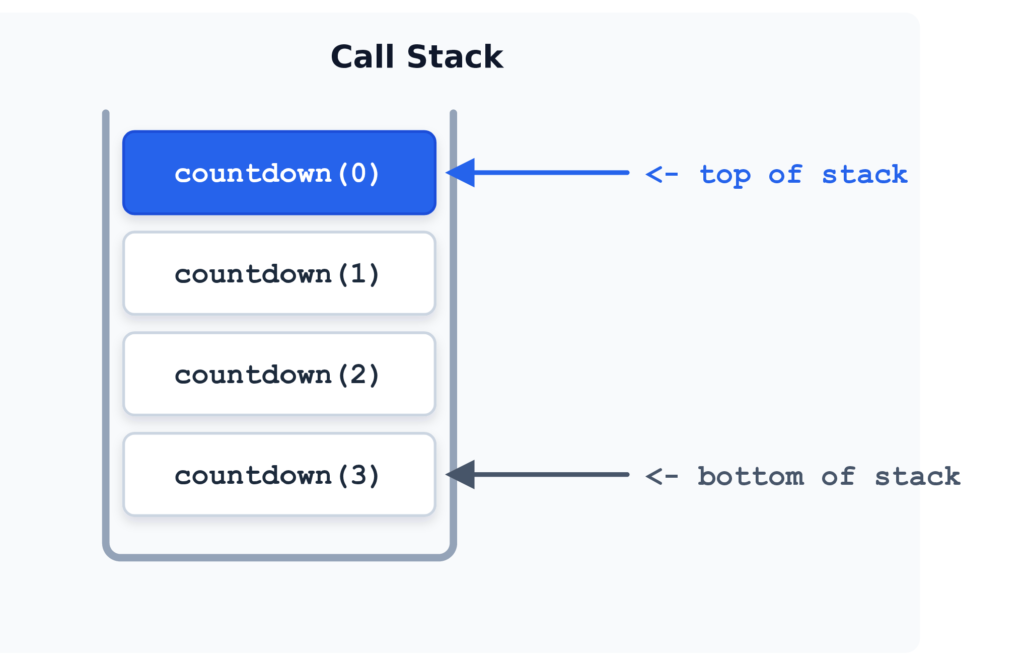
Every recursive call adds a frame. Every time a call finishes, its frame is removed. This is exactly why recursion uses extra memory that a simple loop doesn’t. A loop just updates one variable. Recursion stacks up a new frame for every call, and all of those frames sit in memory until the calls start finishing.
This also explains why recursion can’t go on forever. Python also limits how deeply Python code can recurse. You can check the current limit with sys.getrecursionlimit(). If recursion goes beyond that limit, Python raises RecursionError: maximum recursion depth exceeded. That error is Python telling you the stack of plates got too tall.
You can change the limit with sys.setrecursionlimit(), but increasing it is not a general solution for deep recursion. A higher limit can increase the risk of exhausting the underlying stack, which can crash the program instead of raising a catchable error.
Base Case vs Recursive Case
Every recursive function needs two parts.
The base case is the condition where the function stops calling itself and just returns an answer directly. It’s the smallest doll, the one that doesn’t open.
The recursive case is where the function calls itself again, working on a smaller version of the problem.
Let’s look at a classic example: factorial. The factorial of a number n, written as n!, is the product of every whole number from n down to 1. For example, 4! = 4 × 3 × 2 × 1 = 24.
def factorial(n):
    if n == 0:            # base case
        return 1
    else:                 # recursive case
return n * factorial(n - 1)Here’s why the base case matters. Without it, factorial(4) would call factorial(3), which calls factorial(2), which calls factorial(1), which calls factorial(0), which calls factorial(-1), and so on, forever. The base case is what stops that chain.
Watch what happens if you remove it:
def broken_factorial(n):
return n * broken_factorial(n - 1) # no base case!Calling broken_factorial(4) will keep calling itself with smaller and smaller numbers, never stopping, until Python raises a RecursionError. This is the recursive equivalent of an infinite loop.
A good rule to remember: every recursive case should move the problem closer to the base case. If n doesn’t get smaller (or the input doesn’t shrink in some way) with each call, the recursion never ends.
Simple Recursion Examples
Let’s look at a few more examples to build comfort with the pattern. Each one follows the same shape: a base case, and a recursive case that shrinks the problem.
Sum of a List
Here’s a first attempt worth noticing:
def sum_list_slow(numbers):
    if len(numbers) == 0:               # base case: empty list
        return 0
    else:                               # recursive case
return numbers[0] + sum_list_slow(numbers[1:])This works, but numbers[1:] creates a brand new list on every single call. That copying costs time too, and it means the real cost of this version is higher than it looks. The recursion depth is n, but the repeated slicing pushes the total time closer to O(n²).
It also creates auxiliary list memory on every frame, resulting in $O(n^2)$ total memory allocated across the execution.
A cleaner version tracks a position with an index instead of slicing the list:
def sum_list(numbers, index=0):
    if index == len(numbers):           # base case: reached the end
        return 0
    else:                                # recursive case
return numbers[index] + sum_list(numbers, index + 1)sum_list([1, 2, 3, 4]) breaks down like this:
numbers[0] + sum_list(numbers, 1)
1 + (numbers[1] + sum_list(numbers, 2))
1 + (2 + (numbers[2] + sum_list(numbers, 3)))
1 + (2 + (3 + (numbers[3] + sum_list(numbers, 4))))
1 + (2 + (3 + (4 + 0)))
= 10Each call handles one number, then moves the index forward instead of copying the list. Now the time complexity is a clean O(n), matching the O(n) call stack depth.
This is worth sitting with for a second. The recursive structure alone doesn’t determine complexity. The work done inside each call matters just as much. Two functions can have the same recursion depth and still have very different running times, depending on what each call does before passing the problem along.
Counting Down (revisited)
We already saw this one, but it’s worth repeating because it’s the simplest possible shape:
def countdown(n):
    if n == 0:                          # base case
        print("Done!")
    else:                               # recursive case
        print(n)
countdown(n - 1)Notice the pattern across both examples. Check for the simplest possible version of the problem first. If you’re not there yet, do a small piece of work, then call yourself with a smaller version of the problem.
Recursion vs Iteration
Most recursive algorithms can also be implemented iteratively, usually by using a loop and, when necessary, an explicit stack. So when should you pick one over the other?
Here’s factorial written both ways:
# Recursive version
def factorial_recursive(n):
    if n == 0:
        return 1
    return n * factorial_recursive(n - 1)

# Iterative version
def factorial_iterative(n):
    result = 1
    for i in range(1, n + 1):
        result *= i
return resultBoth do the same job. But they behave differently under the hood.
| Aspect | Recursion | Iteration |
|---|---|---|
| Memory use | Grows with each call (new stack frame) | Stays constant (just updates variables) |
| Readability for tree-like problems | Often much clearer | Often awkward, needs manual stacks |
| Readability for simple counting | Can feel like overkill | Usually more natural |
| Risk of errors | Missing/wrong base case causes crashes | Missing exit condition causes infinite loop |
| Python’s recursion limit | Can be hit on deep recursion | Not a concern |
The honest takeaway: recursion isn’t automatically “better” or “worse” than a loop. It’s better when the problem is naturally recursive, meaning it’s made up of smaller versions of itself. Trees, graphs, and divide-and-conquer algorithms fit that shape well. Simple counting or summing usually doesn’t need recursion at all. A loop does the job with less memory overhead.
One more thing worth knowing: some languages optimize recursive calls so they don’t grow the stack (called tail call optimization). Python does not do this. Every recursive Python call adds another active call frame, so the amount of call-stack space grows with the recursion depth. That’s part of why Python has a recursion limit and other languages might not.
Guido van Rossum deliberately omitted TCO from Python to keep full, accurate stack traces available for debugging.
Recursion Tree Explained
Some recursive functions call themselves once per call, like factorial and countdown. Others call themselves more than once. That’s where a recursion tree becomes useful.
Take the Fibonacci sequence: each number is the sum of the two before it (0, 1, 1, 2, 3, 5, 8, and so on). A direct recursive definition looks like this:
def fibonacci(n):
    if n <= 1:                        # base case
        return n
return fibonacci(n - 1) + fibonacci(n - 2) # two recursive callsCalling fibonacci(4) branches into two calls, and each of those branches into two more. Here’s the tree:
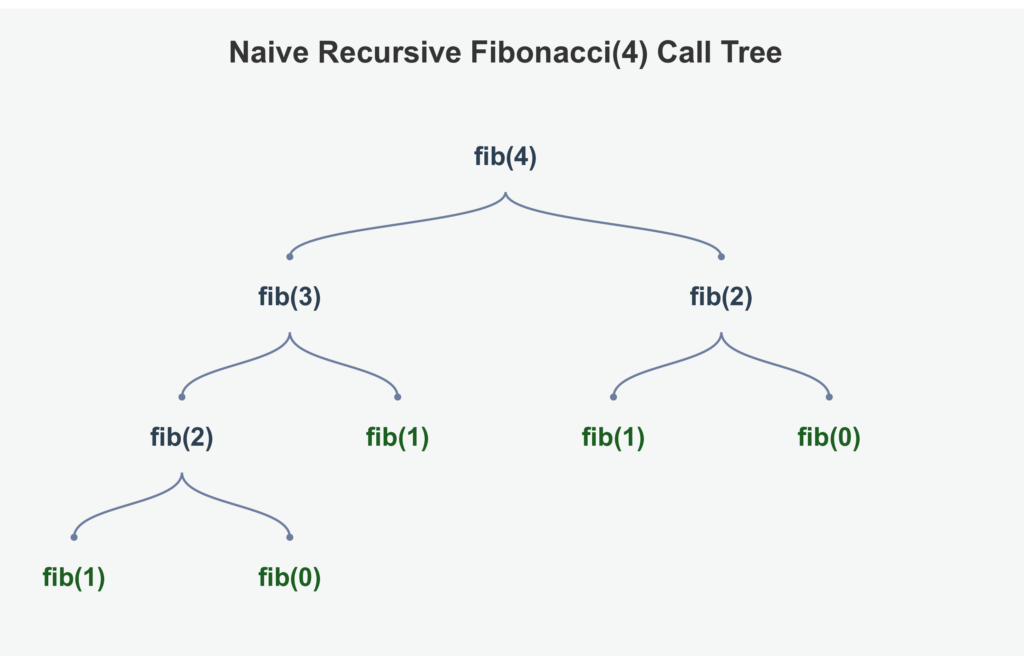
Look closely at that tree. fib(2) shows up twice. fib(1) shows up three times. The same smaller problems get solved over and over, even though the answer never changes.
This is exactly why naive recursive Fibonacci gets slow fast. Every extra level of n roughly doubles the number of calls, because each call spawns two more. That repeated, wasted work is something you’ll fix later with a technique called memoization, once you get to the dynamic programming articles in this series. For now, just recognize the shape: a recursion tree shows you exactly where the repeated work is hiding.
Common Recursion Mistakes
These mistakes show up constantly, even among developers who understand the concept in theory.
Missing the base case. Every recursive function needs a stopping point. Without one, you get infinite recursion and a RecursionError.
A base case that’s never reached. Sometimes the base case exists, but the recursive case doesn’t move toward it. For example, calling factorial(n + 1) instead of factorial(n - 1) moves away from the base case instead of toward it.
Forgetting to return the recursive call. This one is sneaky:
def broken_sum(numbers, index=0):
    if index == len(numbers):
        return 0
numbers[index] + broken_sum(numbers, index + 1) # missing "return"!Without return, the result of the recursive call is calculated and then thrown away. The function ends up returning None instead of the actual sum.
Using mutable default arguments. This isn’t unique to recursion, but it shows up often in recursive helper functions:
def add_to_list(item, result=[]):   # dangerous default
    result.append(item)
return resultDefault arguments in Python are created once, not fresh on every call. If result is a list, the same list gets reused across every call that doesn’t explicitly pass one in. Pass a fresh list explicitly instead.
Recursing when the input doesn’t actually shrink. If you call yourself with the exact same input, or an input that isn’t meaningfully smaller, you’ll never reach the base case. Always double-check that each recursive call moves closer to stopping.
Using recursion where a simple loop would do. Recursion adds stack frames, and stack frames cost memory. For a simple counting task, that overhead usually isn’t worth it. Save recursion for problems that are genuinely recursive in shape.
Recursion and Big O
Recursion doesn’t get a free pass from Big O. You analyze it the same way you’d analyze any other code, just with one extra thing to track: the call stack itself.
Time complexity. Look at how many total calls happen, and how much work each call does on its own.
factorial(n) calls itself once per level, from n down to 0. That’s n calls total, and each call does a constant amount of work (one multiplication). So factorial is:
O(n)Naive Fibonacci is a different story. Remember the recursion tree from earlier? Each call spawns two more calls, and this roughly doubles at every level. That branching pattern gives naive recursive Fibonacci a time complexity of:
O(2^n)That’s an exponential blowup, all because of repeated work the recursion tree revealed. This is the kind of result that looks fine for small inputs and falls apart quickly as n grows. Try fibonacci(35) and you’ll actually feel it take a few seconds. Try fibonacci(50) and you might be waiting a very long time.
Space complexity. This is the part beginners often miss. Every active call sits on the call stack at the same time, taking up memory, until it returns. For factorial(n), the stack grows one frame at a time until it’s n frames deep, so the space complexity is:
O(n)Even though naive Fibonacci makes an enormous number of total calls, its stack never gets deeper than n at once, because calls finish and get removed before their sibling branches even start. So its space complexity is also O(n), despite its time complexity being exponential. Time and space complexity for a recursive function don’t have to match, and that’s a useful thing to check separately.
| Function | Time Complexity | Space Complexity (call stack) |
|---|---|---|
factorial(n) | O(n) | O(n) |
countdown(n) | O(n) | O(n) |
sum_list(n items) | O(n) | O(n) |
Naive fibonacci(n) | O(2^n) | O(n) |
The general rule: to find a recursive function’s time complexity, count how many calls happen in total and multiply by the work each call does on its own. To find its space complexity, look at how deep the call stack gets at its tallest point, not how many total calls happened.
One more pattern worth knowing before you get to trees later in this series: recursive tree traversal visits every node once, so its time complexity is O(n). But its space complexity depends on the tree’s height, written as O(h), since the call stack only ever holds one path from the root down to whichever node is currently being processed. In a balanced tree, h can be as small as O(log n). In a completely skewed tree, where every node has only one child, h can grow all the way to O(n). You’ll see this O(h) pattern again once you get to recursive tree algorithms, so it’s worth recognizing now.
How to Recognize a Recursive Problem
Knowing what recursion is only helps if you can spot it in a new problem. Ask yourself these questions when you’re not sure whether recursion fits:
- Can I solve a smaller version of the same problem?
- Does solving that smaller problem actually help me solve the original one?
- Is there an obvious smallest case, one that doesn’t need any more breaking down?
- Does each step move closer to that smallest case?
- Does the problem contain nested or branching structure, like a tree or a set of choices?
If most of the answers are yes, recursion is a strong candidate. Here’s how that shows up across problem types you’ll meet later in this series:
| Problem shape | Recursive idea |
|---|---|
| Factorial | n! = n × (n - 1)! |
| Tree traversal | Process a node, then recurse into its children |
| Binary search | Search one half of the remaining range |
| Merge sort | Sort two smaller halves, then merge them |
| Backtracking | Try one choice, recurse, then undo it and try the next |
You don’t need to master all of these yet. Just notice the shared shape: a bigger problem, a smaller version of itself, and an obvious stopping point.
When Should You Use Recursion?
Recursion is the right tool when a problem naturally breaks down into smaller versions of itself. Look for these signals:
- The problem is defined in terms of a smaller version of itself (factorial, Fibonacci)
- You’re working with a tree or graph, where each node branches into smaller sub-structures
- You’re exploring every possible combination or path (this leads into backtracking, later in this series)
- A problem can be split into independent sub-problems, then combined (this leads into divide and conquer, like merge sort)
Recursion is usually the wrong tool when:
- The task is a simple, flat loop over a list or range with no natural sub-problem structure
- The recursion depth could get very large, risking a
RecursionError - Memory use matters more than code elegance, and an iterative version would use far less of it
- A loop already expresses the logic clearly, and recursion would only add complexity
A good habit: before reaching for recursion, ask yourself “does solving a smaller version of this problem actually help me solve the bigger version?” If yes, recursion probably fits well. If the task is really just “do this n times,” a loop is usually the simpler, more memory-friendly choice.
FAANG-Style DSA Interview Questions
These are the kinds of recursion questions you may encounter in DSA interviews at companies such as Google, Amazon, Meta, Microsoft, and similar technology companies.
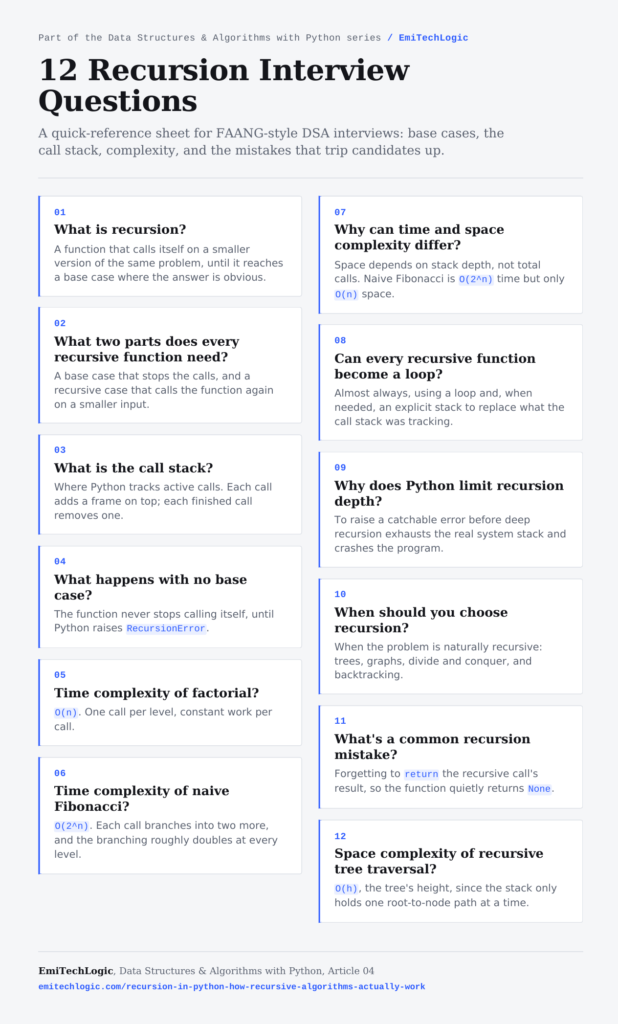
Save this poster so you have all 12 answers on one page for quick review before an interview.
1. What is recursion?
Answer: Recursion is when a function calls itself to solve a smaller version of the same problem. Each call works on a smaller piece of the input, until the pieces get small enough that the answer is obvious. That stopping point is the base case.
2. What are the two required parts of a recursive function?
Answer: A base case, which stops the recursion and returns an answer directly, and a recursive case, which calls the function again on a smaller version of the problem. Without a base case, the function calls itself forever and eventually raises a RecursionError.
3. What is the call stack, and why does it matter for recursion?
Answer: The call stack is where Python keeps track of active function calls. Each call gets its own frame, added to the top of the stack when the call starts and removed when it finishes. Recursion matters here because every recursive call adds a new frame, so deep recursion uses more memory than a loop doing the same work.
4. What happens if a recursive function has no base case?
Answer: The function keeps calling itself with no way to stop. Python eventually raises a RecursionError: maximum recursion depth exceeded, once the call stack grows past the interpreter’s recursion limit.
5. What is the time complexity of a simple recursive function like factorial?
Answer: O(n). The function calls itself once per level, from n down to the base case, and each call does a constant amount of work.
6. What is the time complexity of naive recursive Fibonacci, and why is it different from factorial?
Answer: O(2^n). Unlike factorial, each call to Fibonacci makes two recursive calls instead of one, and this branching roughly doubles the number of calls at every level. A recursion tree makes this visible: the same smaller sub-problems get solved repeatedly instead of once.
7. What is the space complexity of a recursive function, and how is it different from time complexity?
Answer: Space complexity for recursion is based on how deep the call stack gets at its tallest point, not on the total number of calls. Naive Fibonacci makes an exponential number of calls, O(2^n) in time, but its call stack never holds more than O(n) frames at once, because each branch finishes before its sibling starts. Time and space complexity don’t have to match.
8. Can every recursive function be rewritten as a loop?
Answer: Most recursive algorithms can be rewritten iteratively, usually with a loop and, when necessary, an explicit stack data structure to replace what the call stack was tracking. The choice between recursion and iteration is usually about clarity and memory use, not about what’s technically possible.
9. Why does Python limit recursion depth?
Answer: Python protects the call stack from growing without bound. Each stack frame uses memory, and the underlying system stack has a physical limit too. The recursion limit raises a catchable RecursionError before that physical limit gets hit and crashes the program.
10. When should you choose recursion over a loop?
Answer: When the problem is naturally recursive, meaning it’s made up of smaller versions of itself; tree traversal, graph traversal, divide and conquer, and backtracking are common examples. For simple counting or summing with no branching structure, a loop is usually the more memory-efficient choice.
11. What is a common mistake when writing recursive functions?
Answer: Forgetting to return the result of the recursive call. Writing numbers[0] + sum_list(numbers[1:]) without a return in front of it calculates the value and then throws it away, so the function ends up returning None instead of the actual answer.
12. How would you explain the space complexity of recursive tree traversal in an interview?
Answer: Recursive tree traversal visits every node once, giving O(n) time complexity. Its space complexity is O(h), where h is the height of the tree, because the call stack only ever holds one path from the root down to the node currently being processed. A balanced tree keeps h close to O(log n), while a completely skewed tree can push h up to O(n).
Practice Problems
Try to answer these before checking the answers below.
Problem 1: Trace the Calls
def mystery(n):
    if n == 0:
        return 0
return n + mystery(n - 1)What does mystery(4) return? List each call in order.
Problem 2: Find the Bug
def count_down(n):
    print(n)
count_down(n - 1)What happens when you call count_down(3)? What’s missing?
Problem 3: Identify Base and Recursive Case
def power(base, exponent):
    if exponent == 0:
        return 1
return base * power(base, exponent - 1)Which line is the base case? Which line is the recursive case? What does power(2, 3) return?
Problem 4: Count the Calls
For fibonacci(5) using the naive recursive version shown earlier, how many total calls happen? Try drawing the recursion tree.
Problem 5: Space Complexity
A recursive function calls itself twice per call, but only one branch is ever active on the stack at a time (the first branch fully finishes before the second one starts). If the recursion depth is n, what is the space complexity? Does it matter that there are two branches?
Answers
1. mystery(4) returns 10. The calls are: mystery(4) calls mystery(3), which calls mystery(2), which calls mystery(1), which calls mystery(0). Then 4 + 3 + 2 + 1 + 0 = 10.
2. This function has no base case, so it never stops. It will keep calling itself with smaller and smaller (eventually negative) numbers until Python raises a RecursionError.
3. The base case is if exponent == 0: return 1. The recursive case is return base * power(base, exponent - 1). power(2, 3) returns 8, since 2 × 2 × 2 × 1 = 8.
4. Naive fibonacci(5) makes 15 total calls. Here’s the tree:
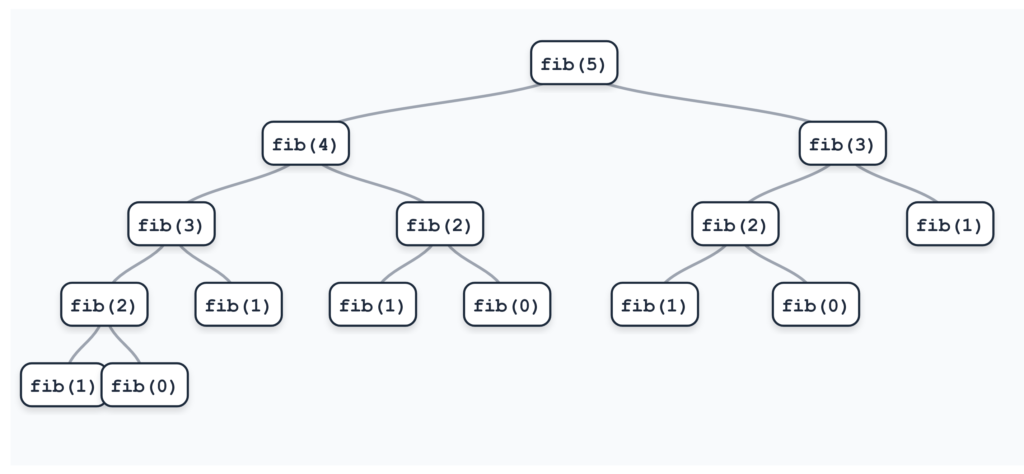
Counting every box in that tree, including fib(5) itself, gives 15 total calls. The branching pattern roughly doubles at each level, which is why this grows so fast as n increases.
5. The space complexity is still O(n). Space complexity depends on how deep the stack gets at any single moment, not on the total number of calls across the whole run. Since only one branch is active at a time, the stack never holds more than n frames at once.
Frequently Asked Questions
Is recursion slower than a loop?
Recursive implementations often have more overhead than equivalent iterative implementations, because each recursive call creates another call frame. The exact difference depends on the algorithm and the input size. For small inputs, it’s usually unnoticeable. For recursion with repeated sub-calls, like naive Fibonacci, the difference can become huge.
Why does Python limit recursion depth?
Python protects the call stack from growing without bound, since each frame consumes memory and the underlying system stack has its own physical limit. Without this check, deeply recursive code could crash the whole program instead of raising a catchable error.
Can I increase Python’s recursion limit?
Yes, using
sys.setrecursionlimit(). But raising it doesn’t fix the underlying memory cost. If a recursive function is hitting the limit, it’s often a sign the function should be rewritten iteratively, or that the recursion is missing a proper base case.Is every loop convertible to recursion, and vice versa?
In general, iterative logic can be expressed recursively, and recursive algorithms can usually be rewritten iteratively using loops and, where necessary, an explicit stack. The resulting code may not always be equally simple or natural.
What’s the difference between recursion and a recursion tree?
Recursion is the technique: a function calling itself. A recursion tree is a way to visualize that technique, showing every call as a branching structure. It’s especially useful for spotting repeated work, like in naive Fibonacci.
Do I need to master recursion before learning trees and graphs?
You need to understand the basics covered here: base cases, the call stack, and how to trace a recursive call. You don’t need to be an expert yet. Tree and graph traversal, covered later in this series, will give you a lot more practice with recursion in a more visual context.
Conclusion
Recursion is a function solving a problem by calling itself on a smaller version of that same problem. Every recursive function needs a base case, the stopping point, and a recursive case that moves the problem closer to that stopping point.
Under the hood, Python tracks every call using the call stack, adding a new frame for each call and removing it once that call finishes. That stack is also why recursion has a real memory cost, and why Python enforces a recursion limit.
The habit worth building from here: whenever you write a recursive function, check for the base case first, then check that the recursive case actually moves toward it. And when you’re deciding whether to use recursion at all, ask whether the problem is genuinely made up of smaller versions of itself, or whether a simple loop would do the same job with less overhead.
If you haven’t already, the best, average, and worst-case complexity guide covers the foundational ideas this article builds on. For the complete learning path, the DSA with Python guide lays out where to go next.
This article used Big O to analyze a few recursive examples. The next article takes that idea further and shows how to systematically calculate the time and space complexity of algorithms, whether they use recursion or iteration.
Further Reading
If you want to explore recursion and the call stack in more detail, these resources are useful:
Python Documentation: The Python Standard Library, sys.setrecursionlimit https://docs.python.org/3/library/sys.html#sys.setrecursionlimit
Python Documentation: Design and History FAQ, on recursion limits https://docs.python.org/3/faq/design.html
University of San Francisco: Data Structures and Algorithms visualizations https://www.cs.usfca.edu/~galles/visualization/Algorithms.html



Leave a Reply