
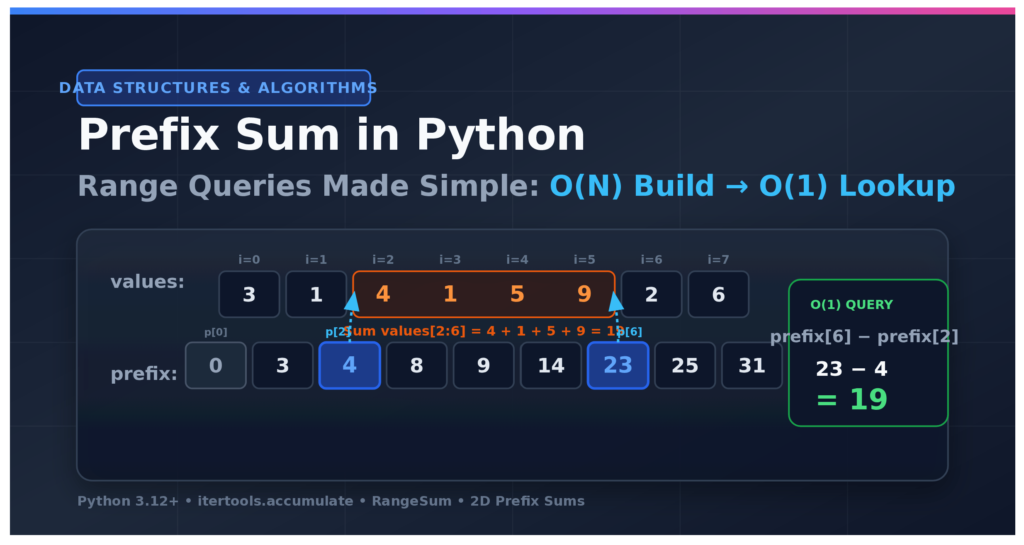

Prefix Sum in Python: This is the fourth article in the Arrays & Strings cluster. It builds on Sliding Window in Python: From Algorithm to Request Rate Limiter, so read that one first if you haven’t. It is part of the Data Structures & Algorithms with Python roadmap.
In simple terms: A prefix sum is a running total of a list, starting with 0. Build it once in O(n) time. After that, the sum of any range is
prefix[stop] - prefix[start], which takes O(1) time. Use it when you ask many range-sum questions about the same data, or when you need subarrays with a given sum and the numbers can be negative.
Your team’s dashboard now has a date picker. Someone selects 14:00 to 14:45 and wants the total number of requests. A minute later, they pick 09:10 to 11:30. Then a manager opens the page and clicks through forty different ranges while a meeting is going on.
Every click asks the same kind of question: what is the sum of a block of neighboring numbers? And it asks it again and again, on data that does not change.
In the last article, you used a sliding window to answer “what is the busiest five minutes?” That worked because the window moved in one direction, and the answer was one number. Here, the ranges are random. They jump around. A sliding window can’t help, and re-adding the numbers on every click gets slow. There is a better way: pay once, then answer every question in constant time. That is the prefix sum technique.
In this tutorial, you’ll build a small query toolkit on top of the same request log from the last article. Every function is tested against a slow brute-force version on thousands of random inputs, and every speed claim is measured.
In this tutorial, you’ll learn how to:
- Explain what a prefix sum is, and why it answers any range-sum question with one subtraction
- Build a prefix sum array with
itertools.accumulate(), with a plain loop, and with NumPy’snp.cumsum() - Use half-open ranges (like Python slices) to avoid off-by-one errors
- Solve subarray sum equals k in Python, and count subarrays with a given sum, even when the numbers are negative
- Build a 2D prefix sum in Python to sum a rectangle of a grid in constant time
- Choose between a prefix sum, a sliding window, and a difference array
Prerequisites: You should know Python lists, dictionaries, classes and functions, and have a basic idea of Big O notation. You should also be comfortable running pytest from a terminal. The code needs Python 3.12 or later, and it was tested on Python 3.12, 3.13 and 3.14. NumPy is used in one section and is optional for the rest.
Modern Python in this tutorial: The code uses the type statement for aliases (3.12), zip(strict=True) to catch length mismatches (3.10), the walrus operator for assign-and-test (3.8), and itertools.accumulate(initial=0) for the leading zero (3.8), plus itertools.pairwise() (3.10) and itertools.batched() (3.12) in the shortcuts section. There is no typing.List, Optional, or other legacy typing import, only built-in generics like list[int] and X | None.
Get the code. The complete, tested project for this tutorial is on GitHub. Clone it and follow along, or build each file as you read. https://github.com/Emmimal/prefix-sum-in-python
Understanding the Prefix Sum Technique
What is a prefix sum? A prefix sum is an array where each entry stores the total of all items before that position, starting with 0. Building it takes O(n) time. After that, the sum of any range is
prefix[stop] - prefix[start], which takes O(1) time.
Think of the odometer in a car. It shows the total distance the car has traveled since it was built. Say it reads 41,200 km when you pass exit A, and 41,260 km when you pass exit B. How far is it from A to B?
You don’t need to know how fast you drove, or where you stopped for coffee. You just subtract: 41,260 − 41,200 = 60 km.
A prefix sum is an odometer for your data. At every position, it stores the total of everything so far. To get the sum of any block in the middle, you read two odometer values and subtract.
Why Re-Adding Every Range Wastes Work
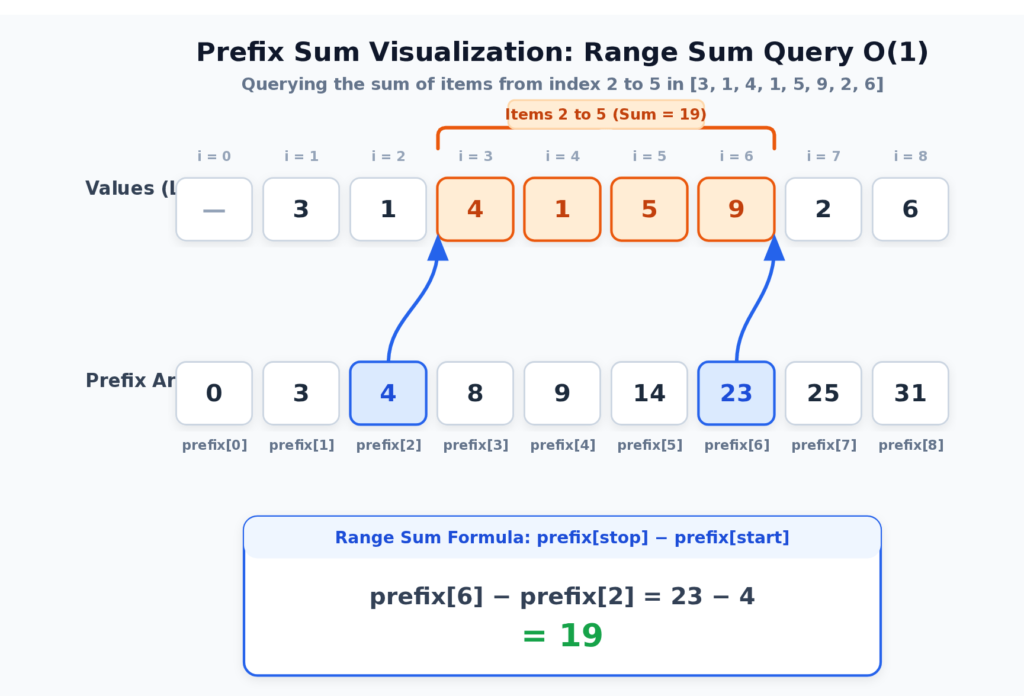
Take the numbers [3, 1, 4, 1, 5, 9, 2, 6]. You want the sum of the items at index 2 up to, but not including, index 6. That is 4 + 1 + 5 + 9 = 19.
The slow way adds those four numbers. If someone asks a second question, you add again. If they ask 5,000 questions about ranges of 100,000 items, you do hundreds of millions of additions, and many of them repeat work you already did.
The prefix sum does the adding once. Here is the odometer for this list:
| Index | 0 | 1 | 2 | 3 | 4 | 5 | 6 | 7 | 8 |
|---|---|---|---|---|---|---|---|---|---|
| Item before this point | — | 3 | 1 | 4 | 1 | 5 | 9 | 2 | 6 |
prefix[i] | 0 | 3 | 4 | 8 | 9 | 14 | 23 | 25 | 31 |
prefix[i] is the sum of the first i items. Now the question “sum of items 2 to 5” is prefix[6] - prefix[2], which is 23 - 4 = 19. That is the same answer, with one subtraction.
The Prefix Sum Formula
Prefix sum formula: For a list
values, setprefix[0] = 0andprefix[i] = prefix[i - 1] + values[i - 1]. The sum ofvalues[start:stop]then equalsprefix[stop] - prefix[start], because the part both totals share cancels out.
For a list called values, the prefix array is built like this:
prefix[0] = 0
prefix[i] = prefix[i - 1] + values[i - 1]
And the sum of values[start:stop] is:
sum(values[start:stop]) = prefix[stop] - prefix[start]Why does it work? prefix[stop] holds everything from the beginning up to stop. prefix[start] holds everything from the beginning up to start. When you subtract, the part they share cancels out, and only the block between them is left.
Why the Prefix Array Starts With Zero
Notice the 0 at the front. The prefix array is one item longer than the data. This is on purpose, and it is the most useful habit in this whole article.
The zero stands for “nothing added yet.” Without it, a range that starts at index 0 would need a special case, because there is no prefix[-1] to subtract. With it, every range uses the same formula, with no if statements.
Inclusive vs Exclusive Ranges: The Python Way
In this article, a range (start, stop) means the same as the slice values[start:stop]. It includes start and excludes stop. This is called a half-open range.
Half-open ranges match how Python already works, and they make the arithmetic clean:
- The length of the range is
stop - start. - An empty range is
start == stop, and its sum isprefix[stop] - prefix[start] = 0. - Two ranges that touch, like
(0, 4)and(4, 9), don’t overlap and don’t leave a gap.
Many interview problems use inclusive ranges instead, where both ends count. To convert, add one to the right end: the inclusive range [left, right] is the half-open range (left, right + 1), so the sum is prefix[right + 1] - prefix[left]. You’ll see what happens when you forget this in the mistakes section.
Setting Up the Project
The project is a flat folder of small modules, like the sliding window project. Create the folder, a virtual environment, and install pytest and NumPy:
$ mkdir prefix_sum
$ cd prefix_sum
$ python -m venv venv
$ source venv/bin/activate
(venv) $ python -m pip install pytest numpy
On Windows, activate the environment with venv\Scripts\activate instead. If you use uv, you can skip the manual environment and run the tests with uv run --with pytest --with numpy python -m pytest. You will create these files as you go:
prefix_sum/
├── sample_data.py
├── prefix_sum.py
├── numpy_queries.py
├── shortcuts.py
├── brute_force.py
├── pitfalls.py
├── practice.py
├── benchmark.py
├── demo.py
├── test_prefix_sum.py
├── test_numpy_queries.py
├── test_shortcuts.py
├── test_pitfalls.py
└── test_practice.py
prefix_sum.py is the toolkit. brute_force.py holds slow, obviously correct solutions. They do two jobs: they are a speed baseline, and they are a test oracle that your fast code must agree with. The tests use random.Random(seed) with a fixed seed, so a failure is reproducible.
Reuse the Request Log
Copy sample_data.py from the sliding window project. It makes the same fake request log, with steady traffic, a spike around minute 100, and an incident from minute 150 to 159. This time, add two helpers at the bottom of the file:
# ... ENDPOINTS, Request, make_requests() and per_minute() stay exactly as before ...


def endpoint_grid(
    requests: list[Request], minutes: int = 240, bucket: int = 60
) -> list[list[int]]:
    """Return a grid of request counts: one row per endpoint, one column per hour."""
    columns = minutes // bucket
    grid = [[0] * columns for _ in ENDPOINTS]
    for request in requests:
        row = ENDPOINTS.index(request.endpoint)
        grid[row][int(request.timestamp // 60) // bucket] += 1
    return grid


def make_net_changes(minutes: int = 240, seed: int = 7) -> list[int]:
    """Return net user change per minute (signups minus cancellations).

    Unlike request counts, these numbers can be negative.
    """
    rng = random.Random(seed)
return [rng.randint(-6, 8) for _ in range(minutes)]endpoint_grid() will be used in the two-dimensional section. make_net_changes() matters for a bigger reason. Request counts are never negative, but “signups minus cancellations” can be. Negative numbers are exactly where the sliding window gave up in the last article, and where prefix sums keep working.
How to Build a Prefix Sum Array in Python
Save this as prefix_sum.py:
"""A small toolkit of prefix sum solutions."""

from collections import Counter
from collections.abc import Iterable, Sequence
from itertools import accumulate

type Span = tuple[int, int]  # (start, stop), stop excluded, like a slice


def build_prefix(values: Iterable[int]) -> list[int]:
    """Return the prefix sums of `values`, starting with a 0.

    The result is one item longer than the input:
    prefix[i] is the sum of the first i values.
    """
return list(accumulate(values, initial=0))itertools.accumulate() yields a running total. The initial=0 argument puts the zero at the front, which is exactly the odometer you want. The line type Span = tuple[int, int] is a type alias, written with the type statement from Python 3.12. You’ll use Span later for (start, stop) results.
>>> from prefix_sum import build_prefix
>>> build_prefix([3, 1, 4, 1, 5, 9, 2, 6])
[0, 3, 4, 8, 9, 14, 23, 25, 31]
>>> build_prefix([])
[0]An empty input still gives [0]. That keeps the rule “the prefix array is one longer than the data” true with no exceptions.
If you prefer to see what accumulate() does, here is the same thing as a plain loop:
def build_prefix_manual(values):
    prefix = [0]
    for value in values:
        prefix.append(prefix[-1] + value)
return prefixEach new entry is the previous entry plus one new value. That is the formula from earlier, written as code. The loop touches each item once, so the time is O(n). The prefix array holds n + 1 numbers, so the extra space is O(n).
Range Sum Queries With Prefix Sums
Now wrap the prefix array in a class that answers questions. Add this to prefix_sum.py:
class RangeSum:
    """Answer "what is the sum of values[start:stop]?" in O(1) time."""

    __slots__ = ("_prefix",)

    def __init__(self, values: Iterable[int]) -> None:
        self._prefix = build_prefix(values)

    def __len__(self) -> int:
        return len(self._prefix) - 1

    def sum_range(self, start: int, stop: int) -> int:
        """Return the sum of values[start:stop]. The stop index is excluded."""
        if not 0 <= start <= stop <= len(self):
            raise ValueError(f"need 0 <= start <= stop <= {len(self)}")
return self._prefix[stop] - self._prefix[start]The constructor does all the work, once. After that, sum_range() is two list lookups and one subtraction, no matter how large the range is.
The check is strict on purpose. Python slices quietly accept values[5:2] and give you an empty list. For a sum, a reversed range is almost always a bug in the caller, so it is better to say so loudly. Negative indexes are rejected too, because prefix[-1] would not mean “before the start” here.
>>> from prefix_sum import RangeSum
>>> queries = RangeSum([3, 1, 4, 1, 5, 9, 2, 6])
>>> queries.sum_range(2, 6)
19
>>> queries.sum_range(0, 8)
31
>>> queries.sum_range(3, 3)
0The first answer matches the hand calculation. The last one shows an empty range giving 0 with no special case.
The __slots__ line keeps the object small, since it has only one attribute. The class takes a snapshot. Because build_prefix() makes a new list, changing your original list later does not change the answers. That is safe, but it also means the prefix array can go stale if your data changes. You’ll see that in the mistakes section.
Test It Against the Brute Force
First, write the slow, obviously correct version. Save this as brute_force.py:
"""Slow but obviously correct solutions, used as a baseline and as a test oracle."""

from collections.abc import Sequence

from prefix_sum import Span


def sum_range_brute(values: Sequence[int], start: int, stop: int) -> int:
    """Add up values[start:stop] from scratch."""
return sum(values[start:stop])You’ll add more brute-force functions here as you meet each problem. Now save these tests as test_prefix_sum.py:
import random

import pytest

from brute_force import sum_range_brute
from prefix_sum import RangeSum, build_prefix


def test_build_prefix_starts_with_zero() -> None:
    assert build_prefix([3, 1, 4, 1, 5]) == [0, 3, 4, 8, 9, 14]
    assert build_prefix([]) == [0]


def test_range_sum_example() -> None:
    queries = RangeSum([3, 1, 4, 1, 5, 9, 2, 6])
    assert queries.sum_range(2, 6) == 19
    assert queries.sum_range(0, 8) == 31
    assert queries.sum_range(3, 3) == 0  # an empty range


@pytest.mark.parametrize(("start", "stop"), [(-1, 2), (3, 2), (0, 9)])
def test_range_sum_rejects_bad_ranges(start: int, stop: int) -> None:
    with pytest.raises(ValueError):
        RangeSum([1, 2, 3]).sum_range(start, stop)


def test_range_sum_does_not_follow_later_changes_to_the_list() -> None:
    values = [1, 2, 3]
    queries = RangeSum(values)
    values[0] = 100
    assert queries.sum_range(0, 3) == 6


def test_range_sum_agrees_with_brute_force_on_random_input() -> None:
    rng = random.Random(42)
    for _ in range(500):
        values = [rng.randint(-20, 20) for _ in range(rng.randint(0, 30))]
        queries = RangeSum(values)
        for _ in range(10):
            start = rng.randint(0, len(values))
            stop = rng.randint(start, len(values))
assert queries.sum_range(start, stop) == sum_range_brute(values, start, stop)The edge cases are chosen on purpose: an empty input, an empty range, the whole input, and bad ranges. The random test uses negative numbers too. The prefix sum doesn’t care about the sign of a number, because it only adds and subtracts. Keep that in mind, because it is the big difference from the sliding window.
Measure the Difference
Now measure it. Save this as benchmark.py:
"""Time prefix sums against recomputing every range."""

import random
from collections.abc import Callable
from itertools import accumulate
from time import perf_counter

import numpy as np

from brute_force import sum_range_brute
from numpy_queries import build_prefix_np, sum_ranges
from prefix_sum import RangeSum


def timed(func: Callable[[], object]) -> float:
    """Return how many seconds one call to func takes."""
    start = perf_counter()
    func()
    return perf_counter() - start


def make_queries(n: int, count: int, seed: int = 5) -> list[tuple[int, int]]:
    rng = random.Random(seed)
    queries = []
    for _ in range(count):
        start = rng.randint(0, n)
        queries.append((start, rng.randint(start, n)))
    return queries


def report_many_queries() -> None:
    n = 200_000
    values = list(range(n))
    print(f"Range sums over {n:,} values: recompute vs prefix sum")
    print(f"{'queries':>8}  {'recompute':>10}  {'prefix sum':>10}")
    for count in (10, 100, 1_000, 5_000):
        queries = make_queries(n, count)
        slow = timed(lambda: [sum_range_brute(values, a, b) for a, b in queries])

        def fast() -> None:
            ranges = RangeSum(values)
            for a, b in queries:
                ranges.sum_range(a, b)

        print(f"{count:>8,}  {slow:>9.4f}s  {timed(fast):>9.4f}s")


def report_build_cost() -> None:
    n = 1_000_000
    values = list(range(n))

    def loop() -> list[int]:
        prefix = [0]
        for value in values:
            prefix.append(prefix[-1] + value)
        return prefix

    print()
    print(f"Building a prefix array of {n:,} values")
    print(f"  manual loop:          {timed(loop):.4f}s")
    print(f"  itertools.accumulate: {timed(lambda: list(accumulate(values, initial=0))):.4f}s")


def report_numpy_batch() -> None:
    n, count = 1_000_000, 200_000
    rng = np.random.default_rng(1)
    values = rng.integers(0, 100, n)
    first = rng.integers(0, n + 1, count)
    second = rng.integers(0, n + 1, count)
    starts, stops = np.minimum(first, second), np.maximum(first, second)
    pairs = list(zip(starts.tolist(), stops.tolist()))
    as_list = values.tolist()

    def python_way() -> None:
        ranges = RangeSum(as_list)
        for a, b in pairs:
            ranges.sum_range(a, b)

    def numpy_way() -> None:
        sum_ranges(build_prefix_np(values), starts, stops)

    print()
    print(f"{count:,} range queries over {n:,} values (build included)")
    print(f"  RangeSum in a Python loop: {timed(python_way):.4f}s")
    print(f"  NumPy batch:               {timed(numpy_way):.4f}s")


if __name__ == "__main__":
    report_many_queries()
    report_build_cost()
report_numpy_batch()The file imports numpy_queries, which you’ll write in the NumPy section below, so finish that section before you run the whole file. The prefix sum timing includes building the array. That is the fair comparison. Here is the output of the first two reports:
Range sums over 200,000 values: recompute vs prefix sum
 queries   recompute  prefix sum
      10     0.0060s     0.0158s
     100     0.0644s     0.0143s
   1,000     0.6778s     0.0134s
   5,000     3.1066s     0.0195s

Building a prefix array of 1,000,000 values
  manual loop:          0.1355s
  itertools.accumulate: 0.0789s
Your times will differ, and single runs are noisy, but the shape should hold. There are three things to notice.
First, with only 10 queries, the prefix sum is slower. Building the array costs time, and ten queries don’t pay it back. This is the honest trade-off: a prefix sum is for many queries on the same data. If you ask once, just add the numbers.
Second, from about 100 queries on, the prefix sum wins, and the gap grows fast. The recompute column grows with the number of queries. The prefix sum column barely moves, because the build cost is paid once and each query is nearly free. At 5,000 queries, recomputing took about 3.1 seconds, and the prefix sum took about 20 milliseconds.
Third, accumulate() built the array faster than the manual loop, because the loop runs in C instead of Python. Use it when you can.
Prefix Sum With NumPy (np.cumsum)
If your data is already in a NumPy array, np.cumsum() computes running totals. It has no initial argument, so you make an array of zeros that is one item longer and write the totals into its tail. Save this as numpy_queries.py:
"""Answer many range queries at once with NumPy."""

import numpy as np


def build_prefix_np(values: np.ndarray) -> np.ndarray:
    """Return the prefix sums of `values`, starting with a 0."""
    prefix = np.zeros(len(values) + 1, dtype=np.int64)
    np.cumsum(values, out=prefix[1:])
    return prefix


def sum_ranges(prefix: np.ndarray, starts: np.ndarray, stops: np.ndarray) -> np.ndarray:
    """Return the sum of values[start:stop] for every pair, in one subtraction."""
return prefix[stops] - prefix[starts]The real payoff is in sum_ranges(). NumPy lets you index with whole arrays, so prefix[stops] - prefix[starts] answers thousands of range queries in one vectorized step, with no Python loop.
>>> import numpy as np
>>> from numpy_queries import build_prefix_np, sum_ranges
>>> values = np.array([3, 1, 4, 1, 5, 9, 2, 6])
>>> prefix = build_prefix_np(values)
>>> prefix.tolist()
[0, 3, 4, 8, 9, 14, 23, 25, 31]
>>> sum_ranges(prefix, np.array([2, 0, 3]), np.array([6, 8, 3])).tolist()
[19, 31, 0]The three answers are the same ones you got by hand: 19, 31, and 0 for an empty range. Test it against the pure Python version. Save this as test_numpy_queries.py:
import numpy as np

from numpy_queries import build_prefix_np, sum_ranges
from prefix_sum import build_prefix


def test_numpy_prefix_matches_the_pure_python_version() -> None:
    values = [3, 1, 4, 1, 5, 9, 2, 6]
    assert build_prefix_np(np.array(values)).tolist() == build_prefix(values)


def test_batch_queries_match_one_by_one() -> None:
    values = np.array([3, 1, 4, 1, 5, 9, 2, 6])
    prefix = build_prefix_np(values)
    starts, stops = np.array([2, 0, 3]), np.array([6, 8, 3])
assert sum_ranges(prefix, starts, stops).tolist() == [19, 31, 0]Now run the last report in benchmark.py:
200,000 range queries over 1,000,000 values (build included)
  RangeSum in a Python loop: 0.1317s
  NumPy batch:               0.0067s
For many queries at once, the NumPy version was about 20 times faster on this machine. The queries are the reason. A Python loop pays the cost of one function call per query, and NumPy does the whole batch in compiled code.
There is one trap. NumPy integers have a fixed width, and they wrap around silently when they get too big:
>>> import numpy as np
>>> np.cumsum(np.array([2**62, 2**62], dtype=np.int64))
array([ 4611686018427387904, -9223372036854775808])The second total went negative, and no error was raised. Python’s own int never does this. For normal counts, int64 is more than enough, but if your totals can approach 9 × 10¹⁸, use Python integers or check your range first.
accumulate() vs np.cumsum()
itertools.accumulate | np.cumsum | |
|---|---|---|
| Needs NumPy | No | Yes |
| Works on | Any iterable, including generators | Arrays |
| Leading zero | initial=0 | Build it yourself |
| Big integers | Exact (Python int) | Can overflow at fixed width |
| Best for | Lists, streams, small and medium data | Large arrays and batch queries |
Prefix Sum Shortcuts: Built-In Tools and One-Liners
Once you have a prefix array, many common questions shrink to one line. These shortcuts use only the standard library, and each one is tested. Save them as shortcuts.py:
"""Short, built-in ways to get common prefix sum results."""

from bisect import bisect_left
from collections import Counter
from collections.abc import Sequence
from itertools import pairwise
from math import comb

from prefix_sum import Span, build_prefix


def window_sums(values: Sequence[int], size: int) -> list[int]:
    """Return the sum of every window of `size` items, in one comprehension."""
    if size < 1:
        raise ValueError("size must be at least 1")
    prefix = build_prefix(values)
    return [stop - start for start, stop in zip(prefix, prefix[size:])]


def block_sums(values: Sequence[int], size: int) -> list[int]:
    """Return the sum of each consecutive block of `size` items.

    The last block is shorter if the length is not a multiple of `size`.
    """
    if size < 1:
        raise ValueError("size must be at least 1")
    prefix = build_prefix(values)
    edges = [*range(0, len(values), size), len(values)]
    return [prefix[stop] - prefix[start] for start, stop in pairwise(edges)]


def shortest_burst_bisect(counts: Sequence[int], target: int) -> Span | None:
    """Return (start, stop) of the shortest window with sum >= target.

    Counts must not be negative, so the prefix array only goes up and can
    be searched with bisect. Takes O(n log n) time.
    """
    if target < 1:
        raise ValueError("target must be at least 1")
    if any(count < 0 for count in counts):
        raise ValueError("counts must not be negative")

    prefix = build_prefix(counts)
    best: Span | None = None
    for start in range(len(counts)):
        stop = bisect_left(prefix, prefix[start] + target, lo=start + 1)
        if stop < len(prefix) and (best is None or stop - start < best[1] - best[0]):
            best = (start, stop)
    return best


def count_zero_sum_subarrays(values: Sequence[int]) -> int:
    """Count subarrays that sum to 0: every pair of equal prefix sums is one."""
return sum(comb(count, 2) for count in Counter(build_prefix(values)).values())Here is what each shortcut does, and why it works.
Every Window Sum in One Line
zip(prefix, prefix[size:]) pairs each prefix value with the one size places later. Subtracting gives the sum of every window. This is the sliding window result from the last article, with no loop that adds and subtracts:
>>> from shortcuts import window_sums
>>> window_sums([2, 1, 5, 1, 3, 2], 3)
[8, 7, 9, 6]These are the same four sums as the first diagram in the sliding window tutorial. zip() stops at the shorter input, so a size larger than the data gives an empty list.
Hourly Totals With pairwise()
itertools.pairwise() (Python 3.10) yields each neighbor pair. Applied to the block edges, it gives the sum of each block:
>>> from sample_data import make_requests, per_minute
>>> from shortcuts import block_sums
>>> totals, _ = per_minute(make_requests())
>>> block_sums(totals, 60)
[1227, 1788, 1194, 1166]Those are the four hourly totals from the report. The function builds the edges [0, 60, 120, 180, 240] and subtracts neighboring prefix values. It also handles a last block that is shorter than the rest.
If you need these block sums once, you don’t need a prefix sum at all. itertools.batched() (Python 3.12) splits the data into blocks:
>>> from itertools import batched
>>> [sum(block) for block in batched(totals, 60)]
[1227, 1788, 1194, 1166]The rule of thumb is the same as before. For one pass, use batched(). When you will also ask about other ranges, build the prefix array once and reuse it.
Shortest Window by Binary Search
If the counts are never negative, the prefix array only goes up, so you can search it. For each start, bisect_left() finds the first stop whose prefix is at least prefix[start] + target:
>>> from shortcuts import shortest_burst_bisect
>>> shortest_burst_bisect([2, 3, 1, 2, 4, 3], 7)
(4, 6)This is the same answer as the sliding window from the last article: the window [4, 3]. It takes O(n log n) time instead of O(n), so the sliding window is still the faster choice for one pass. The bisect version is shorter to write, and it is useful when you want the answer for several different targets on the same prefix array. It rejects negative counts for the same reason the sliding window does: a prefix array that can go down can’t be binary searched.
Zero-Sum Subarrays With math.comb()
A subarray sums to 0 exactly when two prefix values are equal. So if a total appears c times in the prefix array, it makes comb(c, 2) pairs, and each pair is one zero-sum subarray:
>>> from shortcuts import count_zero_sum_subarrays
>>> count_zero_sum_subarrays([1, -1, 1, -1])
4The prefix array is [0, 1, 0, 1, 0]. The value 0 appears three times, giving 3 pairs, and the value 1 appears twice, giving 1 pair. The total is 4. This shortcut only works for a target of 0. For any other target, the order of the two positions matters, so use count_subarrays_with_sum().
Other Running Values With accumulate()
accumulate() accepts any two-argument function, so the same call builds other running values:
>>> from itertools import accumulate
>>> import operator
>>> list(accumulate([3, 1, 4, 1, 5], max))
[3, 3, 4, 4, 5]
>>> list(accumulate([3, 1, 4, 1, 5], operator.mul))
[3, 3, 12, 12, 60]These are a running maximum and a running product. Be careful, though: the subtraction trick only works for sums. You can’t get the maximum of a range by subtracting two running maximums, and getting a range product needs division, which fails when a value is zero. Prefix sums are special because addition has an inverse.
Add these tests as test_shortcuts.py:
import random
from itertools import batched

import pytest

from brute_force import count_subarrays_brute
from prefix_sum import count_subarrays_with_sum
from shortcuts import (
    block_sums,
    count_zero_sum_subarrays,
    shortest_burst_bisect,
    window_sums,
)


def test_window_sums_example() -> None:
    assert window_sums([2, 1, 5, 1, 3, 2], 3) == [8, 7, 9, 6]
    assert window_sums([1, 2], 3) == []


def test_block_sums_example() -> None:
    assert block_sums([1, 2, 3, 4, 5], 2) == [3, 7, 5]
    assert block_sums([], 3) == []


def test_block_sums_match_itertools_batched() -> None:
    rng = random.Random(1)
    for _ in range(200):
        values = [rng.randint(-9, 9) for _ in range(rng.randint(0, 40))]
        size = rng.randint(1, 8)
        assert block_sums(values, size) == [sum(batch) for batch in batched(values, size)]


def test_window_sums_match_slicing() -> None:
    rng = random.Random(2)
    for _ in range(200):
        values = [rng.randint(-9, 9) for _ in range(rng.randint(1, 30))]
        size = rng.randint(1, len(values))
        expected = [sum(values[i : i + size]) for i in range(len(values) - size + 1)]
        assert window_sums(values, size) == expected


@pytest.mark.parametrize("size", [0, -1])
def test_bad_sizes_are_rejected(size: int) -> None:
    with pytest.raises(ValueError):
        window_sums([1, 2, 3], size)
    with pytest.raises(ValueError):
        block_sums([1, 2, 3], size)


def test_shortest_burst_bisect_example() -> None:
    assert shortest_burst_bisect([2, 3, 1, 2, 4, 3], 7) == (4, 6)
    assert shortest_burst_bisect([1, 1], 5) is None


def test_shortest_burst_bisect_rejects_negative_counts() -> None:
    with pytest.raises(ValueError):
        shortest_burst_bisect([2, -1, 2, 3], 5)


def test_shortest_burst_bisect_agrees_with_brute_force() -> None:
    rng = random.Random(4)
    for _ in range(500):
        counts = [rng.randint(0, 6) for _ in range(rng.randint(0, 15))]
        target = rng.randint(1, 12)
        best = None
        for start in range(len(counts)):
            for stop in range(start + 1, len(counts) + 1):
                if sum(counts[start:stop]) >= target and (
                    best is None or stop - start < best[1] - best[0]
                ):
                    best = (start, stop)
                    break
        assert shortest_burst_bisect(counts, target) == best


def test_zero_sum_count_agrees_with_the_general_counter() -> None:
    assert count_zero_sum_subarrays([1, -1, 1, -1]) == 4
    rng = random.Random(5)
    for _ in range(500):
        values = [rng.randint(-3, 3) for _ in range(rng.randint(0, 14))]
        assert count_zero_sum_subarrays(values) == count_subarrays_with_sum(values, 0)
assert count_zero_sum_subarrays(values) == count_subarrays_brute(values, 0)On the request log, shortest_burst_bisect(errors, 40) returns (150, 157): the same seven minutes starting at minute 150 that the sliding window found in the last article.
Shortcut Cheat Sheet
| You want | Shortcut | Time |
|---|---|---|
| Prefix array with leading zero | list(accumulate(values, initial=0)) | O(n) |
| Every window sum | [b - a for a, b in zip(prefix, prefix[k:])] | O(n) |
| Sum of each block | pairwise() over the block edges | O(n) |
| Block sums, one time only | [sum(b) for b in batched(values, k)] | O(n) |
| Shortest window (non-negative) | bisect_left(prefix, prefix[i] + target) | O(n log n) |
| Zero-sum subarray count | sum(comb(c, 2) for c in Counter(prefix).values()) | O(n) |
| Prefix array for many queries at once | np.cumsum + fancy indexing | O(n + q) |
Using Prefix Sums on the Request Log
Time to answer the dashboard’s questions. Save this as demo.py, and build on it as you go:
"""Run the prefix sum tools on a fake request log and print a report."""

from prefix_sum import (
    RangeSum,
    RegionSum,
    count_subarrays_with_sum,
    longest_subarray_with_sum,
)
from sample_data import ENDPOINTS, endpoint_grid, make_net_changes, make_requests, per_minute

MINUTES = 240


def main() -> None:
    requests = make_requests(MINUTES)
    totals, errors = per_minute(requests, MINUTES)
    traffic = RangeSum(totals)
    failures = RangeSum(errors)
    print(f"{len(requests):,} requests over {MINUTES} minutes")

    for hour in range(MINUTES // 60):
        start, stop = hour * 60, (hour + 1) * 60
        print(f"Hour {hour + 1}: {traffic.sum_range(start, stop):,} requests, "
              f"{failures.sum_range(start, stop)} errors")

    incident = (150, 160)
    spike = (100, 108)
    rate = failures.sum_range(*incident) / traffic.sum_range(*incident)
    print(f"Error rate during the incident (minutes 150-159): {rate:.1%}")
    rate = failures.sum_range(*spike) / traffic.sum_range(*spike)
    print(f"Error rate during the spike (minutes 100-107): {rate:.1%}")

    net = make_net_changes(MINUTES)
    print(f"Net user change, minutes 0-239: {RangeSum(net).sum_range(0, MINUTES)}")
    print(f"Stretches with a net change of exactly 25: {count_subarrays_with_sum(net, 25)}")
    best = longest_subarray_with_sum(net, 0)
    if best is not None:
        start, stop = best
        print(f"Longest stretch with a net change of 0: {stop - start} minutes, from minute {start}")

    grid = endpoint_grid(requests, MINUTES)
    regions = RegionSum(grid)
    cart, checkout = ENDPOINTS.index("/cart"), ENDPOINTS.index("/checkout")
    total = regions.sum_region(cart, checkout + 1, 1, 3)
    print(f"/cart and /checkout requests in hours 2 and 3: {total}")


if __name__ == "__main__":
main()The report uses RegionSum, count_subarrays_with_sum() and longest_subarray_with_sum(), which you haven’t written yet. You’ll run it at the end. For now, notice the pattern in the first half: build two RangeSum objects once, then ask as many questions as you like. Each one is a subtraction.
Notice also that the error rate is a ratio of two range sums. Prefix sums give you any quantity that can be added, and ratios, averages and percentages come for free.
Subarray Sum Equals K in Python
How do you solve subarray sum equals k in Python? Keep a running total and a dictionary that counts each earlier total, starting with
{0: 1}. At each item, add the count stored forrunning - kto the answer, then record the current total. This takes O(n) time and works with negative numbers.
Range queries answer “what is the sum of this block?” A second family of problems flips the question around: which blocks have this sum? For example:
- Is there a stretch of minutes where signups minus cancellations was exactly 25?
- How many such stretches are there?
- What is the longest stretch where the net change was zero?
This is the famous “subarray sum equals k” problem. Last time, you’d have reached for a sliding window. Here is why that doesn’t work.
Why a Sliding Window Fails Here
Why does a sliding window fail with negative numbers? A variable sliding window assumes that adding an item never lowers the total and removing one never raises it. Negative numbers break that rule, so the window skips valid subarrays. A prefix sum with a dictionary makes no such assumption.
The variable sliding window relies on one fact: adding a number never lowers the total, and removing a number never raises it. With negative numbers, both statements are false. A window that is “too big” can become “just right” if you add a negative number at the end.
Here is a sliding-window counter that assumes positive numbers. Save it in pitfalls.py, along with two other bugs you’ll meet later:
"""Buggy versions of the prefix sum tools, kept so tests can show how they fail."""

from collections import Counter
from collections.abc import Sequence
from itertools import accumulate


def count_subarrays_sliding_window(values: Sequence[int], target: int) -> int:
    """Bug: a sliding window that assumes the numbers are never negative."""
    left = 0
    window_total = 0
    count = 0
    for right, value in enumerate(values):
        window_total += value
        while window_total > target and left <= right:
            window_total -= values[left]
            left += 1
        if window_total == target:
            count += 1
return countTry it on [1, -1, 1], counting subarrays that sum to 1. There are three: [1] at the start, [1] at the end, and the whole list [1, -1, 1].
>>> from pitfalls import count_subarrays_sliding_window
>>> count_subarrays_sliding_window([1, -1, 1], 1)
2No error. Just a wrong answer. The window missed the whole list, because the total passed through 0 on the way back to 1, and the shrinking rule had no way to know that.
The prefix sum needs no such assumption. It uses a different idea.
The Key Idea: Two Equal Odometer Readings
Suppose the odometer reads 500 at one moment and 560 at a later moment. Then you drove exactly 60 km in between. The reverse is also true: if you want to find a 60 km stretch, look for two readings that differ by 60.
For subarrays, this means:
sum(values[start:stop]) == target
    ⟺  prefix[stop] - prefix[start] == target
    ⟺  prefix[start] == prefix[stop] - target
So, as you walk through the data and compute the running total at stop, you ask one question: have I seen a total equal to running - target before? If yes, the block between that earlier point and now sums to target. A dictionary answers that question in O(1).
Find the Longest Subarray With a Given Sum
For the longest block, you want the earliest place each total appeared, because an earlier start means a longer block. Add this to prefix_sum.py:
def longest_subarray_with_sum(values: Sequence[int], target: int) -> Span | None:
    """Return (start, stop) of the longest subarray that sums to target.

    The stop index is excluded, like a slice. Returns None if there is none.
    On a tie, the earliest subarray wins. Negative numbers are fine.
    """
    first_seen = {0: 0}  # prefix sum -> earliest prefix index with that sum
    running = 0
    best: Span | None = None

    for stop, value in enumerate(values, start=1):
        running += value
        if (start := first_seen.get(running - target)) is not None and (
            best is None or stop - start > best[1] - best[0]
        ):
            best = (start, stop)
        first_seen.setdefault(running, stop)

return bestThere are four details to look at.
The walrus operator := looks up the earlier position and tests it in one expression, so start is available in the lines that follow.
The dictionary starts as {0: 0}. This is the zero at the front of the prefix array. It says “before any items, the total was 0.” Without it, you’d miss every block that starts at index 0.
setdefault() stores a total only the first time it appears. Later appearances of the same total are ignored, so the dictionary always remembers the earliest position.
running is the prefix sum at the current stop. The code never builds the full prefix array. It only needs the latest value, so the extra space is the dictionary alone.
>>> from prefix_sum import longest_subarray_with_sum
>>> longest_subarray_with_sum([1, -1, 5, -2, 3], 3)
(0, 4)
>>> longest_subarray_with_sum([1, 2, 3], 100) is None
TrueThe answer (0, 4) is the slice [1, -1, 5, -2], and its sum is 3. Here is the trace, with the target at 3:
stop | Item in | running | Looking for running − 3 | Found at | What happens |
|---|---|---|---|---|---|
| 1 | 1 | 1 | −2 | — | Store 1 → 1 |
| 2 | −1 | 0 | −3 | — | 0 already stored at 0, keep it |
| 3 | 5 | 5 | 2 | — | Store 5 → 3 |
| 4 | −2 | 3 | 0 | 0 | Block (0, 4), length 4. Store 3 → 4 |
| 5 | 3 | 6 | 3 | 4 | Block (4, 5), length 1. Not longer |
At stop = 4, the running total is 3 and 3 − 3 = 0. The total 0 was first seen at position 0, so the block (0, 4) sums to 3. A sliding window could not have found this, because the total dipped to 0 in the middle.
The loop runs once per item, and each dictionary operation is O(1) on average. The time is O(n). The dictionary holds at most n + 1 totals, so the extra space is O(n).
Count Subarrays With a Given Sum in Python
To count the blocks instead, you can’t keep only the first position. Every earlier occurrence of running - target makes a different valid block. So you count how many times each total has appeared:
def count_subarrays_with_sum(values: Iterable[int], target: int) -> int:
    """Return how many subarrays sum to target. Negative numbers are fine."""
    seen = Counter({0: 1})  # the empty prefix has sum 0
    running = 0
    count = 0

    for value in values:
        running += value
        count += seen[running - target]
        seen[running] += 1

return countLook at the order of the last two lines in the loop. First you add seen[running - target] to the answer. Only then do you record the current total. If you record first and target is 0, the current position would count as a block with itself.
A Counter returns 0 for a missing key and doesn’t add the key, so seen[running - target] is safe even when nothing matches.
>>> from prefix_sum import count_subarrays_with_sum
>>> count_subarrays_with_sum([1, -1, 1], 1)
3
>>> count_subarrays_with_sum([3, 4, 7, 2, -3, 1, 4, 2], 7)
4The first call gives the right answer of 3, where the sliding window returned 2. The second is a classic example: the four blocks are [3, 4], [7], [7, 2, -3, 1], and [1, 4, 2].
The time is O(n) and the extra space is O(n), for the same reasons as before. And count_subarrays_with_sum() accepts any iterable, so it works on a stream.
Add the brute-force partners to brute_force.py. The Span import at the top of the file is the one from the earlier snippet:
def longest_subarray_brute(values: Sequence[int], target: int) -> Span | None:
    """Return (start, stop) of the longest subarray summing to target."""
    best: Span | None = None
    for start in range(len(values)):
        total = 0
        for stop in range(start + 1, len(values) + 1):
            total += values[stop - 1]
            if total == target and (best is None or stop - start > best[1] - best[0]):
                best = (start, stop)
    return best


def count_subarrays_brute(values: Sequence[int], target: int) -> int:
    """Count the subarrays that sum to target."""
    count = 0
    for start in range(len(values)):
        total = 0
        for stop in range(start + 1, len(values) + 1):
            total += values[stop - 1]
            if total == target:
                count += 1
return countThen add this test to test_prefix_sum.py. Import the new functions at the top of the file:
def test_subarray_examples_with_negative_numbers() -> None:
    assert longest_subarray_with_sum([1, -1, 5, -2, 3], 3) == (0, 4)
    assert count_subarrays_with_sum([1, -1, 1], 1) == 3
    assert longest_subarray_with_sum([1, 2, 3], 100) is None


def test_subarray_tools_agree_with_brute_force_on_random_input() -> None:
    rng = random.Random(7)
    for _ in range(1_000):
        values = [rng.randint(-5, 5) for _ in range(rng.randint(0, 14))]
        target = rng.randint(-6, 6)
        assert longest_subarray_with_sum(values, target) == longest_subarray_brute(values, target)
assert count_subarrays_with_sum(values, target) == count_subarrays_brute(values, target)The random test uses small numbers on purpose. With values between −5 and 5, many blocks add up to the same target, so the tests hit ties and repeated totals often.
2D Prefix Sum in Python: Summing a Rectangle
How does a 2D prefix sum work? A 2D prefix sum stores, for each cell, the sum of the rectangle above and to the left of it. Any rectangle sum then needs four lookups: add the large corner, subtract the top and left strips, and add back the overlap. Queries take O(1) time after O(rows × cols) setup.
So far, the data was a line. Often it is a grid. In the request log, you can count requests by endpoint (rows) and by hour (columns). A product manager asks: “How many /cart and /checkout requests were there in hours 2 and 3?” That is a rectangle in the grid.
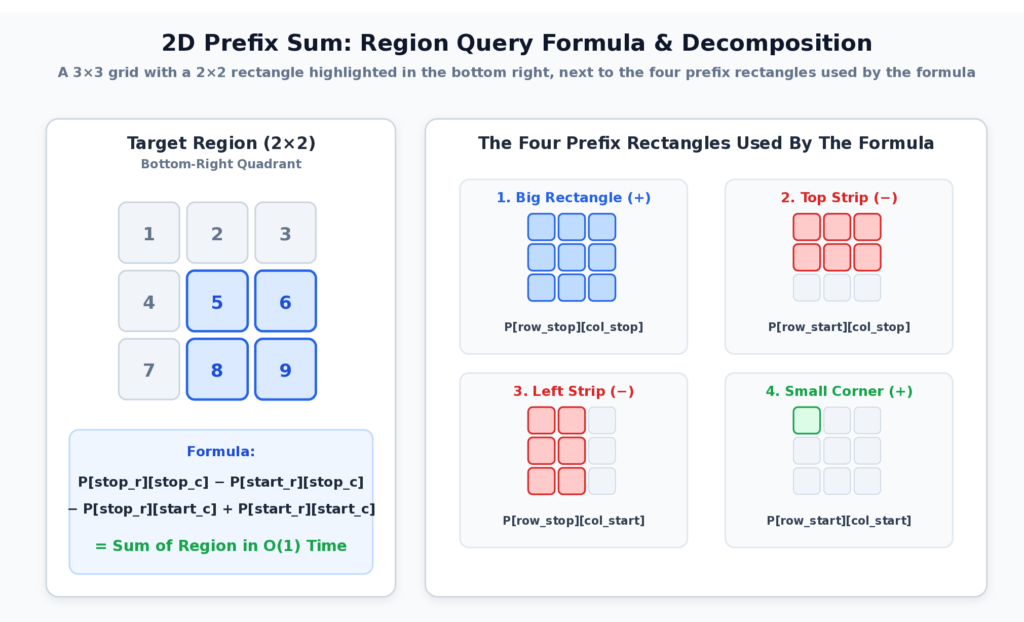
The idea is the same as the odometer, but the “total so far” is now the sum of everything above and to the left of a point. The rectangle you want comes from four of those values:
region = P[row_stop][col_stop]
       - P[row_start][col_stop]
       - P[row_stop][col_start]
       + P[row_start][col_start]
Think of it as cutting a rectangle out of a larger one. You take the big block, cut off the strip above and the strip on the left, and then notice that the top-left corner was cut twice. So you add it back once.
Add this class to prefix_sum.py:
class RegionSum:
    """Answer rectangle-sum queries on a grid in O(1) time."""

    __slots__ = ("rows", "cols", "_prefix")

    def __init__(self, grid: Sequence[Sequence[int]]) -> None:
        rows = len(grid)
        cols = len(grid[0]) if rows else 0
        if any(len(row) != cols for row in grid):
            raise ValueError("every row must have the same length")

        self.rows, self.cols = rows, cols
        self._prefix = [[0] * (cols + 1)]
        for row in grid:
            # Each prefix row is the one above it, plus this row's running totals.
            running = accumulate(row, initial=0)
            self._prefix.append(
                [above + here for above, here in zip(self._prefix[-1], running, strict=True)]
            )

    def sum_region(
        self, row_start: int, row_stop: int, col_start: int, col_stop: int
    ) -> int:
        """Return the sum of grid[row_start:row_stop][col_start:col_stop]."""
        if not (0 <= row_start <= row_stop <= self.rows):
            raise ValueError(f"need 0 <= row_start <= row_stop <= {self.rows}")
        if not (0 <= col_start <= col_stop <= self.cols):
            raise ValueError(f"need 0 <= col_start <= col_stop <= {self.cols}")
        p = self._prefix
        return (
            p[row_stop][col_stop]
            - p[row_start][col_stop]
            - p[row_stop][col_start]
            + p[row_start][col_start]
)The same idea builds the table, one row at a time. For each row of the grid, you take its running totals with accumulate(), and add them to the prefix row above. That gives, for every cell, the sum of everything above and to its left. The table gets an extra row and column of zeros, just like the 1D version got an extra zero. The strict=True in zip() raises an error if the two rows ever differ in length, instead of silently dropping items.
You may see the classic cell-by-cell version in other tutorials: P[r+1][c+1] = grid[r][c] + P[r][c+1] + P[r+1][c] - P[r][c]. It builds the same table. The row-by-row version is shorter, and it reuses accumulate() from the 1D case.
Try the small grid from the figure:
>>> from prefix_sum import RegionSum
>>> grid = [[1, 2, 3], [4, 5, 6], [7, 8, 9]]
>>> regions = RegionSum(grid)
>>> regions.sum_region(1, 3, 1, 3)
28
>>> regions.sum_region(0, 3, 0, 3)
45The first answer is 5 + 6 + 8 + 9 = 28. The second is the whole grid. Building the table takes O(rows × cols) time and space. After that, every query is four lookups, so it is O(1).
Add the oracle to brute_force.py and a test with random grids to test_prefix_sum.py:
def region_sum_brute(
    grid: Sequence[Sequence[int]],
    row_start: int,
    row_stop: int,
    col_start: int,
    col_stop: int,
) -> int:
    """Add up every cell in the rectangle from scratch."""
    return sum(
        grid[r][c] for r in range(row_start, row_stop) for c in range(col_start, col_stop)
    )
def test_region_sum_agrees_with_brute_force_on_random_input() -> None:
rng = random.Random(3)
for _ in range(300):
rows, cols = rng.randint(1, 6), rng.randint(1, 6)
grid = [[rng.randint(-9, 9) for _ in range(cols)] for _ in range(rows)]
regions = RegionSum(grid)
r1 = rng.randint(0, rows)
r2 = rng.randint(r1, rows)
c1 = rng.randint(0, cols)
c2 = rng.randint(c1, cols)
assert regions.sum_region(r1, r2, c1, c2) == region_sum_brute(grid, r1, r2, c1, c2)(The repository version also has the example test and a ragged-grid test.)
Run the Report
Now you have everything demo.py needs:
(venv) $ python demo.py
5,375 requests over 240 minutes
Hour 1: 1,227 requests, 25 errors
Hour 2: 1,788 requests, 39 errors
Hour 3: 1,194 requests, 77 errors
Hour 4: 1,166 requests, 21 errors
Error rate during the incident (minutes 150-159): 30.5%
Error rate during the spike (minutes 100-107): 1.7%
Net user change, minutes 0-239: 118
Stretches with a net change of exactly 25: 196
Longest stretch with a net change of 0: 109 minutes, from minute 1
/cart and /checkout requests in hours 2 and 3: 1037
The first line matches the sliding window tutorial, which is a good sign that you’re working on the same log. The numbers tell the story you built into the data:
- Hour 2 has the most traffic, because the spike at minutes 100 to 107 falls inside it.
- Hour 3 has the most errors, because the incident at minutes 150 to 159 falls inside it.
- The error rate during the incident is 30.5%, close to the 35% failure chance in the data. During the spike, it is 1.7%. The spike was busy, but it wasn’t broken.
The last line is the 2D query. You can check it by hand from the grid. The /cart row for hours 2 and 3 is 295 + 212 = 507, the /checkout row is 314 + 216 = 530, and 507 + 530 = 1,037.
Prefix Sum vs Sliding Window: Which Works With Negative Numbers?
Prefix sum vs sliding window: Use a sliding window to find the best block, such as the longest or shortest, when the numbers are non-negative. Use a prefix sum to answer many range-sum queries, or to find subarrays with a given sum, especially when the numbers can be negative.
Both techniques work on contiguous blocks, so how do you choose? Ask what the question looks like.
| Sliding window | Prefix sum | |
|---|---|---|
| Typical question | “Find the best block.” (longest, shortest, busiest) | “What is the sum of this block?” Or “which blocks have sum k?” |
| How queries arrive | One pass, answer is one result | Many queries on the same data |
| Negative numbers | Usually break the shrinking rule | No problem |
| Needs a rule that grows and shrinks predictably | Yes | No |
| Extra space | Often O(1) | O(n) for the array or dictionary |
| Works on a stream | Yes | Only the dictionary versions |
A short way to remember it: a sliding window moves, and a prefix sum remembers. The window walks along the data and keeps only what is inside. The prefix sum keeps a history of totals, so it can answer questions about any block at any time.
There is also a good middle ground. If the numbers are all positive and you want the shortest or longest block, the sliding window is simpler and uses O(1) space. If the numbers can be negative, or you will ask many different questions, use prefix sums.
Prefix Sum vs Difference Array
A difference array is the mirror image of a prefix sum. They are inverse operations:
- A prefix sum turns a list into its running totals.
- A difference array turns a list into its step-by-step changes. Taking the prefix sum of a difference array gives back the original list.
The problems they solve are mirror images too. A prefix sum makes range queries fast: many questions, no changes. A difference array makes range updates fast: many “add 5 to every item from index 3 to 8” operations, then one pass to see the final result.
If your problem says “add to a range,” think difference array. If it says “sum of a range,” think prefix sum. The article on difference arrays builds directly on what you learned here.
Time and Space Complexity of Prefix Sums
Prefix sum complexity: Building a prefix sum takes O(n) time and O(n) space. Each range-sum query then takes O(1) time. Recomputing every range from scratch instead costs O(n) per query.
| Tool | Time | Extra space | Why |
|---|---|---|---|
| Recompute each range | O(n) per query | O(1) | Adds every item in the range |
build_prefix / RangeSum(...) | O(n) once | O(n) | One pass, n + 1 stored totals |
RangeSum.sum_range | O(1) per query | O(1) | Two lookups and a subtraction |
sum_ranges (NumPy) | O(q) for q queries | O(q) | One vectorized subtraction |
longest_subarray_with_sum | O(n) | O(n) | One pass, dictionary of first positions |
count_subarrays_with_sum | O(n) | O(n) | One pass, counter of totals |
RegionSum(...) | O(rows × cols) once | O(rows × cols) | Each cell uses three earlier cells |
RegionSum.sum_region | O(1) per query | O(1) | Four lookups |
Two assumptions sit behind these numbers. Dictionary and Counter operations are O(1) on average, which is true for Python’s dict in normal use but is an average, not a promise for every input.
The second assumption is about numbers. Python integers never overflow, so integer prefix sums are always exact. NumPy integers can wrap around, as you saw. Floating-point numbers are different again. Subtracting two large, nearly equal totals can lose small differences. If you need exact answers on money or counts, use integers, such as cents instead of dollars.
Common Prefix Sum Mistakes
Each of the bugs in pitfalls.py has a test, so the lesson stays in the suite. Add these two functions to pitfalls.py, next to the one you already wrote:
def sum_range_inclusive_mixup(values: Sequence[int], left: int, right: int) -> int:
    """Bug: treats `right` as included, but uses the half-open formula."""
    prefix = list(accumulate(values, initial=0))
    return prefix[right] - prefix[left]  # Should be prefix[right + 1].


def count_subarrays_no_seed(values: Sequence[int], target: int) -> int:
    """Bug: forgets that the empty prefix (sum 0) has been seen once."""
    seen: Counter[int] = Counter()  # Missing: Counter({0: 1})
    running = 0
    count = 0
    for value in values:
        running += value
        count += seen[running - target]
        seen[running] += 1
return countSave these tests as test_pitfalls.py:
from brute_force import count_subarrays_brute
from pitfalls import (
    count_subarrays_no_seed,
    count_subarrays_sliding_window,
    sum_range_inclusive_mixup,
)
from prefix_sum import RangeSum, count_subarrays_with_sum


def test_inclusive_mixup_leaves_out_the_last_item() -> None:
    values = [3, 1, 4, 1, 5]
    assert sum(values[1:4]) == 6  # items at index 1, 2 and 3
    assert RangeSum(values).sum_range(1, 4) == 6
    assert sum_range_inclusive_mixup(values, 1, 3) == 5  # missed the item at index 3


def test_missing_seed_skips_subarrays_that_start_at_index_zero() -> None:
    values = [3, 4, 7]
    assert count_subarrays_brute(values, 7) == 2  # [3, 4] and [7]
    assert count_subarrays_with_sum(values, 7) == 2
    assert count_subarrays_no_seed(values, 7) == 1


def test_sliding_window_count_breaks_on_negative_numbers() -> None:
    values = [1, -1, 1]
    assert count_subarrays_brute(values, 1) == 3
    assert count_subarrays_with_sum(values, 1) == 3
    assert count_subarrays_sliding_window(values, 1) == 2


def test_sliding_window_count_is_fine_when_numbers_are_all_positive() -> None:
    values = [1, 2, 3, 4, 1, 2]
assert count_subarrays_sliding_window(values, 3) == count_subarrays_brute(values, 3)The last test is the sneaky one. The sliding window version passes on all-positive input, so it can survive a lot of testing before the first negative number exposes it.
Here is what each test teaches:
- Mixing up inclusive and half-open ranges. If your problem gives you an inclusive range
[left, right], the answer isprefix[right + 1] - prefix[left]. Writingprefix[right]quietly leaves out the last item. Check your formula on a range of one item, such as[2, 2]. It should give backvalues[2]. - Forgetting the starting zero. In the dictionary versions, the starting entry
{0: 0}orCounter({0: 1})represents the empty prefix. Without it, every block that begins at index 0 is missed. This is one of the most common bugs in interview solutions, because the code looks complete. - Using a sliding window when numbers can be negative. The count comes out wrong, and no error is raised.
Four more mistakes are worth watching for:
- Using a stale prefix array. The array is a snapshot. If you change
values[3]after building it, every later answer that spans index 3 is wrong. If your data changes often, a prefix array is the wrong tool. A Fenwick tree (binary indexed tree) handles updates and queries in O(log n), and it deserves its own article. - Recording the current total before counting. In
count_subarrays_with_sum(), update the answer first, and the counter second. The other order breaks the case wheretargetis 0. - Rebuilding the prefix array for every query. If you call
build_prefix()inside a loop of queries, you have turned an O(1) query back into O(n). Build once, then query. - Trusting fixed-width integers. NumPy
int64totals can wrap around without an error when they get huge.
Edge Cases to Test Every Time
Prefix sum code usually breaks at the edges. Try these on every function:
- an empty list
- one item
- a range that covers the whole input
- an empty range, where
start == stop - negative numbers
- zeros, which can create many equal prefix totals
- a target that no block reaches, and the function should say so clearly
- a target of 0, which is where “count before recording” matters
Practice Problems With Solutions
Three more problems use the same ideas. Try each one for a few minutes before you open the solution. Save the solutions as practice.py. The tests for them are in test_practice.py in the repository.
Find the Pivot Index
Given a list of integers, return the first index where the sum of everything to its left equals the sum of everything to its right. Return -1 if there is none. Hint: you don’t need the full prefix array. Keep the left sum, and get the right sum from the total.
"""Practice problems for the prefix sum technique."""

from collections import Counter
from collections.abc import Sequence

from prefix_sum import longest_subarray_with_sum


def pivot_index(values: Sequence[int]) -> int:
    """Return the first index where the sum on the left equals the sum on the right.

    Returns -1 if there is no such index.
    """
    total = sum(values)
    left_sum = 0
    for index, value in enumerate(values):
        if left_sum == total - left_sum - value:
            return index
        left_sum += value
return -1The right side is the total, minus the left side, minus the item itself. The time is O(n) and the extra space is O(1). This is a prefix sum where only the current value is kept. </details>
Count Subarrays Divisible by K
Given a list of integers and a number k, return how many subarrays have a sum divisible by k. Hint: two prefix totals with the same remainder when divided by k mean the block between them is divisible by k.
def subarrays_divisible_by_k(values: Sequence[int], k: int) -> int:
    """Return how many subarrays have a sum divisible by k."""
    if k < 1:
        raise ValueError("k must be at least 1")
    seen = Counter({0: 1})
    running = 0
    count = 0
    for value in values:
        running = (running + value) % k  # Python's % is never negative here.
        count += seen[running]
        seen[running] += 1
return countThis is the counting pattern again, with remainders instead of totals. The difference between two totals is divisible by k exactly when their remainders match. Python’s % always returns a value between 0 and k - 1 for a positive k, even for negative totals. That is why this works without extra care, while the same code in some other languages needs a fix-up. The time is O(n) and the extra space is O(k). </details>
Longest Run With Equal Zeros and Ones
Given a list of 0s and 1s, return the length of the longest block that has the same number of 0s and 1s. Hint: change every 0 into −1. Now “equal numbers” means “the block sums to 0.” <details> <summary>Solution</summary>
def longest_balanced_run(bits: Sequence[int]) -> int:
    """Return the length of the longest run with equally many 0s and 1s."""
    swapped = [1 if bit == 1 else -1 for bit in bits]
    result = longest_subarray_with_sum(swapped, 0)
return 0 if result is None else result[1] - result[0]Here the trick is to reshape the problem until it matches a tool you already have. After the swap, this is exactly longest_subarray_with_sum() with a target of 0. The time is O(n) and the extra space is O(n). </details>
How to Recognize a Prefix Sum Problem
Knowing the code is half the skill. Spotting the problem is the other half. Read the problem and ask these questions in order:
- Does it ask about a contiguous block, such as a subarray, a substring, a time range, or a rectangle?
- Is the quantity something you can add and subtract, like counts, sums, or totals?
- Will you ask many questions about the same data, or does it say “sum equals k,” “divisible by k,” or “equal number of”?
- Can the numbers be negative, or is the data not suited to a window that grows and shrinks?
If the first two answers are yes and either of the last two is yes, a prefix sum is very likely the right tool. If the problem is “find the best block” on positive numbers, the sliding window may be simpler.
Frequently Asked Questions
What is the time complexity of a prefix sum?
Building it takes O(n) time and O(n) space. After that, each range-sum query takes O(1) time.
Why does the prefix array start with 0?
The zero stands for “nothing added yet.” It lets you use one formula,
prefix[stop] - prefix[start], for every range, including ranges that start at index 0.Why does the hash map start with
{0: 1}in subarray sum equals k?That entry stands for the empty prefix before the first item, whose sum is 0. Without it, every subarray that starts at index 0 is missed.
Why does a sliding window fail for subarray sum equals k?
Shrinking a window only makes sense if removing a number always lowers the total. With negative numbers, that is false, so valid blocks are skipped. The
[1, -1, 1]test above shows a window returning 2 instead of 3.Can prefix sums handle negative numbers?
Yes. They only add and subtract, so the sign doesn’t matter. This is the main reason to choose them over a sliding window for “sum equals k” problems.
Can prefix sums handle negative numbers?
Yes. They only add and subtract, so the sign doesn’t matter. This is the main reason to choose them over a sliding window for “sum equals k” problems.
What is the difference between
itertools.accumulateandnp.cumsum?accumulateis in the standard library, works on any iterable, and has aninitialargument for the leading zero.np.cumsumworks on NumPy arrays and is the better fit for batch queries on large data, but its fixed-width integers can overflow.Can I use a prefix sum if the data changes?
Not without extra work. A prefix array is a snapshot, and one change means rebuilding it in O(n). If you mix many updates with many queries, look at a Fenwick tree or a segment tree.
Conclusion
You built a tested query toolkit around the prefix sum technique and measured why it matters. With 5,000 range queries on 200,000 values, recomputing took about 3.1 seconds, and the prefix sum took about 20 milliseconds. Along the way, you:
- Built a prefix array with
itertools.accumulate(), a loop, and NumPy, and wrapped it in aRangeSumclass - Used half-open ranges, so that every range follows the same formula
- Measured that a prefix sum loses at 10 queries and wins by a wide margin at thousands
- Answered 200,000 queries at once with one NumPy subtraction
- Replaced loops with one-liners using
pairwise(),batched(),bisectandmath.comb() - Found and counted subarrays with a given sum using a dictionary of earlier totals, including with negative numbers
- Extended the idea to a grid with
RegionSum - Checked every fast version against brute force on thousands of random inputs
- Saw how a missing zero, a mixed-up range, or a sliding window with negative numbers gives wrong answers without any error
The key habit is two questions. When you see a problem about contiguous blocks, ask whether the data stays still and the questions keep coming. Then ask whether the numbers can be negative. If either answer is yes, reach for a prefix sum.
A natural next step is difference arrays. They are the mirror image of what you just built: instead of making range queries fast, they make range updates fast. If you want the bigger picture, the Data Structures & Algorithms with Python roadmap shows where this fits. The array manipulation patterns guide compares prefix sums, two pointers, sliding windows and the other array techniques side by side.
The complete project is on GitHub, if you want to run the tests yourself. https://github.com/Emmimal/prefix-sum-in-python/
Sources
- Python documentation:
itertools.accumulate()describes theinitialargument used to start the prefix array with zero. The same page coverspairwise()andbatched(). - Python documentation:
collections.Counterdescribes the counting dictionary used for the subarray problems. - Python documentation: Common Sequence Operations explains slice semantics, which the half-open range convention follows.
- Python documentation:
bisectandmath.comb()are used in the shortcuts section. - Python documentation: The
typestatement describes the type alias syntax added in Python 3.12. - NumPy documentation:
numpy.cumsumdescribes the cumulative sum function and itsoutargument. - Code: Prefix Sum in Python on GitHub has the complete project and tests.


Leave a Reply