

Sliding Window in Python: From Algorithm to Request Rate Limiter
Sliding Window in Python: This is the third article in the Arrays & Strings cluster. It builds on Two Pointers in Python: A Complete Problem-Solving Guide, so read that one first if you haven’t. It is part of the Data Structures & Algorithms with Python roadmap.
Your team has a dashboard that shows requests per minute. Someone asks a simple question: “What were the busiest five minutes today?” A few minutes later, a harder one follows: “What is the shortest stretch of time that had at least 40 errors?” And then: “Can we reject a user who sends more than 14 requests in any 10 seconds?”
These look like three different problems. They are all the same problem. Each one asks about a block of neighboring items that moves along a stream of data. In the last article, you saw that two pointers can mark the two ends of such a block. The sliding window technique is what you get when you also keep a running value for everything between those ends.
In this tutorial, you’ll use the sliding window technique to build a small monitoring toolkit for a request log. Every function is tested against a slow brute-force version, and every speed claim is measured.
In this tutorial, you’ll learn how to:
- Explain why recomputing every window wastes work, and how a sliding window avoids it
- Tell a fixed-size window from a variable-size window, and a count-based window from a time-based one
- Use
collections.dequeand generators to slide a window over a stream of data - Keep a dictionary or a
Counteras the running value for string and log problems - Build a rate limiter on top of a sliding window
- Recognize the inputs where a sliding window silently gives wrong answers
Prerequisites: You should know Python lists, strings, dictionaries, generators and functions, and have a basic idea of Big O notation. You should also be comfortable running pytest from a terminal. The code needs Python 3.12 or later, because it uses the def windows[T](...) generics syntax. It was tested on Python 3.12, 3.13, 3.14, and a 3.15 beta, and the timings below come from Python 3.14.
Get the code. The complete, tested project for this tutorial is on GitHub. Clone it and follow along, or build each file as you read.
Understanding the Sliding Window Technique
Think of a train window. As the train moves, you see a small part of a long landscape. One new tree comes into view on the right, and one old tree leaves on the left. You don’t stop the train and count every tree again from the start.
A window in code is the same thing: a block of items that sit next to each other in a list or a string. You slide it along the data one step at a time. At each step, one item enters the window and one item may leave. You update a running answer instead of rebuilding it.
Why Recomputing Every Window Wastes Work
Take the numbers [2, 1, 5, 1, 3, 2] and ask for the largest sum of any three neighbors. The slow way adds up every window from scratch:
[2, 1, 5] → 8
[1, 5, 1] → 7
[5, 1, 3] → 9
[1, 3, 2] → 6
Look at the first two windows. The numbers 1 and 5 are in both, and the slow way adds them twice. The window moved by one step, so only two things changed: the 2 left and a 1 came in. The new sum is the old sum minus 2 plus 1.
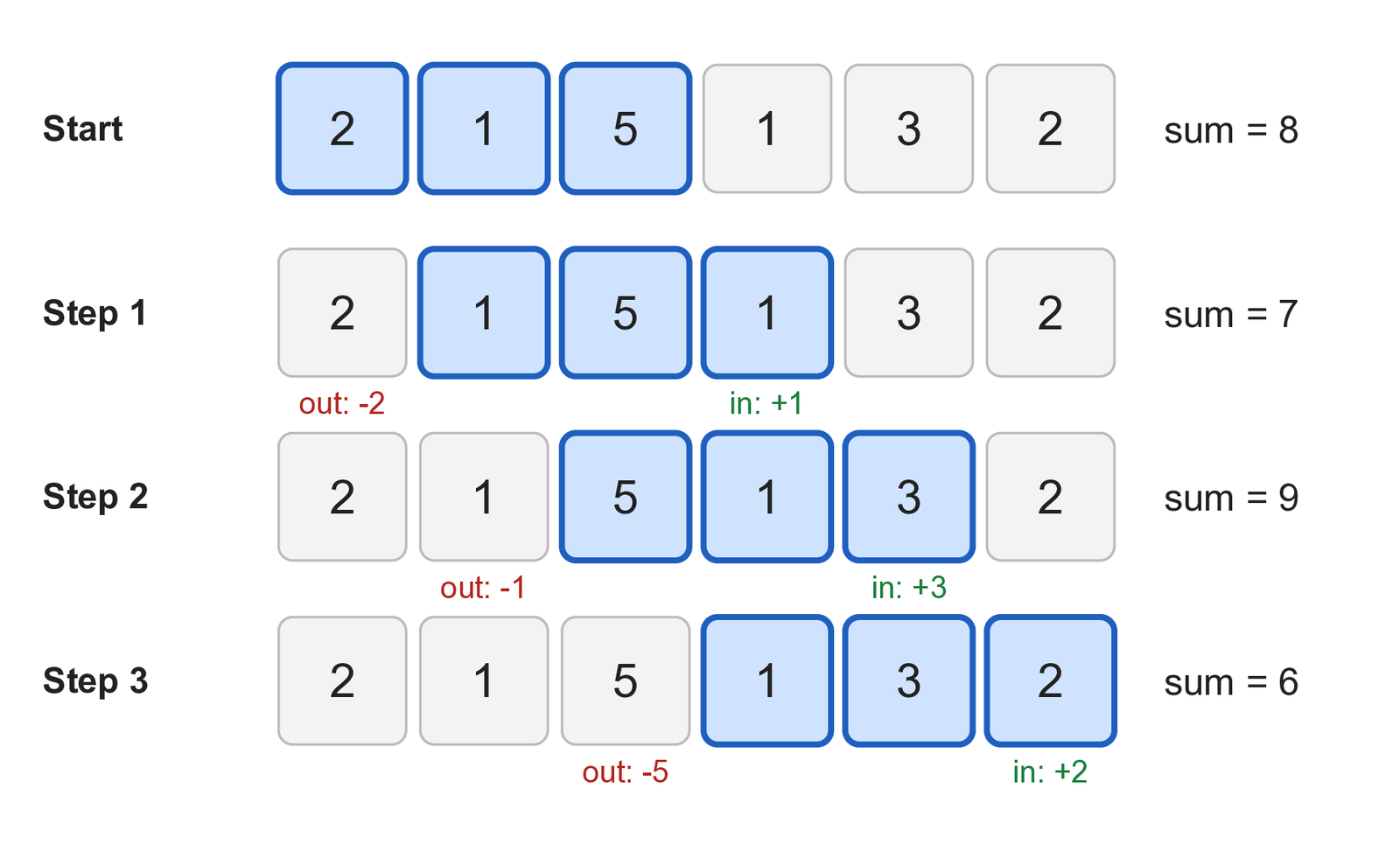
The size of the window does not change the cost of a step. A window of 3 and a window of 3,000 both cost one addition and one subtraction. That is how the technique turns O(n × k) work into O(n), where n is the length of the data and k is the window size.
Fixed and Variable Windows
There are two main shapes, and it helps to name them early:
- A fixed-size window always holds
kitems. Both edges move together, one step at a time. You use it when the question says “of sizek” or “everykminutes.” - A variable-size window grows and shrinks. The right edge always moves forward. The left edge moves only when the window breaks a rule. You use it when the question says “shortest,” “longest,” “at most,” or “at least.”
A window can also be measured in time instead of items, such as “the last 10 seconds.” You’ll build one of those too.
Setting Up the Project
The project is a flat folder of small modules, like the two pointers project. Create the folder, a virtual environment, and install pytest:
$ mkdir sliding_window
$ cd sliding_window
$ python -m venv venv
$ source venv/bin/activate
(venv) $ python -m pip install pytest
On Windows, activate the environment with venv\Scripts\activate instead. You will create these files as you go:
sliding_window/
├── sample_data.py
├── sliding_window.py
├── rate_limiter.py
├── brute_force.py
├── pitfalls.py
├── practice.py
├── benchmark.py
├── demo.py
├── test_sliding_window.py
├── test_rate_limiter.py
├── test_pitfalls.py
└── test_practice.py
sliding_window.py and rate_limiter.py are the toolkit. brute_force.py holds slow, obviously correct solutions. They do two jobs: they are a speed baseline, and they are a test oracle that your fast code must agree with. The tests use random.Random(seed) with a fixed seed, so a failure is reproducible.
Make a Request Log to Work With
You need data. Save this as sample_data.py. It builds a fake request log with steady traffic, a spike around minute 100, and an incident from minute 150 to 159 where many requests fail:
"""Make a small, repeatable request log to run the sliding window tools on."""

import random
from dataclasses import dataclass

ENDPOINTS = ["/home", "/search", "/cart", "/checkout", "/login", "/api/items"]


@dataclass(frozen=True, slots=True)
class Request:
    """One line of the request log."""

    timestamp: float  # seconds since the log started
    user: int
    endpoint: str
    status: int


def make_requests(minutes: int = 240, seed: int = 42) -> list[Request]:
    """Return a fake request log, sorted by timestamp.

    Traffic is steady, with a spike around minute 100 and an incident
    from minute 150 to 159 where many requests fail.
    """
    rng = random.Random(seed)
    requests: list[Request] = []

    for minute in range(minutes):
        rate = 90 if 100 <= minute < 108 else 20
        error_chance = 0.35 if 150 <= minute < 160 else 0.02

        for _ in range(rng.randint(rate - 5, rate + 5)):
            requests.append(
                Request(
                    timestamp=minute * 60 + rng.random() * 60,
                    user=rng.randint(1, 400),
                    endpoint=rng.choice(ENDPOINTS),
                    status=500 if rng.random() < error_chance else 200,
                )
            )

    requests.sort(key=lambda request: request.timestamp)
    return requests


def per_minute(requests: list[Request], minutes: int = 240) -> tuple[list[int], list[int]]:
    """Return (requests per minute, errors per minute) as two lists."""
    totals = [0] * minutes
    errors = [0] * minutes
    for request in requests:
        minute = int(request.timestamp // 60)
        totals[minute] += 1
        if request.status >= 500:
            errors[minute] += 1
return totals, errorsmake_requests() gives you a list of Request objects, one per log line. per_minute() turns the log into two lists of 240 numbers: how many requests arrived in each minute, and how many of them failed. Most of the tutorial works on those two lists, and later parts use the raw log.
Because the seed is fixed, you should get the same log, and the same numbers in the report at the end, that this tutorial shows.
Using a Fixed-Size Window
Start with the dashboard question: what were the busiest five minutes? Before you speed anything up, write the obvious version and measure it. Save this as brute_force.py:
"""Slow but obviously correct solutions, used as a baseline and as a test oracle."""

from collections.abc import Hashable, Sequence


def busiest_window_brute(counts: Sequence[int], size: int) -> tuple[int, int]:
    """Return (total, start) of the largest window sum, earliest on a tie."""
    if size < 1 or size > len(counts):
        raise ValueError("size must be between 1 and len(counts)")
    best_total, best_start = sum(counts[:size]), 0
    for start in range(1, len(counts) - size + 1):
        total = sum(counts[start : start + size])
        if total > best_total:
            best_total, best_start = total, start
return best_total, best_startYou’ll add the other brute-force functions in brute_force.py as you meet each problem. This one works, but it adds size numbers for each of the n − size + 1 windows. That is O(n × k), and when k is about half of n, it is O(n²).
Find the Busiest Window
Now write the sliding version. Save this as sliding_window.py:
"""A small toolkit of sliding window solutions."""

from collections import Counter, deque
from collections.abc import Hashable, Iterable, Iterator, Sequence
from itertools import islice


def busiest_window(counts: Sequence[int], size: int) -> tuple[int, int]:
    """Return (total, start) for the window of `size` items with the largest sum.

    On a tie, the earliest window wins. Raises ValueError for a bad size.
    """
    if size < 1 or size > len(counts):
        raise ValueError("size must be between 1 and len(counts)")

    window_total = sum(counts[:size])
    best_total, best_start = window_total, 0

    for right in range(size, len(counts)):
        # Add the item that enters, drop the item that leaves.
        window_total += counts[right] - counts[right - size]
        if window_total > best_total:
            best_total, best_start = window_total, right - size + 1

return best_total, best_startThe function builds the first window with sum(counts[:size]). Then right points at the item that is entering the window. The item that leaves is size places behind it, at right - size. One line updates the total, and one if records the best window and where it starts.
Try it on the numbers from the diagram:
>>> from sliding_window import busiest_window
>>> busiest_window([2, 1, 5, 1, 3, 2], 3)
(9, 2)The best total is 9, and the window starts at index 2, which is [5, 1, 3]. Compare this with the diagram: the sums are 8, 7, 9, and 6.
The loop runs n − size times, and each round does a fixed amount of work, so the time is O(n). The extra space is O(1), because you only store a few numbers. The function also raises ValueError for a bad size. A window of size 0, or one bigger than the data, has no meaning, so it is better to say so than to return a number.
Test It Against the Brute Force
One example passing proves little. A stronger check is to run both versions on thousands of random inputs and require them to agree. Save this as test_sliding_window.py:
import random

import pytest

from brute_force import busiest_window_brute
from sliding_window import busiest_window


def test_busiest_window_example() -> None:
    assert busiest_window([2, 1, 5, 1, 3, 2], 3) == (9, 2)


@pytest.mark.parametrize(
    ("counts", "size", "expected"),
    [
        ([5], 1, (5, 0)),
        ([1, 2, 3], 3, (6, 0)),
        ([-1, -2, -3], 2, (-3, 0)),
        ([4, 4, 4, 4], 2, (8, 0)),  # tie: earliest window wins
    ],
)
def test_busiest_window_edge_cases(
    counts: list[int], size: int, expected: tuple[int, int]
) -> None:
    assert busiest_window(counts, size) == expected


@pytest.mark.parametrize(("counts", "size"), [([], 1), ([1, 2], 3), ([1, 2], 0)])
def test_busiest_window_rejects_bad_size(counts: list[int], size: int) -> None:
    with pytest.raises(ValueError):
        busiest_window(counts, size)


def test_busiest_window_agrees_with_brute_force_on_random_input() -> None:
    rng = random.Random(42)
    for _ in range(1_000):
        counts = [rng.randint(-10, 10) for _ in range(rng.randint(1, 15))]
        size = rng.randint(1, len(counts))
assert busiest_window(counts, size) == busiest_window_brute(counts, size)The edge cases are chosen on purpose. A window the size of the whole input, a window of one item, a tie, and negative numbers are where window code usually breaks. The fixed window handles negative numbers without trouble, because it never decides anything based on the sign of a number. It only adds and subtracts. Keep that in mind, because it changes later.
Measure the Difference
Now measure it. Save this as benchmark.py:
"""Time the sliding window tools against the obvious alternatives."""

import math
import random
from collections import deque
from collections.abc import Callable
from time import perf_counter

from brute_force import busiest_window_brute
from sliding_window import busiest_window, moving_average


def timed(func: Callable[[], object]) -> float:
    """Return how many seconds one call to func takes."""
    start = perf_counter()
    func()
    return perf_counter() - start


def report_recompute_vs_sliding() -> None:
    print("Busiest window: recompute vs sliding (window = half the data)")
    print(f"{'n':>7}  {'size':>6}  {'recompute':>10}  {'sliding window':>14}")
    for n in (5_000, 10_000, 20_000, 40_000):
        size = n // 2
        counts = list(range(n))
        slow = timed(lambda: busiest_window_brute(counts, size))
        fast = timed(lambda: busiest_window(counts, size))
print(f"{n:>7,} {size:>6,} {slow:>9.4f}s {fast:>13.6f}s")The file imports moving_average, which you’ll write in the next section, so you’ll finish benchmark.py there. For now, you can call the first report from a Python shell:
>>> from benchmark import report_recompute_vs_sliding
>>> report_recompute_vs_sliding()
Busiest window: recompute vs sliding (window = half the data)
      n    size   recompute  sliding window
  5,000   2,500     0.0367s       0.000234s
 10,000   5,000     0.1490s       0.000448s
 20,000  10,000     0.6000s       0.000637s
40,000 20,000 2.3256s 0.001542sYour times will differ, and single runs are noisy, but the shape should hold. At the larger sizes, the recompute version takes about four times as long each time n doubles. That is the signature of O(n²) when the window grows with the data. The sliding window time grows roughly in step with n. At 40,000 items, recomputing took about 2.3 seconds, and the sliding window took about 1.5 milliseconds.
Sliding a Window Over a Stream
So far, the data sat in a list. Real logs often arrive as a stream: lines read from a file, rows from a database cursor, or events from a socket. You can’t index into a stream, and you may not want to hold all of it in memory.
You can still slide a window over it. You only need to remember the last k items, and Python has the right tool for that.
Use a Deque as the Window
collections.deque is a double-ended queue. If you give it a maxlen, it throws away the oldest item on its own when you add a new one to a full deque. That is exactly how a window behaves. Add these functions to sliding_window.py:
def windows[T](iterable: Iterable[T], size: int) -> Iterator[tuple[T, ...]]:
    """Yield every window of `size` neighboring items, one tuple at a time.

    Works on any iterable, including generators, and holds only `size`
    items in memory.
    """
    if size < 1:
        raise ValueError("size must be at least 1")
    return _windows(iterable, size)


def _windows[T](iterable: Iterable[T], size: int) -> Iterator[tuple[T, ...]]:
    iterator = iter(iterable)
    window = deque(islice(iterator, size - 1), maxlen=size)
    for item in iterator:
        window.append(item)
yield tuple(window)This is based on the sliding_window() recipe in the itertools documentation. The standard library does not ship it as a function. At the time of writing, the docs list it as a recipe that is still being evaluated.
The [T] after the function name is the type-parameter syntax added in Python 3.12 (PEP 695). It says “this function works on items of any one type T,” and it replaces the older TypeVar setup. It is also why this tutorial needs Python 3.12 or later.
The function is split in two on purpose. A generator function runs none of its code until you call next() on it. If windows() were itself the generator, a bad size would only raise an error when you start to loop, possibly far from the line that caused it. By checking in a normal function and returning the generator, the error appears right at the call.
Try it:
>>> from sliding_window import windows
>>> list(windows("ABCDEFG", 3))
[('A', 'B', 'C'), ('B', 'C', 'D'), ('C', 'D', 'E'), ('D', 'E', 'F'), ('E', 'F', 'G')]
>>> stream = (n * n for n in range(5))
>>> list(windows(stream, 2))
[(0, 1), (1, 4), (4, 9), (9, 16)]The second example passes a generator, which has no len() and can’t be indexed. windows() doesn’t mind. It holds only size items at any moment, so memory use does not grow with the length of the stream.
Compute a Moving Average
A moving average is a very common window problem: the average response time over the last k requests. Add this to sliding_window.py:
def moving_average(values: Iterable[float], size: int) -> Iterator[float]:
    """Yield the average of every window of `size` values from a stream."""
    if size < 1:
        raise ValueError("size must be at least 1")

    window: deque[float] = deque(maxlen=size)
    total = 0.0

    for value in values:
        if len(window) == size:
            total -= window[0]  # This item is about to be pushed out.
        window.append(value)
        total += value
        if len(window) == size:
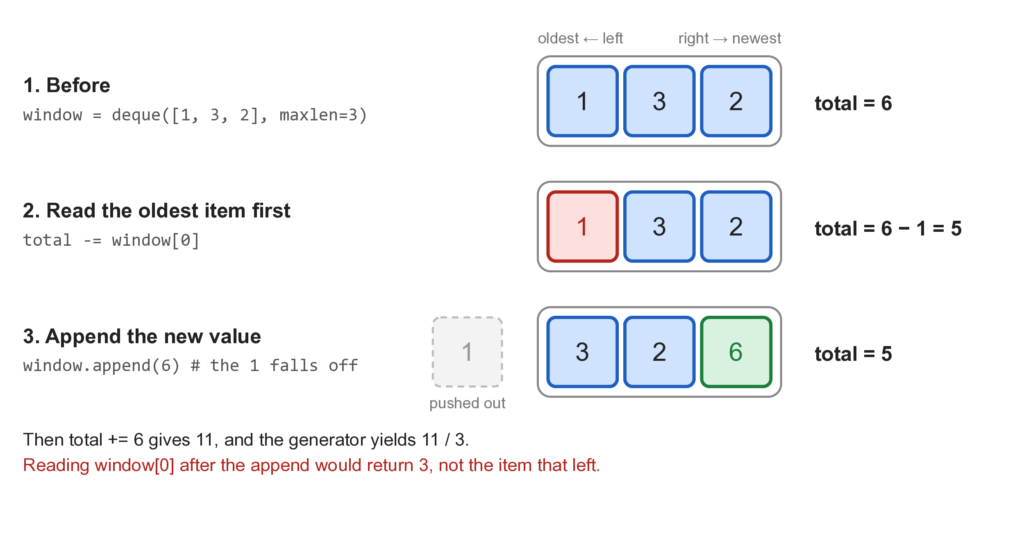
yield total / sizeYou need to subtract the item that leaves before you append the new one. A full deque(maxlen=size) discards its oldest item the moment you append, so after the append, that item is gone and you can’t read it. Reading window[0] first gets it while it is still there.
>>> from sliding_window import moving_average
>>> list(moving_average([1, 3, 2, 6, -1, 4], 3))
[2.0, 3.6666666666666665, 2.3333333333333335, 3.0]Is the Deque Version Faster?
It’s fair to ask. Add the rest of benchmark.py and compare three ways to compute a moving average: recompute each window from a slice, a running total with index arithmetic, and the deque generator:
def moving_average_slices(values: list[int], size: int) -> list[float]:
    """Recompute every window from a slice."""
    return [sum(values[i : i + size]) / size for i in range(len(values) - size + 1)]


def moving_average_indexes(values: list[int], size: int) -> list[float]:
    """Running total with index arithmetic."""
    total = sum(values[:size])
    averages = [total / size]
    for right in range(size, len(values)):
        total += values[right] - values[right - size]
        averages.append(total / size)
    return averages


def report_moving_average_styles() -> None:
    print()
    print("Moving average over 200,000 values: three ways")
    print(f"{'size':>6}  {'slices':>9}  {'indexes':>9}  {'deque generator':>15}")
    values = list(range(200_000))
    for size in (10, 100, 1_000):
        slices = timed(lambda: moving_average_slices(values, size))
        indexes = timed(lambda: moving_average_indexes(values, size))
        stream = timed(lambda: list(moving_average(values, size)))
        print(f"{size:>6,}  {slices:>8.4f}s  {indexes:>8.4f}s  {stream:>14.4f}s")


def report_float_drift() -> None:
    print()
    print("Float drift after 1,000,000 updates (window of 100)")
    rng = random.Random(1)
    values = [rng.random() * 1000 for _ in range(1_000_000)]
    size = 100
    window: deque[float] = deque(maxlen=size)
    total = 0.0
    for value in values:
        if len(window) == size:
            total -= window[0]
        window.append(value)
        total += value
    print(f"running total: {total!r}")
    print(f"exact total:   {math.fsum(window)!r}")


if __name__ == "__main__":
    report_recompute_vs_sliding()
    report_moving_average_styles()
report_float_drift()Run it:
(venv) $ python benchmark.py
Busiest window: recompute vs sliding (window = half the data)
      n    size   recompute  sliding window
  5,000   2,500     0.0367s       0.000234s
 10,000   5,000     0.1490s       0.000448s
 20,000  10,000     0.6000s       0.000637s
 40,000  20,000     2.3256s       0.001542s

Moving average over 200,000 values: three ways
  size     slices    indexes  deque generator
    10    0.0358s    0.0160s          0.0264s
   100    0.1370s    0.0135s          0.0239s
 1,000    1.1471s    0.0174s          0.0326s

Float drift after 1,000,000 updates (window of 100)
running total: 53386.44100454691
exact total:   53386.441004547654
There are three things to notice.
First, slicing gets slower as the window grows, as you’d expect. Both running-total versions stay flat, no matter the window size.
Second, the deque generator is not the fastest. On this machine, the index version beat it by about 1.6 to 1.9 times. Generators and deque calls cost something per item. So if your data is already in a list, index arithmetic is the faster choice.
Third, the deque generator is the one that works on a stream. It never needs the whole input, and its memory use depends only on the window size. That is what you pay the extra time for.
The last report shows something about floating-point numbers. Adding and subtracting floats over and over can let tiny errors build up. After a million updates, the running total differs from the exact total by about 7 × 10⁻¹⁰, on a value of about 53,386. That is negligible here. If you need exact answers over very long streams, use integers, such as milliseconds instead of fractional seconds, or recompute the total now and then.
Using a Variable-Size Window
A fixed window is the easy case. Real questions often ask for the shortest or longest stretch that follows a rule, and the size is not given. For that, the left edge needs its own rule for when to move.
Find the Shortest Burst of Errors
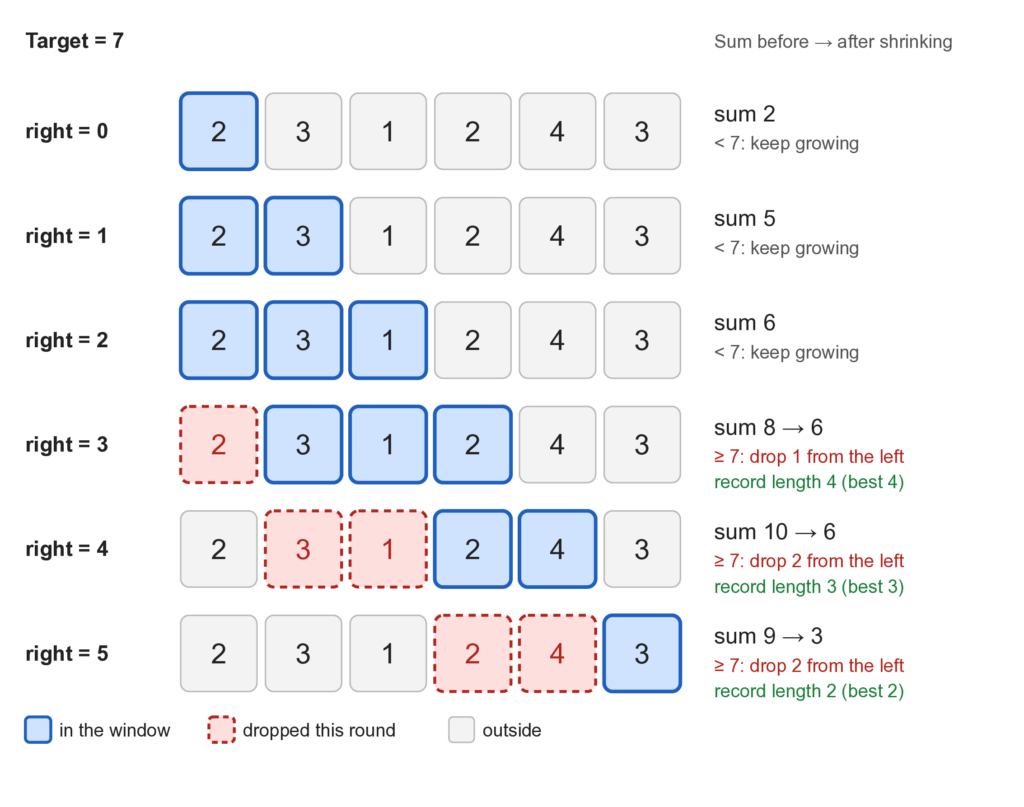
Back to the dashboard. During an incident, someone asks: what is the shortest stretch of minutes that had at least 40 errors? That tells you how concentrated the failures were.
Here the window grows until it holds enough errors, then shrinks from the left to find the shortest version that still does. Add this to sliding_window.py:
def shortest_burst(counts: Sequence[int], target: int) -> tuple[int, int] | None:
    """Return (length, start) of the shortest window whose sum is >= target.

    Returns None when no window reaches the target. Every count must be
    zero or more: the shrinking rule below is wrong for negative numbers,
    so they are rejected instead of giving a quiet wrong answer.
    """
    if target < 1:
        raise ValueError("target must be at least 1")
    if any(count < 0 for count in counts):
        raise ValueError("counts must not be negative")

    left = 0
    window_total = 0
    best: tuple[int, int] | None = None

    for right, value in enumerate(counts):
        window_total += value

        # The window is big enough, so shrink it as far as we can.
        while window_total >= target:
            length = right - left + 1
            if best is None or length < best[0]:
                best = (length, left)
            window_total -= counts[left]
            left += 1

return bestThe right edge always moves forward and adds a count. Whenever the total reaches the target, the window is good enough. So you record its length, then remove counts from the left to see whether a shorter window still reaches the target. When the total drops below the target, the inner loop stops, and the right edge continues.
>>> from sliding_window import shortest_burst
>>> shortest_burst([2, 3, 1, 2, 4, 3], 7)
(2, 4)The shortest window has length 2 and starts at index 4. That is [4, 3]. Here is the trace, with the target at 7:
right | Item in | Window | Total | What happens |
|---|---|---|---|---|
| 0 | 2 | [2] | 2 | Too small, keep going |
| 1 | 3 | [2, 3] | 5 | Too small, keep going |
| 2 | 1 | [2, 3, 1] | 6 | Too small, keep going |
| 3 | 2 | [2, 3, 1, 2] | 8 | Reached 7. Length 4. Drop 2, total 6 |
| 4 | 4 | [3, 1, 2, 4] | 10 | Length 4. Drop 3, total 7. Length 3. Drop 1, total 6 |
| 5 | 3 | [2, 4, 3] | 9 | Length 3. Drop 2, total 7. Length 2. Drop 4, total 3 |
You might worry that the while loop inside the for loop makes this O(n²). It doesn’t. Count how many times each item is touched, not how the loops are nested. Each item enters the window once, when right reaches it. Each item leaves at most once, when left passes it. So the right edge moves exactly n times, the left edge moves at most n times, and the total work is at most 2n steps. That is O(n), with O(1) extra space.
Notice also that the function refuses negative counts. That is deliberate, and you’ll see exactly why in a later section.
Run it on the sample log. Save this as demo.py and build on it as you go:
"""Run the sliding window tools on a fake request log and print a report."""

from rate_limiter import SlidingWindowRateLimiter
from sample_data import make_requests, per_minute
from sliding_window import (
    busiest_window,
    longest_distinct_run,
    longest_run_with_at_most_k_distinct,
    max_events_in_window,
    shortest_burst,
)

MINUTES = 240


def main() -> None:
    requests = make_requests(MINUTES)
    totals, errors = per_minute(requests, MINUTES)
    print(f"{len(requests):,} requests over {MINUTES} minutes")

    total, start = busiest_window(totals, 5)
    print(f"Busiest 5 minutes: minute {start} to {start + 4}, {total} requests")

    burst = shortest_burst(errors, 40)
    if burst is not None:
        length, start = burst
        print(f"Shortest stretch with 40+ errors: {length} minutes, starting at minute {start}")

    timestamps = [request.timestamp for request in requests]
    print(f"Most requests in any 10 seconds: {max_events_in_window(timestamps, 10)}")

    users = [request.user for request in requests]
    length, start = longest_distinct_run(users)
    print(f"Longest run with no repeated user: {length} requests, starting at line {start}")

    endpoints = [request.endpoint for request in requests]
    length, start = longest_run_with_at_most_k_distinct(endpoints, 2)
    print(f"Longest run touching at most 2 endpoints: {length} requests, starting at line {start}")

    limiter = SlidingWindowRateLimiter(limit=14, window_seconds=10)
    rejected = sum(not limiter.allow(timestamp) for timestamp in timestamps)
    print(f"Rate limiter (14 per 10 s) would reject {rejected} requests")


if __name__ == "__main__":
main()The report uses functions you haven’t written yet, so you’ll run it at the end. The first two lines of its output come from the functions you have now.
Slide a Window Over Time
Counting minutes is convenient, but real events carry exact timestamps. A window measured in seconds is different, because the number of events in it changes from step to step. That is a variable-size window by nature.
The question: what is the most requests that fell inside any 10-second stretch? Add this to sliding_window.py:
def max_events_in_window(timestamps: Sequence[float], span: float) -> int:
    """Return the most events that fall inside any window `span` seconds long.

    `timestamps` must be sorted. A window covers [start, start + span).
    """
    if span <= 0:
        raise ValueError("span must be positive")

    left = 0
    best = 0

    for right, timestamp in enumerate(timestamps):
        # The window is defined by time, so the left edge moves until
        # the oldest event is less than `span` seconds old.
        while timestamp - timestamps[left] >= span:
            left += 1
        best = max(best, right - left + 1)

return bestEach new event lets the right edge advance. Then the left edge moves forward while the oldest event is too old to be in the window. The number of events inside is right - left + 1, and you keep the biggest one.
>>> from sliding_window import max_events_in_window
>>> max_events_in_window([0.0, 1.0, 1.5, 2.0, 9.0, 9.5], 2.0)
3The first three events at 0.0, 1.0 and 1.5 fall inside one 2-second window, and so do 1.0, 1.5 and 2.0. No window holds four, so the answer is 3. The list must be sorted by time, which a log already is. The time is O(n) by the same argument as before, and the extra space is O(1).
Add its brute-force partner to brute_force.py:
def shortest_burst_brute(counts: Sequence[int], target: int) -> tuple[int, int] | None:
    """Return (length, start) of the shortest window with sum >= target."""
    best: tuple[int, int] | None = None
    for start in range(len(counts)):
        total = 0
        for end in range(start, len(counts)):
            total += counts[end]
            if total >= target:
                length = end - start + 1
                if best is None or length < best[0]:
                    best = (length, start)
                break
    return best


def max_events_brute(timestamps: Sequence[float], span: float) -> int:
    """Return the most events inside any window that starts at an event."""
    best = 0
    for i, start in enumerate(timestamps):
        count = sum(1 for later in timestamps[i:] if later - start < span)
        best = max(best, count)
return bestBuild a Sliding Window Rate Limiter
Now the last question from the start: reject a client that sends more than 14 requests in any 10 seconds. A time window like the one above fits, except now it has to decide one request at a time, as they arrive.
The window only needs to hold the timestamps of requests that were accepted recently. A deque is a good fit again: new timestamps go on the right, and old ones are removed from the left. Save this as rate_limiter.py:
"""A sliding window rate limiter built on a deque."""

from collections import deque


class SlidingWindowRateLimiter:
    """Allow at most `limit` requests in any `window_seconds` stretch of time."""

    def __init__(self, limit: int, window_seconds: float) -> None:
        if limit < 1:
            raise ValueError("limit must be at least 1")
        if window_seconds <= 0:
            raise ValueError("window_seconds must be positive")
        self.limit = limit
        self.window_seconds = window_seconds
        self._accepted: deque[float] = deque()
        self._latest = float("-inf")

    def allow(self, timestamp: float) -> bool:
        """Return True and record the request if it fits in the window."""
        if timestamp < self._latest:
            raise ValueError("timestamps must not go backwards")
        self._latest = timestamp

        # Drop requests that have slid out of the window. Each request is
        # added once and removed at most once, so this stays cheap.
        cutoff = timestamp - self.window_seconds
        while self._accepted and self._accepted[0] <= cutoff:
            self._accepted.popleft()

        if len(self._accepted) < self.limit:
            self._accepted.append(timestamp)
            return True
return FalseOn each call, the limiter first removes timestamps that are at least window_seconds old. Then it counts what is left. If there is room, it records the new timestamp and says yes. If not, it says no and records nothing, so a rejected request doesn’t use up any of the limit.
Two details matter. The deque never holds more than limit timestamps, so the memory use is O(limit), no matter how much traffic arrives. And every timestamp is appended once and removed at most once, so the cost per call is O(1) on average.
This version limits all traffic as a whole. A real service would keep one limiter per user or per API key, for example in a dictionary of limiters.
Test it against a brute force that counts from scratch for every request. Add this oracle to brute_force.py:
def rate_limit_brute(timestamps: Sequence[float], limit: int, window: float) -> list[bool]:
    """Decide each request by counting accepted requests from scratch."""
    accepted: list[float] = []
    decisions: list[bool] = []
    for timestamp in timestamps:
        recent = sum(1 for earlier in accepted if earlier > timestamp - window)
        if recent < limit:
            accepted.append(timestamp)
            decisions.append(True)
        else:
            decisions.append(False)
return decisionsThen save these tests as test_rate_limiter.py:
import random

import pytest

from brute_force import rate_limit_brute
from rate_limiter import SlidingWindowRateLimiter


def test_allows_up_to_the_limit_then_rejects() -> None:
    limiter = SlidingWindowRateLimiter(limit=3, window_seconds=10)
    decisions = [limiter.allow(t) for t in (0, 1, 2, 3, 4)]
    assert decisions == [True, True, True, False, False]


def test_old_requests_slide_out_of_the_window() -> None:
    limiter = SlidingWindowRateLimiter(limit=2, window_seconds=10)
    assert limiter.allow(0) is True
    assert limiter.allow(5) is True
    assert limiter.allow(9) is False
    # The request at t=0 is exactly 10 seconds old, so it no longer counts.
    assert limiter.allow(10) is True


def test_rejected_requests_do_not_use_up_the_limit() -> None:
    limiter = SlidingWindowRateLimiter(limit=1, window_seconds=10)
    assert limiter.allow(0) is True
    assert [limiter.allow(t) for t in (1, 2, 3)] == [False, False, False]
    assert limiter.allow(10) is True


def test_rejects_timestamps_that_go_backwards() -> None:
    limiter = SlidingWindowRateLimiter(limit=2, window_seconds=10)
    limiter.allow(5)
    with pytest.raises(ValueError, match="backwards"):
        limiter.allow(4)


@pytest.mark.parametrize(("limit", "window"), [(0, 10), (1, 0), (1, -5)])
def test_rejects_bad_settings(limit: int, window: float) -> None:
    with pytest.raises(ValueError):
        SlidingWindowRateLimiter(limit, window)


def test_memory_stays_bounded_by_the_limit() -> None:
    limiter = SlidingWindowRateLimiter(limit=5, window_seconds=10)
    for t in range(10_000):
        limiter.allow(t / 10)
    assert len(limiter._accepted) <= 5


def test_agrees_with_brute_force_on_random_traffic() -> None:
    rng = random.Random(8)
    for _ in range(500):
        timestamps = sorted(rng.randint(0, 60) / 2 for _ in range(rng.randint(0, 25)))
        limit = rng.randint(1, 4)
        window = rng.randint(1, 8) / 2
        limiter = SlidingWindowRateLimiter(limit, window)
        fast = [limiter.allow(t) for t in timestamps]
assert fast == rate_limit_brute(timestamps, limit, window)The second test pins down the edge of the window. A request exactly window_seconds old no longer counts, which matches the brute force’s earlier > timestamp - window. Decisions like that are easy to get wrong by one, and the random comparison catches them.
Keeping a Count of What Is Inside the Window
Some questions are not about sums. They ask what the window contains. For those, the running value is a dictionary.
Find the Longest Run With No Repeated User
Suppose you want the longest stretch of log lines in which every request came from a different user. The running value is a record of where each user was last seen. Add this to sliding_window.py:
def longest_distinct_run(items: Sequence[Hashable]) -> tuple[int, int]:
    """Return (length, start) of the longest run with no repeated item."""
    last_seen: dict[Hashable, int] = {}
    left = 0
    best_length, best_start = 0, 0

    for right, item in enumerate(items):
        # If the item is already inside the window, jump left past its old spot.
        if item in last_seen and last_seen[item] >= left:
            left = last_seen[item] + 1
        last_seen[item] = right

        if right - left + 1 > best_length:
            best_length, best_start = right - left + 1, left

return best_length, best_startWhen the right edge meets an item that is already inside the window, the window is broken. Instead of moving the left edge one step at a time, you can jump it right past the old copy. The dictionary tells you where that copy is.
The check last_seen[item] >= left is important. The dictionary remembers every item ever seen, including ones that left the window long ago. If the old copy is to the left of left, it is not in the window, and nothing should move.
>>> from sliding_window import longest_distinct_run
>>> longest_distinct_run("abcabcbb")
(3, 0)
>>> longest_distinct_run("abba")
(2, 0)
>>> longest_distinct_run([7, 3, 7, 9, 4, 3])
(4, 1)The string "abba" is a good one to trace by hand. At the second b, the left edge jumps to index 2. At the last a, the old a is at index 0, which is outside the window, so the left edge must not move back. The >= left check protects that case.
The function works on any hashable items, so it works for strings and user IDs equally. The time is O(n), because the right edge visits each item once and dictionary operations are O(1) on average. The extra space is O(m), where m is the number of different items.
Find the Longest Run With at Most K Distinct Items
A second question: what is the longest stretch of the log that touched at most two different endpoints? This is a variable window with a count for each item. Add this to sliding_window.py:
def longest_run_with_at_most_k_distinct(
    items: Sequence[Hashable], k: int
) -> tuple[int, int]:
    """Return (length, start) of the longest run with at most k different items."""
    if k < 1:
        raise ValueError("k must be at least 1")

    counts: Counter[Hashable] = Counter()
    left = 0
    best_length, best_start = 0, 0

    for right, item in enumerate(items):
        counts[item] += 1

        # Too many kinds of items: shrink from the left.
        while len(counts) > k:
            leaving = items[left]
            counts[leaving] -= 1
            if counts[leaving] == 0:
                del counts[leaving]
            left += 1

        if right - left + 1 > best_length:
            best_length, best_start = right - left + 1, left

return best_length, best_startThe Counter tracks how many of each item are in the window. When a count falls to zero, you delete the key, so len(counts) is always the number of distinct items. Forgetting that del is a common bug, because a key with count 0 still counts as a key.
>>> from sliding_window import longest_run_with_at_most_k_distinct
>>> longest_run_with_at_most_k_distinct("eceba", 2)
(3, 0)The answer is length 3 starting at index 0, which is "ece". The time is O(n) by the same counting argument as before. The extra space is O(k), since the window never holds more than k + 1 distinct items.
Finish brute_force.py with the two oracles for these functions:
def longest_distinct_brute(items: Sequence[Hashable]) -> tuple[int, int]:
    """Return (length, start) of the longest run with no repeated item."""
    best_length, best_start = 0, 0
    for start in range(len(items)):
        seen: set[Hashable] = set()
        for end in range(start, len(items)):
            if items[end] in seen:
                break
            seen.add(items[end])
            if end - start + 1 > best_length:
                best_length, best_start = end - start + 1, start
    return best_length, best_start


def longest_k_distinct_brute(items: Sequence[Hashable], k: int) -> tuple[int, int]:
    """Return (length, start) of the longest run with at most k different items."""
    best_length, best_start = 0, 0
    for start in range(len(items)):
        seen: set[Hashable] = set()
        for end in range(start, len(items)):
            seen.add(items[end])
            if len(seen) > k:
                break
            if end - start + 1 > best_length:
                best_length, best_start = end - start + 1, start
return best_length, best_startThe Pattern Behind the Variable Windows
The variable windows share a shape:
left = 0
for right in range(len(data)):
    # 1. Add data[right] to the running value.
    # 2. While the window breaks the rule:
    #        remove data[left] from the running value
    #        left += 1
# 3. Record the answer for the window data[left : right + 1].For “shortest” problems, you record the answer inside the shrinking loop, because every valid window is a candidate. For “longest” problems, you record it after the shrinking loop, because now the window is valid again. Mixing these up gives answers that are close to right, which is the hardest kind of bug to see.
The rest of the tests for these functions follow the same idea as before: examples, edge cases, and a random comparison with the brute force. They live in test_sliding_window.py in the repository. Run them with the whole suite:
(venv) $ python -m pytestRun the Report
Now you have everything demo.py needs:
(venv) $ python demo.py
5,375 requests over 240 minutes
Busiest 5 minutes: minute 101 to 105, 457 requests
Shortest stretch with 40+ errors: 7 minutes, starting at minute 150
Most requests in any 10 seconds: 28
Longest run with no repeated user: 67 requests, starting at line 2798
Longest run touching at most 2 endpoints: 9 requests, starting at line 849
Rate limiter (14 per 10 s) would reject 163 requests
The numbers tell the story you built into the data. The busiest five minutes fall inside the traffic spike at minutes 100 to 107. The shortest stretch with 40 errors begins at minute 150, where the incident starts. The rate limiter rejects 163 requests, and every one of them falls inside the spike.
Sliding Window vs Two Pointers
A sliding window is a two pointers technique, so when do you use each name? The difference is in what you keep.
In the two pointers article, the pointers looked at two items. For a pair sum, only nums[left] and nums[right] mattered, and the items between them did not. Here the whole range between left and right matters. You need to know its sum, or which items are in it.
So ask one question: does the answer depend on everything between the two pointers, or only on the two items they point to? If it depends on the range, you have a sliding window. If it depends only on the two ends, you have plain two pointers.
This also explains why a sliding window does not need sorted input. Two pointers on a pair sum decides which pointer to move by comparing sizes, and that only works on sorted data. A sliding window decides by checking a rule on the window, and that works on data in any order. For the other side of this story, see the two pointers guide.
Time and Space Complexity
| Tool | Time | Extra space | Why |
|---|---|---|---|
| Recompute every window | O(n × k) | O(1) | Each of n − k + 1 windows is summed from scratch |
busiest_window | O(n) | O(1) | One add and one subtract per step |
windows, moving_average | O(n) | O(k) | The deque holds the last k items |
shortest_burst | O(n) | O(1) | Each item enters once and leaves at most once |
max_events_in_window | O(n) | O(1) | Same argument, with a time rule |
SlidingWindowRateLimiter.allow | O(1) average | O(limit) | Old timestamps are removed once each |
longest_distinct_run | O(n) | O(m) | m is the number of different items |
longest_run_with_at_most_k_distinct | O(n) | O(k) | The counter holds about k entries |
Two assumptions sit behind these numbers. Dictionary and Counter operations are O(1) on average, which is true for Python’s dict in normal use but is an average, not a promise for every input. And the O(n) for a variable window relies on the idea that each item enters once and leaves at most once. If your shrinking loop could bring items back into the window, that argument would no longer hold.
When Sliding Window Does Not Work
A sliding window needs three things to be true. The question must be about a contiguous range, so subarrays and substrings, not subsequences. Adding one item and removing one item must be cheap updates to the running value. And moving an edge must have a predictable effect: growing the window moves you one way, and shrinking it moves you the other way.
The third condition is the one that breaks.
Negative Numbers Break the Shrinking Rule
shortest_burst() works because of one fact: when you add a count, the total never goes down, and when you remove a count, it never goes up. With non-negative numbers, that is true. With negative numbers, it is not.
Here is a failing case. You want the shortest window with a total of at least 5 in [2, -1, 2, 3]. The right answer is length 2, from [2, 3]. Save the unchecked version in pitfalls.py, along with two other bugs you’ll meet in the next section:
"""Buggy versions of the sliding window, kept so tests can show how they fail."""

from collections.abc import Hashable, Sequence


def shortest_burst_unchecked(counts: Sequence[int], target: int) -> int:
    """Bug: the shrinking rule assumes counts are never negative.

    Same loop as shortest_burst(), without the check that rejects negative
    numbers. Returns the shortest length, or 0 when nothing reaches target.
    """
    left = 0
    window_total = 0
    best = 0

    for right, value in enumerate(counts):
        window_total += value
        while window_total >= target:
            length = right - left + 1
            if best == 0 or length < best:
                best = length
            window_total -= counts[left]
            left += 1

    return best


def busiest_total_off_by_one(counts: Sequence[int], size: int) -> int:
    """Bug: the item that leaves is at right - size + 1, not right - size."""
    window_total = sum(counts[:size])
    best = window_total

    for right in range(size, len(counts)):
        window_total += counts[right] - counts[right - size + 1]
        best = max(best, window_total)

    return best


def longest_distinct_no_guard(items: Sequence[Hashable]) -> int:
    """Bug: moves left backwards when the repeated item is outside the window."""
    last_seen: dict[Hashable, int] = {}
    left = 0
    best = 0

    for right, item in enumerate(items):
        if item in last_seen:
            left = last_seen[item] + 1  # Missing: max(left, ...)
        last_seen[item] = right
        best = max(best, right - left + 1)

return bestHere is what the unchecked loop does on the bad input, next to the brute force:
>>> from pitfalls import shortest_burst_unchecked
>>> from brute_force import shortest_burst_brute
>>> shortest_burst_unchecked([2, -1, 2, 3], 5)
4
>>> shortest_burst_brute([2, -1, 2, 3], 5)
(2, 2)Nothing raises an error. You just get a wrong answer. The window reached the target at length 4. Then it shrank by dropping the 2, and that lowered the total below the target. The -1 made shrinking unsafe, and the shorter window [2, 3] was never seen.
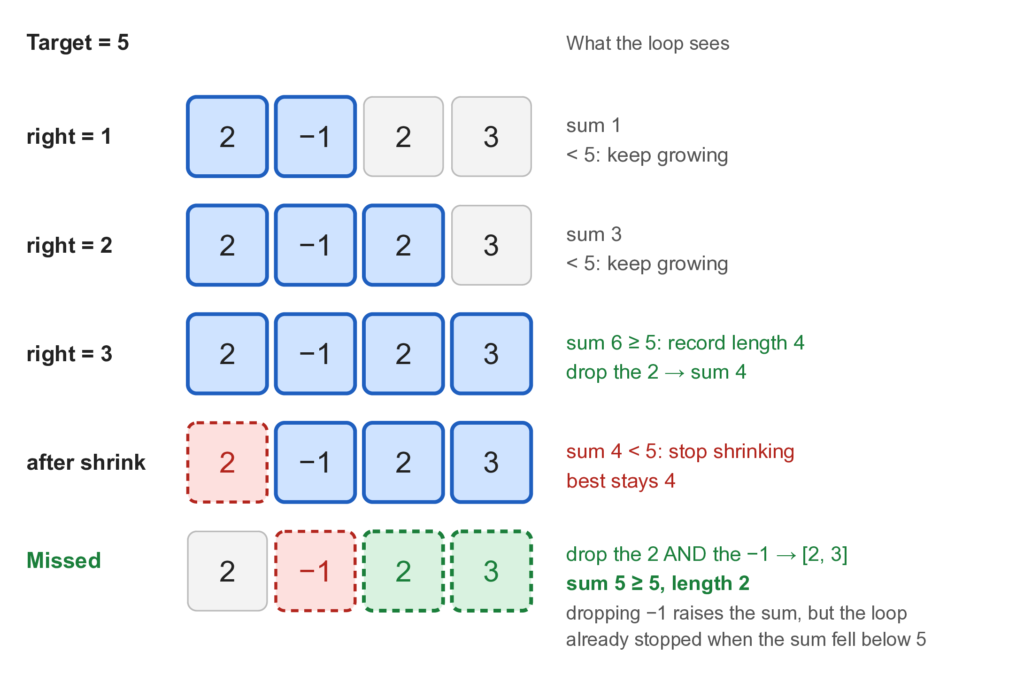
That is why the real shortest_burst() rejects negative counts with a ValueError. A request count can never be negative, so the check costs you nothing, and it turns a silent wrong answer into a loud one. If your numbers can be negative, use a prefix sum with a dictionary instead. That is the topic of the next article in this cluster.
A few other cases don’t fit a window either:
- Subsequences, where items need not sit next to each other. A window only holds neighbors, so you usually need dynamic programming.
- Pair sum on a sorted list. No range needs to be tracked, so plain two pointers is simpler.
- Many range-sum queries on fixed data. Each query is a different window, and a prefix sum answers each one in constant time.
- Finding one value in a sorted list. No range is involved, and binary search is the right tool.
Common Sliding Window Mistakes
Each of the three bugs in pitfalls.py has a test, so the lesson stays in the suite. Save this as test_pitfalls.py:
import pytest

from brute_force import shortest_burst_brute
from pitfalls import (
    busiest_total_off_by_one,
    longest_distinct_no_guard,
    shortest_burst_unchecked,
)
from sliding_window import busiest_window, longest_distinct_run


def test_shrinking_window_gives_a_wrong_answer_with_negative_numbers() -> None:
    # 2 + 3 = 5 is a window of length 2, but the shrinking rule never sees it.
    counts = [2, -1, 2, 3]
    assert shortest_burst_brute(counts, 5) == (2, 2)
    assert shortest_burst_unchecked(counts, 5) == 4


def test_off_by_one_drops_the_wrong_item() -> None:
    counts = [2, 1, 5, 1, 3, 2]
    total, _ = busiest_window(counts, 3)
    assert total == 9
    assert busiest_total_off_by_one(counts, 3) != 9


def test_missing_guard_lets_left_move_backwards() -> None:
    # In "abba", the last "a" was last seen at index 0, outside the window.
    length, _ = longest_distinct_run("abba")
    assert length == 2
    assert longest_distinct_no_guard("abba") == 3


@pytest.mark.parametrize("counts", [[3, 1, 2], [0, 0, 5]])
def test_unchecked_version_is_fine_when_counts_are_not_negative(counts: list[int]) -> None:
    expected = shortest_burst_brute(counts, 3)
    assert expected is not None
assert shortest_burst_unchecked(counts, 3) == expected[0]The last test is the sneaky one. The unchecked version passes every non-negative input, so it can survive a lot of testing before the first negative number exposes it.
Here is what each test teaches:
- Using a shrinking window with negative numbers. Covered above. Reject them, or pick another technique.
- Removing the wrong item. In a fixed window, the item that leaves is at
right - size. Writingright - size + 1removes an item that is still inside the window. The total drifts away from the truth a little at every step, and nothing raises an error. Check your indexes on a tiny example by hand, such as a window of size 1. - Forgetting that the dictionary remembers old items. In
longest_distinct_run(), the checklast_seen[item] >= leftstops the left edge from moving backward. Without it,"abba"returns 3 instead of 2.
Two more mistakes are worth watching for:
- Recording the answer in the wrong place. For “shortest” problems, record inside the shrinking loop. For “longest” problems, record after it.
- Leaving zero counts in a
Counter. Aftercounts[x] -= 1, a count of 0 stays as a key. If you checklen(counts)to count distinct items, that dead key gives the wrong number. Delete the key when the count reaches 0.
Edge Cases to Test Every Time
Window code usually breaks at the edges. Try these on every function:
- an empty list or empty string
- one item
- a window the size of the whole input
- a window of size 1
- all items equal
- no valid window exists, and the function should say so clearly
- negative numbers, when the technique allows them
Practice Problems
Three more problems use the same patterns. Try each one for a few minutes before you open the solution. Save the solutions as practice.py. The tests for them are in test_practice.py in the repository.
Maximum Vowels in a Window
Given a string and a number k, return the most vowels in any substring of length k. Hint: this is a fixed window, and the running value is a count. When a vowel enters, add one. When a vowel leaves, subtract one.
Solution
…the solution code and explanation…"""Practice problems for the sliding window technique."""
from collections import Counter
def max_vowels_in_window(text: str, k: int) -> int:
"""Return the most vowels in any substring of length k."""
vowels = set("aeiou")
if k <= 0 or k > len(text):
raise ValueError("k must be between 1 and len(text)")
count = sum(1 for char in text[:k] if char in vowels)
best = count
for right in range(k, len(text)):
if text[right] in vowels:
count += 1
if text[right - k] in vowels:
count -= 1
best = max(best, count)
return bestThe time is O(n) and the extra space is O(1). It is the same fixed window as busiest_window(), but the running value counts vowels instead of adding numbers.
Find an Anagram Inside a String
Given a text and a pattern, return True if some window of text has the same letters as pattern, in any order. Hint: the window has the fixed size len(pattern). Compare the counts of letters.
def contains_anagram(text: str, pattern: str) -> bool:
    """Return True if some window of text is an anagram of pattern."""
    k = len(pattern)
    if k == 0:
        return True
    if k > len(text):
        return False

    need = Counter(pattern)
    window = Counter(text[:k])
    if window == need:
        return True

    for right in range(k, len(text)):
        window[text[right]] += 1
        leaving = text[right - k]
        window[leaving] -= 1
        if window[leaving] == 0:
            del window[leaving]
        if window == need:
            return True

return FalseHere the del when a count reaches 0 keeps the counter tidy. On Python 3.10 and later, two counters compare as equal even if one has a zero-count key, but older versions do not. The time is O(n × a), where a is the number of different letters, because comparing two counters takes time in proportion to their size. For a small alphabet like lowercase letters, that is effectively O(n).
Longest Run of Ones After Flips
Given a list of 0s and 1s and a number flips, return the longest run of 1s you can make by flipping at most flips zeros. Hint: you never need to flip anything. Ask for the longest window that holds at most flips zeros.
def longest_ones_after_flips(bits: list[int], flips: int) -> int:
    """Return the longest run of 1s after flipping at most `flips` zeros."""
    left = 0
    zeros = 0
    best = 0

    for right, bit in enumerate(bits):
        if bit == 0:
            zeros += 1
        while zeros > flips:
            if bits[left] == 0:
                zeros -= 1
            left += 1
        best = max(best, right - left + 1)

return bestThis is a “longest valid window” problem, so the answer is recorded after the shrinking loop. The time is O(n), and the extra space is O(1).
How to Recognize a Sliding Window Problem
Knowing the code is half the skill. Spotting the problem is the other half. Read the problem and ask these questions in order:
- Does it ask about a contiguous subarray or substring, or about a stretch of time?
- Does it say “of size
k,” “longest,” “shortest,” “at most,” or “at least”? - Can you update the answer by adding one item and removing one item?
- If it is about sums, are all the numbers non-negative?
If you answer yes to all four, a sliding window is very likely the right tool. If the fourth answer is no, stop and think about prefix sums.
Conclusion
You built a tested monitoring toolkit around the sliding window technique and measured why it matters. On 40,000 items with a window of 20,000, recomputing every window took about 2.3 seconds, and the sliding window took about 1.5 milliseconds. Along the way, you:
- Wrote a fixed window for the busiest stretch, and a deque-based generator for streams
- Measured that index arithmetic beats the deque version on a list, and that the deque version wins when the data is a stream
- Wrote variable windows for the shortest burst, the busiest time span, and a rate limiter
- Used a dictionary and a
Counteras the running value for distinct-item problems - Saw why an inner
whileloop can still be O(n) - Checked every fast version against brute force on thousands of random inputs
- Saw how negative numbers silently break the shrinking rule, and how to fail loudly instead
The key habit is two questions. When you see a problem about a contiguous range, ask whether you can update the answer by adding one item and removing one item. Then ask whether shrinking the window always moves you in one direction. If both answers are yes, a sliding window can turn O(n × k) into O(n).
The complete project is on GitHub, if you want to run the tests yourself.
A natural next step is prefix sums. They solve the problem the sliding window could not: subarray sums with negative numbers, and many range-sum queries on the same data. They are the topic of the next article in the Arrays & Strings cluster. If you want the bigger picture, the Data Structures & Algorithms with Python roadmap shows where this fits.
Sources
- Python documentation:
itertoolsrecipes include thesliding_window()recipe thatwindows()is based on. - Python documentation:
collections.dequedescribes themaxlenoption that makes a deque behave like a window. - Python documentation:
collections.Counterdescribes the counting dictionary used for the distinct-item problems.







Leave a Reply