

Arrays in Python: Operations, Complexity, and Common Patterns
Arrays in Python: Part of the Data Structures & Algorithms with Python roadmap
This article starts the Arrays & Strings cluster. It builds on Amortized Analysis in Data Structures, so read that one first if you haven’t.
In the last article, you learned why list.append() is cheap and why insert(0, x) is not. But you never saw the full picture of the structure behind them. That structure is the array.
Arrays are the base of almost every other data structure. Stacks, queues, heaps, and hash tables all use one inside. If you understand arrays well, the rest of DSA gets much easier.
This guide is for Python learners and interview candidates. You will see how arrays work in memory, how Python lists differ from the array module and NumPy, and what each operation costs. You will also meet the common patterns that the next articles teach in depth.
In simple terms: An array is a row of items stored next to each other in memory. Each item has a numbered position called an index. Because of this layout, you can reach any item by its index in O(1) time. Inserting or deleting in the middle is slower, because the items after it must move.
What Is an Array in Data Structures?
Think of a row of lockers in a school hallway. Each locker has a number: 0, 1, 2, 3, and so on. They sit side by side.
If someone says, “Go to locker 7,” you walk straight there. You do not open lockers 0 to 6 first. The number tells you exactly where to go.
That is an array:
- Items sit next to each other in memory.
- Each item has an index, starting at 0.
- You can jump to any index directly.
Here is the technical definition. An array is a data structure that stores elements in one continuous block of memory. The computer finds element i with this simple calculation:
address of item i = start address + (i × size of one item)There is no searching and no looping. It is one multiplication and one addition. That is why indexing is O(1).
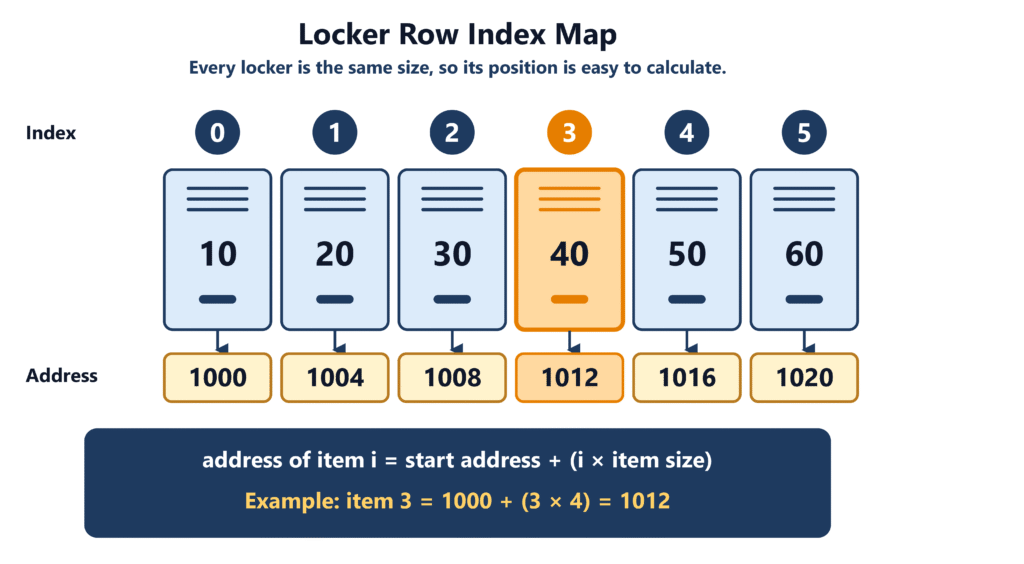
The same layout has a cost. The lockers are packed in a row. If you want to add a new locker in the middle, every locker after it must shift over. We will see this soon.
How Arrays Work in Python
Python does not have one “array” type. It gives you three tools that look alike but behave differently. The next section compares them. First, let’s see what the most common one, the list, does inside.
A Python list is a dynamic array. You met this idea in the last article. It keeps its slots in one continuous block. It also keeps some free slots at the end, so append is usually fast.
There is one more detail. A list slot does not hold the value itself. It holds a reference to the value. Think of each locker holding a note that says where the real item is stored.
items = [10, "hello", 3.5, [1, 2]]
print(items[1])        # hello
print(type(items[3])) # <class 'list'>Because slots only hold references, one list can hold different types. That is flexible. But it also means the actual values are scattered in memory, and each one has extra overhead.
Python Lists vs Arrays: What’s the Difference?
People often say “array” and “list” as if they mean the same thing in Python. They don’t. Here are the three options.
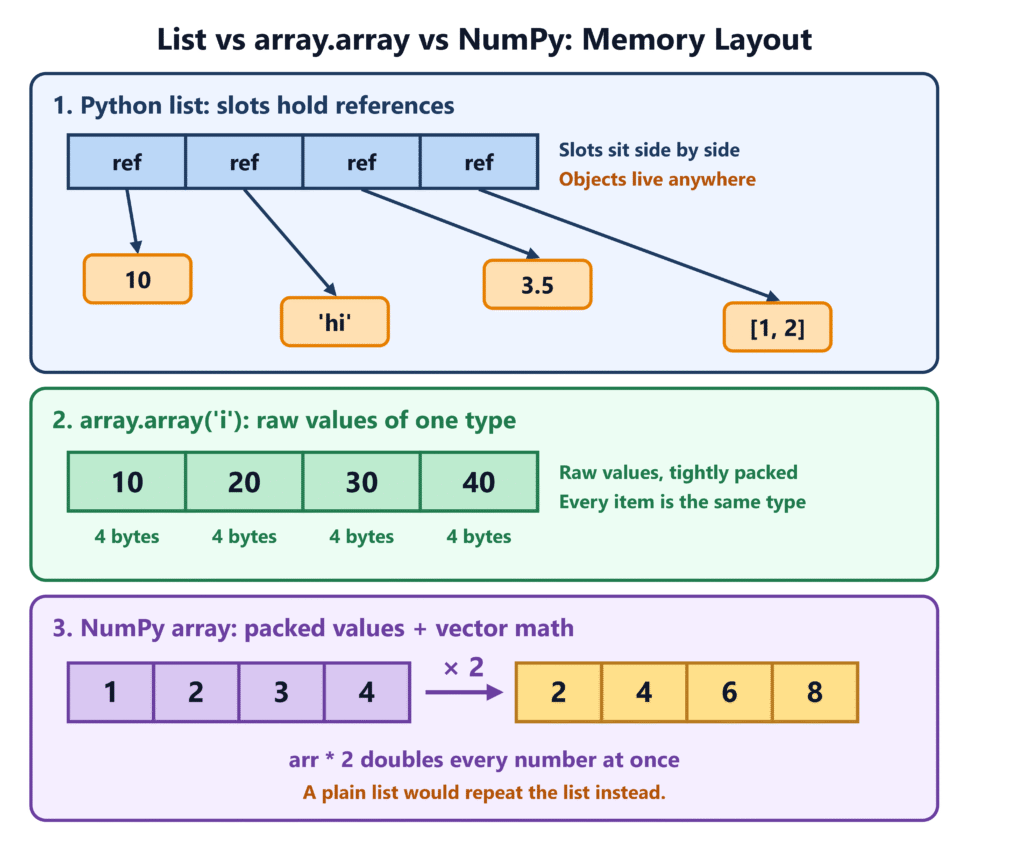
| Feature | list | array.array | NumPy ndarray |
|---|---|---|---|
| Comes with Python | Yes | Yes (standard library) | No (pip install numpy) |
| Item types | Any mix | One type only | One type only |
| What is stored | References to objects | Raw values | Raw values |
| Memory use | Higher | Low | Low |
| Can grow | Yes | Yes | No (you make a new one) |
| Best for | General DSA and daily code | Compact numbers | Fast math on large data |
A good way to remember it:
- list is a backpack. You can throw anything in it.
- array.array is an egg carton. Every slot holds the same kind of thing, and it is compact.
- NumPy array is a factory conveyor belt. It is built to process huge amounts of numbers very fast.
For most DSA problems and interviews, you will use a plain list. When people say “array” in a coding problem, they almost always mean a Python list.
Here is how the other two look:
from array import array

nums = array("i", [1, 2, 3, 4])   # "i" means signed int
print(nums[2])        # 3
print(nums.itemsize)  # bytes per item (usually 4)

nums.append(5)        # works, like a list
# nums.append("a") # TypeError: only whole numbers allowedimport numpy as np
arr = np.array([1, 2, 3, 4])
print(arr * 2) # [2 4 6 8] (math on every item at once)Notice the NumPy line. arr * 2 doubles every item. A plain list does not do that. These tools are not interchangeable, so pick the one that fits the job.
How to Create an Array in Python
Here are the most common ways to create a list. Each one has a use.
empty = []                         # empty list
numbers = [4, 8, 15, 16, 23, 42]   # with values
zeros = [0] * 5                    # [0, 0, 0, 0, 0]
squares = [i * i for i in range(5)]  # [0, 1, 4, 9, 16]
letters = list("cat") # ['c', 'a', 't']The [0] * n form is handy when you know the size in advance. As you saw last time, it reserves space once, so no resize happens while you fill it.
A careful note on 2D arrays. Do not build a grid like this:
grid = [[0] * 3] * 3      # wrong!
grid[0][0] = 1
print(grid) # [[1, 0, 0], [1, 0, 0], [1, 0, 0]]All three rows are the same list, repeated. Changing one changes all. Build it like this instead:
grid = [[0] * 3 for _ in range(3)]   # three separate rows
grid[0][0] = 1
print(grid)               # [[1, 0, 0], [0, 0, 0], [0, 0, 0]]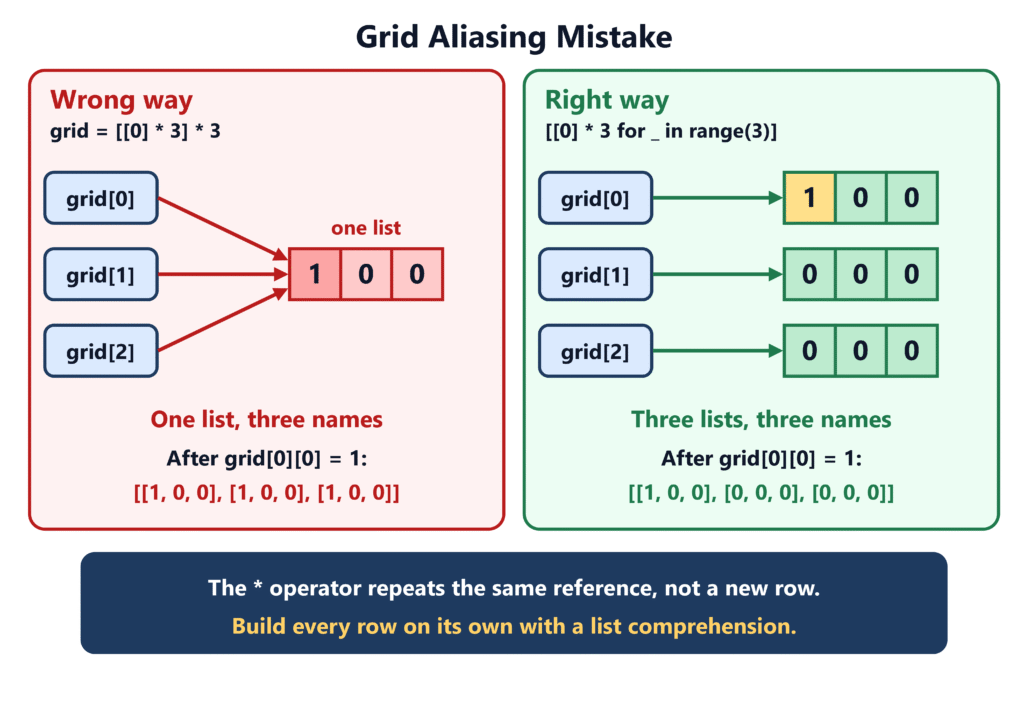
Common Array Operations in Python
Let’s use a real example. Imagine a cinema row with seats 0 to 4. Each seat holds the name of the person sitting there.
seats = ["Asha", "Ben", "Carl", "Dina", "Eli"]Accessing Elements
Accessing by index is the array’s superpower.
print(seats[0])    # Asha
print(seats[3])    # Dina
print(seats[-1]) # Eli (negative index counts from the end)It costs O(1), no matter how long the list is. Seat 3 in a row of 5 and seat 3 in a row of 5 million take the same time.
Going outside the list raises an error:
print(seats[10]) # IndexError: list index out of rangeSlicing gives you a part of the list:
print(seats[1:4]) # ['Ben', 'Carl', 'Dina']A slice makes a new list and copies the items. So slicing costs O(k), where k is the slice length.
Inserting and Deleting Elements
Adding at the end is easy. A new person just sits in the next free seat.
seats.append("Fay")        # O(1) amortized
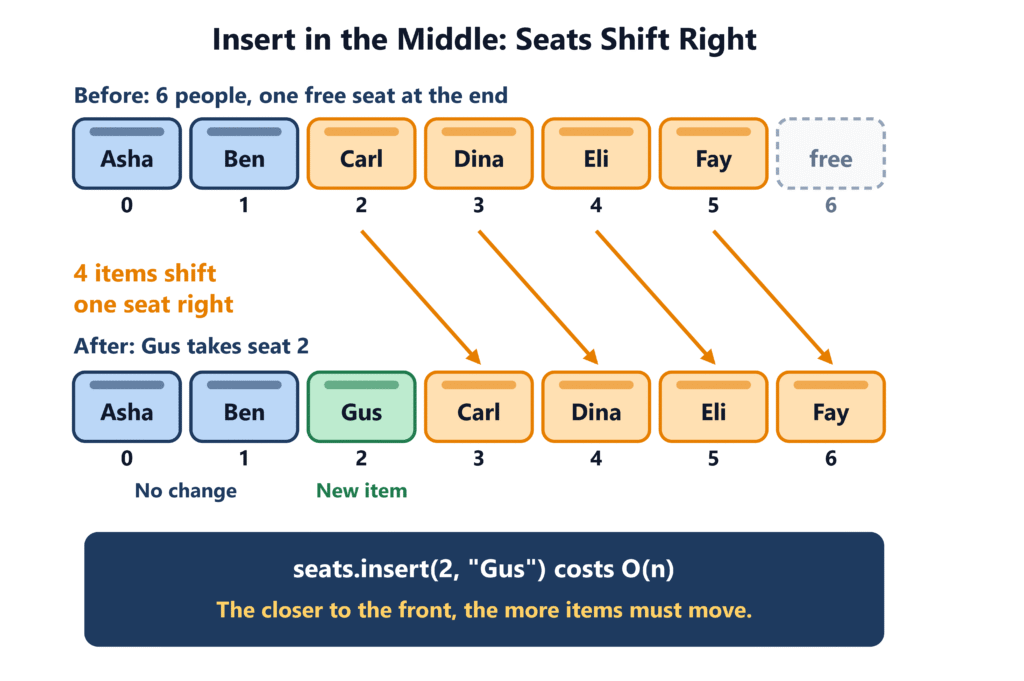
print(seats) # ['Asha', 'Ben', 'Carl', 'Dina', 'Eli', 'Fay']Adding in the middle is harder. Say Gus must sit at seat 2. Everyone from seat 2 onward has to stand up and move one seat to the right.
seats.insert(2, "Gus")     # O(n)
print(seats) # ['Asha', 'Ben', 'Gus', 'Carl', 'Dina', 'Eli', 'Fay']Deleting works the same way in reverse. If someone leaves, the people behind them shift left to close the gap.
seats.pop()                # removes the last item, O(1)
seats.pop(2)               # removes seat 2 (Gus), O(n)
seats.remove("Ben")        # finds "Ben" first, then removes, O(n)
del seats[0] # removes seat 0, O(n)The rule is simple. The closer to the front you change, the more items must move. Changing at the end moves nothing.
This is the same reason insert(0, x) and pop(0) are slow, as the last article showed.
Updating and Traversing Elements
Updating one item is O(1), because you jump straight to it.
seats[1] = "Zoe" # replace the item at index 1Traversing means visiting every item once. That is always O(n).
for name in seats:
    print(name)

for i, name in enumerate(seats):   # when you need the index too
print(i, name)Use enumerate instead of range(len(seats)). It is shorter and harder to get wrong.
Searching for an Element
To find an item in an unsorted array, you must check the seats one by one. This is called linear search.
print("Dina" in seats)         # True,  O(n)
print(seats.index("Dina")) # position of Dina, O(n)In the worst case, the item is last or missing. Then you check all n items. That is O(n).
If the list is sorted, you can do much better with binary search. Python has the bisect module for it. You will learn that in the searching and sorting cluster.
Here is one more habit to build. If you search the same list many times, a set or a dict is often a better tool. They find items in O(1) on average.
Time and Space Complexity of Array Operations
Here is everything in one table. This is for a Python list.
| Operation | Example | Time | Why |
|---|---|---|---|
| Index (read) | a[i] | O(1) | Direct address calculation |
| Update | a[i] = x | O(1) | Same direct jump |
| Append | a.append(x) | O(1) amortized | Free slot usually exists; resize is rare |
| Pop from end | a.pop() | O(1) | Nothing needs to move |
| Insert in middle | a.insert(i, x) | O(n) | Items after i shift right |
| Insert at front | a.insert(0, x) | O(n) | Every item shifts |
| Delete in middle | del a[i], a.pop(i) | O(n) | Items after i shift left |
| Search (unsorted) | x in a, a.index(x) | O(n) | May check every item |
| Traverse | for x in a | O(n) | Visit each item once |
| Slice | a[i:j] | O(j − i) | Copies the items |
| Copy | a.copy() | O(n) | Copies every reference |
Space complexity. A list of n items uses O(n) space. Operations like append, insert, and pop use O(1) extra space. A slice or a copy uses extra space equal to the number of items copied.
Two important notes:
- Amortized O(1) for
appenddoes not promise that every call is fast. One call can still be O(n) when a resize happens. If you forgot why, review the amortized analysis article. - To read these costs in your own code, use the process from How to Analyze the Time and Space Complexity of an Algorithm. If Big O notation still feels new, start with What Is Big O Notation?
Common Array Patterns in DSA
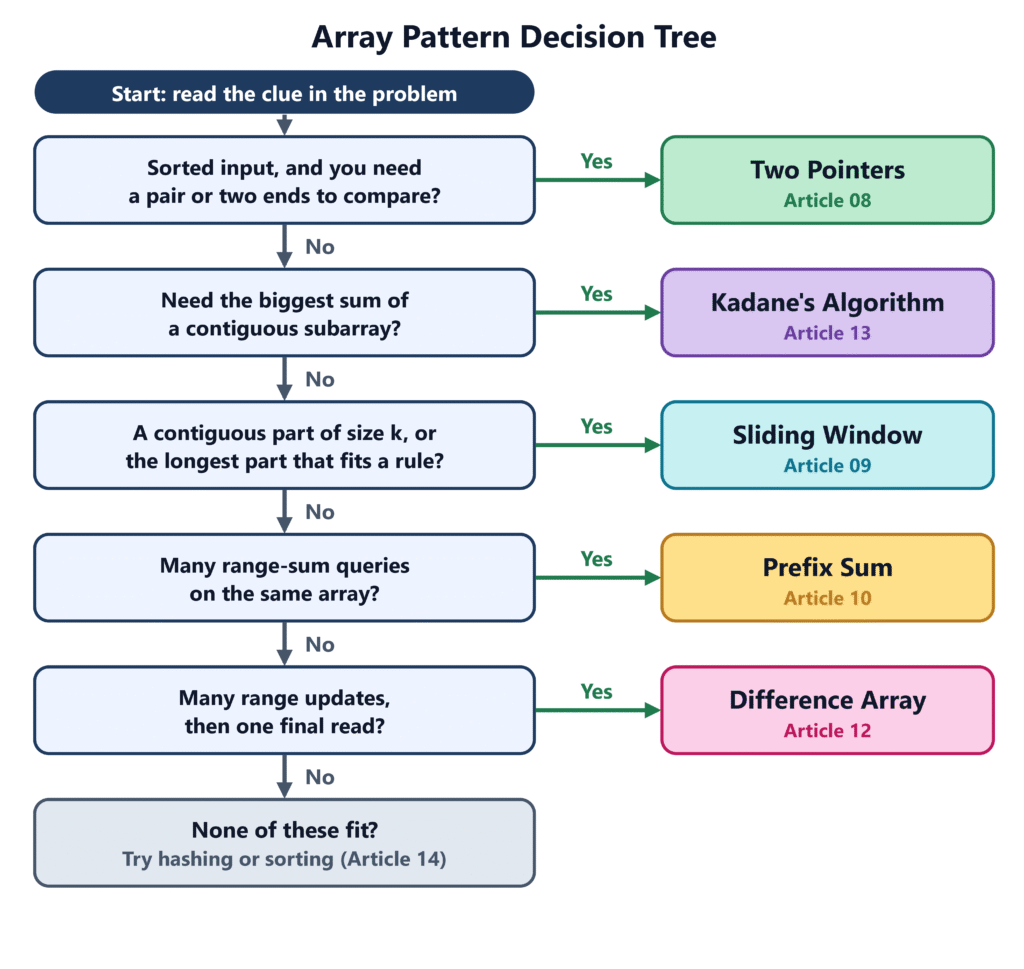
Most array problems in interviews use a small set of ideas. You do not need to memorize hundreds of solutions. You need to recognize the pattern. Here is a short preview of each one. Each gets its own full article.
Two Pointers
Use two index variables that move through the array. They can start at opposite ends or move in the same direction.
Clue: the input is sorted, or you need to compare pairs.
def has_pair_with_sum(sorted_nums, target):
    left, right = 0, len(sorted_nums) - 1
    while left < right:
        total = sorted_nums[left] + sorted_nums[right]
        if total == target:
            return True
        if total < target:
            left += 1
        else:
            right -= 1
    return False

print(has_pair_with_sum([1, 3, 5, 8, 11], 13)) # True (5 + 8)A nested loop would check every pair, which is O(n²). Two pointers does it in O(n). The full guide is in the Two Pointers in Python article (Article 08).
Sliding Window
Keep a “window” over a part of the array. Slide it forward by adding one item and removing one item, instead of recalculating everything.
Clue: the problem asks about a contiguous part, such as “the best 3 days in a row.”
You will study it in the Sliding Window Technique in Python article (Article 09).
Prefix Sum
Build a running total once. After that, the sum of any range takes O(1).
Clue: many range-sum questions on the same array.
nums = [2, 4, 1, 3]
prefix = [0]
for x in nums:
    prefix.append(prefix[-1] + x)

print(prefix)                    # [0, 2, 6, 7, 10]
print(prefix[4] - prefix[1]) # 8 (sum of 4 + 1 + 3)See the Prefix Sum in Python article (Article 10).
Difference Arrays
This is the reverse of a prefix sum. It helps when you must add a value to many ranges and only want the final array at the end. Each update takes O(1).
Clue: many range updates, then one final read.
See the Difference Arrays in Python article (Article 12).
Maximum Subarray
Find the contiguous part with the biggest sum. Kadane’s algorithm solves it in one pass, in O(n) time and O(1) extra space.
Clue: “largest sum of a contiguous subarray.”
See the Kadane’s Algorithm in Python article (Article 13). The Array Manipulation Patterns article (Article 14) will help you choose between all of these.
Common Array Problems in Python
Here are three classic problems. Try each one before you read the answer.
1. Reverse an array in place
Swap the first and last items, then move toward the middle. No new list is needed.
def reverse_in_place(a):
    left, right = 0, len(a) - 1
    while left < right:
        a[left], a[right] = a[right], a[left]
        left += 1
        right -= 1

nums = [1, 2, 3, 4, 5]
reverse_in_place(nums)
print(nums) # [5, 4, 3, 2, 1]Time is O(n). Extra space is O(1).
2. Move all zeros to the end
Keep the order of the other items. Use a “write” position for the next non-zero value.
def move_zeros(a):
    write = 0
    for read in range(len(a)):
        if a[read] != 0:
            a[write], a[read] = a[read], a[write]
            write += 1

nums = [0, 1, 0, 3, 12]
move_zeros(nums)
print(nums) # [1, 3, 12, 0, 0]Time is O(n). Extra space is O(1).
3. Two Sum (unsorted input)
Find two numbers that add up to a target. Return their indexes.
The brute force way checks every pair in O(n²). A dictionary does better. For each number, ask: “Have I already seen the number I need?”
def two_sum(nums, target):
    seen = {}                      # value -> index
    for i, x in enumerate(nums):
        need = target - x
        if need in seen:
            return [seen[need], i]
        seen[x] = i
    return []

print(two_sum([2, 7, 11, 15], 9)) # [0, 1]Time is O(n). Extra space is O(n). This is a common trade: spend memory to save time.
Common Mistakes When Working with Arrays
| Mistake | What goes wrong | How to avoid it |
|---|---|---|
| Off-by-one in loops | Last item skipped, or IndexError | Remember valid indexes are 0 to len(a) - 1. Prefer for x in a |
| Removing items while looping over them | Items get skipped | Loop over a copy, or build a new list with a comprehension |
Using [[0] * n] * m for a grid | All rows are the same list | Use [[0] * n for _ in range(m)] |
Thinking b = a makes a copy | Both names point to one list | Use a.copy() or a[:] |
Using pop(0) or insert(0, x) in a loop | Quietly turns O(n) into O(n²) | Use collections.deque |
| Forgetting empty input | a[0] raises IndexError | Check if not a: first |
| Treating a list like a NumPy array | a * 2 repeats the list, not the numbers | Use NumPy for math on whole arrays |
| Searching a list again and again | Each in check is O(n) | Use a set or dict |
Here is the aliasing mistake in action:
a = [1, 2, 3]
b = a              # not a copy!
b.append(4)
print(a)           # [1, 2, 3, 4]

c = a.copy()       # a real (shallow) copy
c.append(5)
print(a) # [1, 2, 3, 4] (unchanged)Also remember the edge cases. Test your code with an empty list, a single item, duplicate values, negative numbers, and a very large input.
FAANG-Style DSA Interview Questions on Arrays
These eight questions come up again and again. Practice saying the answers out loud. Try the coding ones on your own first.
1. What is the difference between an array and a Python list?
An array stores items of one type in a continuous block of memory. A Python list is a dynamic array. It also sits in a continuous block, but each slot holds a reference to an object. That is why a list can hold mixed types. The array module and NumPy store raw values instead, so they use less memory.
2. Why is reading a[i] O(1)?
The items sit side by side and every slot has the same size. So the computer finds item i with one calculation: start address + (i × item size). It does not matter if the array has 10 items or 10 million.
3. Why is append O(1) but insert(0, x) O(n)?
append writes into a free slot at the end. Nothing moves. The rare resize is paid for by many cheap appends, so the cost is O(1) amortized. insert(0, x) must shift every item one place to the right on every call. That is O(n) each time, with no discount.
4. Remove duplicates from a sorted array in place.
Use two pointers. read scans the array. write marks where the next unique value goes.
def remove_duplicates(a):
    if not a:
        return 0
    write = 1
    for read in range(1, len(a)):
        if a[read] != a[read - 1]:   # a new value
            a[write] = a[read]
            write += 1
    return write                     # length of the unique part

nums = [1, 1, 2, 2, 3]
k = remove_duplicates(nums)
print(nums[:k]) # [1, 2, 3]Time is O(n). Extra space is O(1). Say out loud that this only works because the array is sorted. Equal values sit next to each other.
5. Rotate an array to the right by k steps.
The simple answer uses slicing.
def rotate(nums, k):
    n = len(nums)
    if n == 0:
        return
    k %= n                            # k can be bigger than n
    nums[:] = nums[n - k:] + nums[:n - k]

nums = [1, 2, 3, 4, 5, 6, 7]
rotate(nums, 3)
print(nums) # [5, 6, 7, 1, 2, 3, 4]Time is O(n). Extra space is O(n), because slices make copies. An interviewer may ask for O(1) extra space. Then reverse the whole array, reverse the first k items, and reverse the rest. Each reverse is the two-pointer swap you saw earlier.
6. Find the missing number in an array of n distinct numbers from 0 to n.
The sum of 0 to n is known: n * (n + 1) // 2. Subtract the sum of the array. What is left is the missing number.
def missing_number(nums):
    n = len(nums)
    return n * (n + 1) // 2 - sum(nums)

print(missing_number([3, 0, 1])) # 2Time is O(n). Extra space is O(1). A hash set also works, but it costs O(n) space.
7. You get many queries of the form “sum of items from index i to j.” How do you answer them fast?
Build a prefix sum array once in O(n). After that, each query is prefix[j + 1] - prefix[i], which is O(1). Looping over the range for every query would cost O(n) each. You will learn this in the Prefix Sum in Python article (Article 10).
8. When would you choose array.array or NumPy over a list?
Choose array.array when you store many numbers of one type and memory matters. Choose NumPy when you need fast math on large data, such as sums or matrix work on whole arrays. For general DSA logic and interviews, a list is the right default. Add that these three types are not interchangeable. For example, a * 2 repeats a list but doubles every number in a NumPy array.
Practice Problems With Solutions
The best way to learn arrays is to solve problems. Read each problem and try it on your own for a few minutes. Then check the solution.
| # | Problem | Level | Idea |
|---|---|---|---|
| 1 | Second largest number | Easy | Track two values in one pass |
| 2 | Contains duplicate | Easy | Hash set |
| 3 | Merge two sorted arrays | Easy | Two pointers |
| 4 | Best time to buy and sell stock | Easy | Track the lowest so far |
| 5 | Running sum | Easy | Prefix sum |
| 6 | Product of array except self | Medium | Left and right passes |
Problem 1: Second Largest Number
Given a list of numbers, return the second largest distinct value. Return None if there is none.
Hint: Keep two variables, first and second. Update them as you scan. Do not sort.
def second_largest(nums):
    first = second = None
    for x in nums:
        if first is None or x > first:
            second = first
            first = x
        elif x != first and (second is None or x > second):
            second = x
    return second

print(second_largest([5, 9, 9, 3, 7]))   # 7
print(second_largest([4, 4, 4])) # NoneTime is O(n). Extra space is O(1). Sorting would work, but it costs O(n log n). Notice the duplicate 9. The x != first check stops it from becoming the “second” value.
Problem 2: Contains Duplicate
Return True if any value appears at least twice.
Hint: Ask, “Have I seen this number before?” Which structure answers that in O(1)?
def contains_duplicate(nums):
    seen = set()
    for x in nums:
        if x in seen:
            return True
        seen.add(x)
    return False

print(contains_duplicate([1, 2, 3, 1]))   # True
print(contains_duplicate([1, 2, 3, 4])) # FalseTime is O(n). Extra space is O(n). The brute force way compares every pair in O(n²). A set trades memory for speed. It also stops early when it finds a repeat.
Problem 3: Merge Two Sorted Arrays
Merge two sorted lists into one sorted list.
Hint: Put one pointer on each list. Take the smaller item, then move that pointer.
def merge_sorted(a, b):
    i = j = 0
    result = []
    while i < len(a) and j < len(b):
        if a[i] <= b[j]:
            result.append(a[i])
            i += 1
        else:
            result.append(b[j])
            j += 1
    result.extend(a[i:])   # one of these is empty
    result.extend(b[j:])
    return result

print(merge_sorted([1, 4, 7], [2, 3, 9])) # [1, 2, 3, 4, 7, 9]Time is O(n + m). Extra space is O(n + m) for the result. This is the same step that merge sort uses later in the series.
Problem 4: Best Time to Buy and Sell Stock
You get daily prices. Buy on one day and sell on a later day. Return the biggest profit. Return 0 if no profit is possible.
Hint: On each day, ask, “If I sell today, what is the best buy price before today?”
def max_profit(prices):
    lowest = float("inf")
    best = 0
    for p in prices:
        lowest = min(lowest, p)        # cheapest day so far
        best = max(best, p - lowest)   # profit if we sell today
    return best

print(max_profit([7, 1, 5, 3, 6, 4]))   # 5  (buy at 1, sell at 6)
print(max_profit([7, 6, 4, 3, 1])) # 0Time is O(n). Extra space is O(1). The brute force way tries every pair of days in O(n²). One pass is enough because we only need the lowest price seen so far.
Problem 5: Running Sum
Return a list where item i is the sum of items 0 to i.
Hint: Each answer is the previous answer plus the new item.
def running_sum(nums):
    result = []
    total = 0
    for x in nums:
        total += x
        result.append(total)
    return result

print(running_sum([1, 2, 3, 4])) # [1, 3, 6, 10]Time is O(n). Extra space is O(n) for the output. This is the idea behind prefix sums. Python also has itertools.accumulate for this exact job.
Problem 6: Product of Array Except Self
For each index, return the product of all other items. Do not use division.
Hint: The answer at index i is (product of everything to the left) × (product of everything to the right). Do two passes.
def product_except_self(nums):
    n = len(nums)
    result = [1] * n

    left = 1
    for i in range(n):            # left to right
        result[i] = left
        left *= nums[i]

    right = 1
    for i in range(n - 1, -1, -1):   # right to left
        result[i] *= right
        right *= nums[i]

    return result

print(product_except_self([1, 2, 3, 4])) # [24, 12, 8, 6]Time is O(n). Extra space is O(1), not counting the output list. The brute force way multiplies everything again for each index, which is O(n²). Division also fails when the array contains a zero.
After these six, try the same ideas on harder inputs. Add empty lists, one item, negative numbers, and zeros to your tests.
Frequently Asked Questions
Does Python have a real array type?
Yes. The standard library has the array module. It stores raw values of one type. Most people use lists instead, because lists are more flexible.
Is a Python list an array or a linked list?
It is a dynamic array. Its items sit in one continuous block of references. It is not a linked list.
When should I use
array.arrayinstead of a list?Use it when you store many numbers of the same type and memory matters. For everyday code and interviews, a list is simpler.
When should I use NumPy instead of a list?
Use NumPy for fast math on large sets of numbers, like averages, matrix work, or data analysis. For general DSA logic, a list is fine.
Why is inserting in the middle of an array slow?
Because the items are packed side by side. To make room, every item after the insert position must shift one place. That takes O(n) time.
Are Python arrays 0-indexed?
Yes. The first item is at index 0 and the last item is at index len(a) – 1. Negative indexes count from the end, so a[-1] is the last item.
How do I find the length of an array in Python?
Use
len(a). It is O(1), because the list stores its own size.
Conclusion
An array is a row of items in continuous memory. That layout gives you instant access by index and fast work at the end. It also makes changes near the front costly, because items must shift.
Python gives you three tools: the flexible list, the compact array module, and the fast NumPy array. For DSA, you will use the list most of the time.
You also saw five patterns that solve most array problems: two pointers, sliding window, prefix sum, difference arrays, and maximum subarray. Learn to spot the clue in the problem, and the right pattern follows.
Next, learn the first pattern in depth. Read Two Pointers in Python: A Complete Problem-Solving Guide. To see the whole path, visit the DSA with Python guide.
Official External Resources
These sources are the best places to check facts and go deeper.
- Python Tutorial: Data Structures: the official guide to lists and their methods, including
append,insert,pop, and slicing. - Python Docs:
arraymodule: the type codes, item sizes, and methods of the compact, single-type array. - Python Wiki: Time Complexity: the reference table of costs for list operations, with the “amortized worst case” column.
- Python FAQ: How are lists implemented in CPython?: a short official explanation of why a list is a dynamic array, not a linked list.
- CPython source:
listobject.c: the real code behindlist, including how it over-allocates when it grows. - NumPy: Absolute Beginners Guide: a good first read on NumPy arrays and how they differ from lists.
- Python Docs:
collections.deque: the right tool when you add or remove items at the front. - Python Docs:
bisectmodule: binary search on sorted lists, which you will use in the searching cluster. - MIT OpenCourseWare: Introduction to Algorithms (6.006): free lectures from MIT, including arrays and sequence data structures.







Leave a Reply